
ASUS ProArt PA248QV
4.6Editor score
24-inch WUXGA IPS panel
100% sRGB color coverage
Fully adjustable ergonomic stand
An ASUS ProArt monitor is designed for creative professionals who need accurate color, detailed imagery, flexible connectivity, and a workspace that supports demanding editing workflows. The most important factors vary by discipline, from calibrated color and wide gamuts to high resolution, USB-C power delivery, HDR performance, and ergonomic positioning.
This guide compares ten ASUS ProArt models across resolution, panel technology, color coverage, calibration, ports, refresh rate, HDR support, and included accessories. It includes compact 24-inch options, versatile 27-inch displays, 4K and 6K productivity monitors, mini-LED models, and an OLED reference-style screen.
Each review identifies the strongest use case and the compromises worth considering. Ratings and specifications reflect the supplied product information, while availability and pricing can change. Check the current listing before buying so you can confirm the exact configuration, included accessories, warranty terms, and latest offer.
4.6Editor score

4.4Editor score
As an Amazon Associate we earn from qualifying purchases.
The comparison below highlights the major differences among all ten monitors, including panel size, resolution, color performance, power delivery, HDR capability, and workflow-specific connectivity.
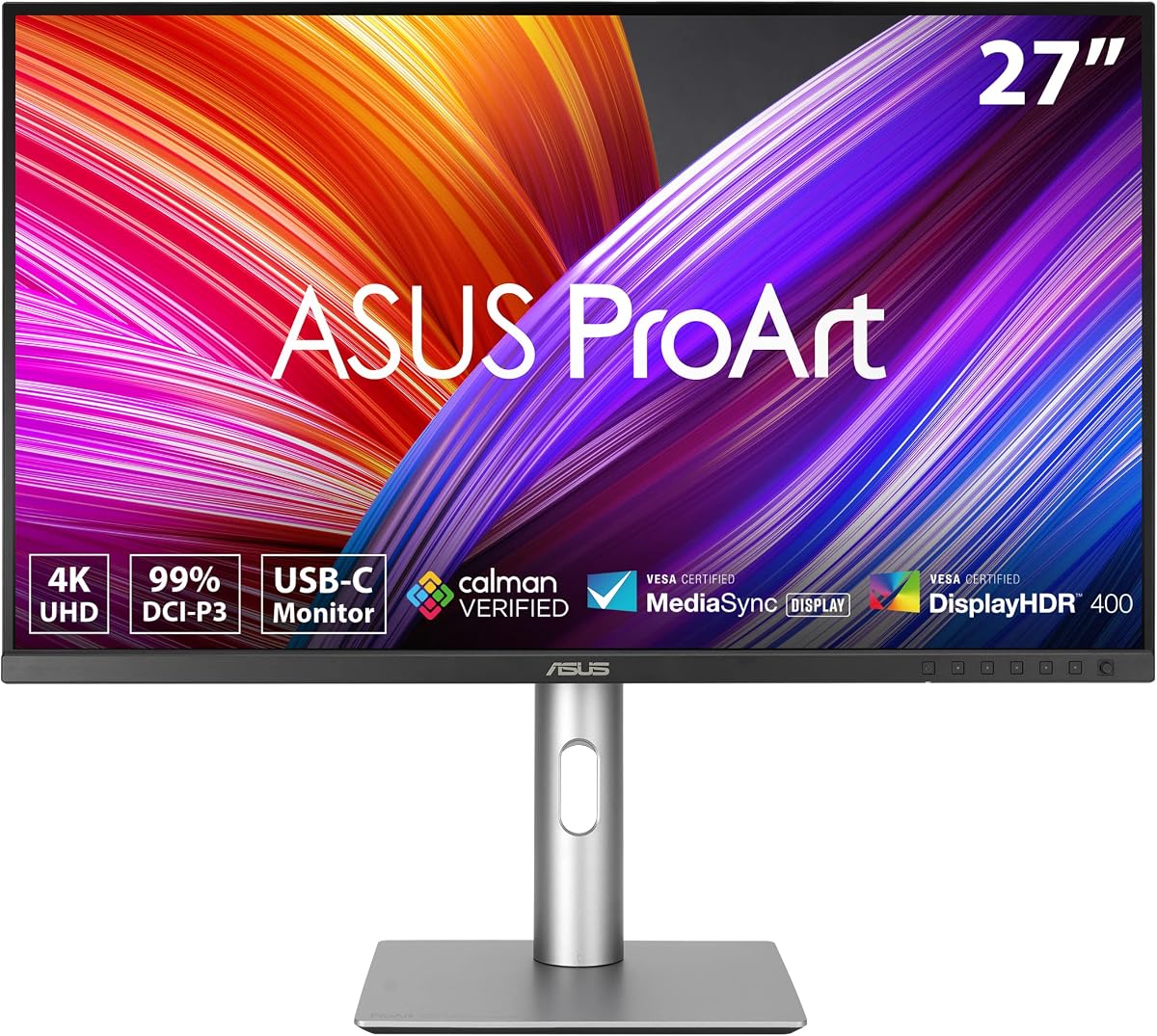


The ASUS ProArt PA279CRV combines a 27-inch 4K IPS display with 99% DCI-P3 and 99% Adobe RGB coverage, giving it a strong balance of resolution and professional color capability. Its supplied rating is 4.2, but the specification sheet makes it a compelling all-rounder for photographers, designers, video editors, and Mac users who want a detailed canvas without moving to a 32-inch model.
We may earn a commission when you buy through this link, at no additional cost to you.
Factory calibration to Delta E below 2 and Calman Verified status are particularly important for color-sensitive work. The broad gamut provides room for demanding edits, while the 4K resolution gives designers substantially more usable space than a standard QHD display. Connectivity is equally practical: 96-watt USB-C power delivery, DisplayPort, HDMI, and a USB hub support a relatively clean desk setup.
The main trade-off is that the listing describes HDR without highlighting a high-end peak-brightness specification, so it is better viewed as a color-accurate productivity display than a dedicated reference monitor for extreme HDR mastering. Users whose laptops require more than 96 watts of charging will also need to keep a separate charger. Neither limitation undermines its position as a strong general-purpose ProArt option.
Choose the PA279CRV when you need a balance of fine detail, wide color, USB-C convenience, and multi-monitor flexibility. It is especially well suited to a mixed creative workload involving photo editing, design, and general production, while its daisy-chain support helps create an efficient multi-screen workspace.
The 3840 x 2160 resolution provides meaningful room for image panels, editing timelines, and application sidebars. It also makes on-screen typography and fine visual detail easier to judge without requiring a larger physical display.
Coverage of 99% DCI-P3 and 99% Adobe RGB, combined with Delta E below 2 factory calibration, gives creative users a dependable starting point for demanding color workflows.
We may earn a commission when you buy through this link, at no additional cost to you.
The ASUS ProArt PA248QV is a 24-inch WUXGA monitor with a 1920 x 1200 16:10 panel, 100% sRGB and Rec.709 coverage, and factory calibration to Delta E below 2. Its 4.6 rating is the highest among the models with an available numerical score, making it an attractive option for photographers and designers who prioritize dependable color over expansive features.
We may earn a commission when you buy through this link, at no additional cost to you.
The 16:10 format provides more vertical space than a conventional 16:9 screen of similar width. That extra room is useful for application menus, photo thumbnails, and document work, while the IPS panel delivers clear imagery and consistent viewing. DisplayPort, HDMI, and D-Sub connectivity gives it flexibility with modern and legacy equipment.
Its limitations are straightforward. The sRGB-focused gamut does not provide the same working latitude as models with broad DCI-P3 or Adobe RGB coverage, and 1920 x 1200 offers less pixel density than QHD or 4K. It is therefore not the ideal choice for large-format printing, heavily cropped images, or a demanding video pipeline.
The PA248QV is best for photographers working in sRGB, web designers, students, office professionals, and anyone building a color-conscious secondary display. Its rating, adjustable stand, anti-glare treatment, and accurate factory calibration make it a particularly sensible way to enter the ProArt ecosystem without moving to a larger flagship display.
The taller 16:10 format creates additional room for menus, reference panels, and documents. It can therefore feel more spacious than a 24-inch 16:9 display even when the pixel count is not as high as newer QHD models.
Factory calibration, Calman Verified status, and Delta E below 2 accuracy make the monitor a strong choice for web publishing, product presentation, photography, and other workflows centered on the sRGB standard.
We may earn a commission when you buy through this link, at no additional cost to you.
The ASUS ProArt PA32QCV is built around a 31.5-inch 6K LuxPixel AGLR IPS panel with a 6016 x 3384 resolution. Its 3.9 supplied rating does not diminish the significance of that pixel density: for a Mac-based creative professional, it offers an unusually fine canvas for photography, design, video, and high-resolution application interfaces.
We may earn a commission when you buy through this link, at no additional cost to you.
The color specification is suitably ambitious, with 98% DCI-P3 coverage, 100% sRGB, factory calibration to Delta E below 2, and Calman Verified status. A dedicated M Model-P3 preset is designed to match the color performance of a MacBook display, which may simplify the visual transition between a laptop and external monitor.
Its strongest differentiator is connectivity. Two Thunderbolt 4 ports provide up to 96 watts of power delivery and daisy-chaining, while HDMI 2.1, DisplayPort 1.4, and a built-in USB hub complete the selection. The Auto KVM switch also makes it easier to move between two connected computers with one keyboard and mouse.
The large panel, high resolution, and premium feature set require a suitably spacious desk and compatible modern equipment. Buyers should also consider the modest 3.9 rating and verify their software workflow before committing. Even so, the PA32QCV is a compelling choice for a Mac creator who values 6K detail and Thunderbolt-based command of multiple devices.
The 6016 x 3384 panel offers more room for large images, timelines, and detailed interfaces than a standard 4K display. It gives creative applications a large, finely rendered workspace.
Dual Thunderbolt 4 connections, charging, daisy-chaining, and Auto KVM switching reduce the amount of equipment needed to manage a laptop and another connected computer.
We may earn a commission when you buy through this link, at no additional cost to you.
The ASUS ProArt PA278CV is a 27-inch QHD IPS monitor that combines 100% sRGB and Rec.709 coverage with Calman Verified factory calibration to Delta E below 2. Its 4.4 rating, useful port selection, and ergonomic stand make it one of the most balanced choices in this guide for everyday creative work.
We may earn a commission when you buy through this link, at no additional cost to you.
Its 2560 x 1440 resolution creates enough desktop space for editing panels, timelines, and reference images without requiring the desk area of a 32-inch monitor. The USB-C connection delivers 65 watts of power and data transfer, so many compatible laptops can use one cable for display and charging. DisplayPort daisy-chaining also supports the creation of a multi-screen workstation.
The stand can tilt, swivel, pivot through 90 degrees, and adjust in height. That pivot function is particularly useful for programmers, long-form editors, and anyone who occasionally prefers a portrait orientation. The listing also states that USB-C, HDMI, and DisplayPort cables are included, reducing the chance of an incomplete first-day setup.
The PA278CV does not focus on high-end HDR peak brightness or broad wide-gamut coverage, so it is not the natural choice for HDR grading or a large Adobe RGB workflow. Even so, it offers an excellent mix of accurate color, workspace flexibility, clean connectivity, and adjustment at a practical size. It is a strong default recommendation for editors, designers, and hybrid creative professionals.
QHD resolution and a 27-inch footprint create a productive editing environment while keeping the monitor easier to position than many 32-inch alternatives. It suits desks that cannot accommodate a much larger screen.
USB-C carries both display data and up to 65 watts of charging, reducing cable clutter for compatible laptops. DisplayPort daisy-chaining adds a straightforward path toward a larger multi-monitor workspace.
We may earn a commission when you buy through this link, at no additional cost to you.
This ASUS 27-inch ProArt combines a 2560 x 1440 IPS panel with 100% sRGB and Rec.709 coverage, Calman Verified status, and factory calibration to Delta E below 2. Its 5.0 supplied rating is the highest numerical score in the group, making it especially appealing to users who prioritize a well-rounded specification at a familiar 27-inch size.
We may earn a commission when you buy through this link, at no additional cost to you.
The monitor includes 178-degree wide viewing angles, a useful range of connection options, and a built-in USB hub. DisplayPort, HDMI, and DVI support make it suitable for creative workstations, office systems, and installations that may still involve older equipment. ASUS Eye Care flicker-free and low-blue-light technologies are intended to improve comfort during long sessions.
The fully adjustable stand supports tilt, swivel, pivot, and height adjustment, allowing the display to fit a preferred posture or a multi-monitor arrangement. Although it lacks the advanced HDR emphasis and wide-gamut claims found on some premium ProArt models, its core creative features are focused and easy to understand.
This is a compelling option for photo editing, video production, design, and general office productivity within the sRGB workflow. It is particularly useful when legacy ports matter more than USB-C charging. Buyers seeking broad DCI-P3 or Adobe RGB coverage, high-end HDR, or the newest connection standard should examine the newer PA278CV or PA278CGV instead.
The combination of 100% sRGB, Rec.709, Calman Verified calibration, and Delta E below 2 accuracy makes the display a dependable option for web, print-preparation, and general creative tasks.
DisplayPort, HDMI, DVI, and USB hub access provide unusual flexibility for a professional monitor, particularly in offices that still operate systems with legacy video connections.
We may earn a commission when you buy through this link, at no additional cost to you.
The ASUS PA329CRV-P is a 31.5-inch 4K ProArt display with 98% DCI-P3 and 100% sRGB coverage, factory calibration to Delta E below 2, and Calman Verified status. Its 4.4 rating and TAA compliance make it particularly interesting for government, institutional, and enterprise buyers whose procurement requirements extend beyond display quality.
We may earn a commission when you buy through this link, at no additional cost to you.
The IPS panel includes HDR400 support and a listed 3000:1 contrast ratio, producing a more vivid image than a standard office monitor. Color performance is the stronger emphasis: the broad DCI-P3 gamut and tight factory calibration support photo and video workflows where a dependable starting point matters.
Connectivity is extensive. USB-C provides 96-watt charging and DisplayPort Alt Mode, two DisplayPort 1.4 inputs support daisy-chaining, dual HDMI 2.1 ports serve modern video sources, and a four-port USB hub simplifies peripheral connections. A color pre-calibration report and multiple cables are included for a professional setup.
Its main limitation is that HDR400 should not be confused with the higher brightness and local-dimming performance of the premium mini-LED and OLED models. The 32-inch footprint also demands sufficient desk depth. For professional buyers who need TAA compliance, accurate color, and flexible 4K connectivity, however, it is a well-aligned choice.
TAA compliance is a decisive advantage for organizations that cannot use general-purpose displays in government or other restricted procurement environments.
USB-C with 96-watt charging and DisplayPort Alt Mode provides a straightforward connection to compatible Macs, while dual HDMI and DisplayPort options support a broader mix of workstations.
We may earn a commission when you buy through this link, at no additional cost to you.
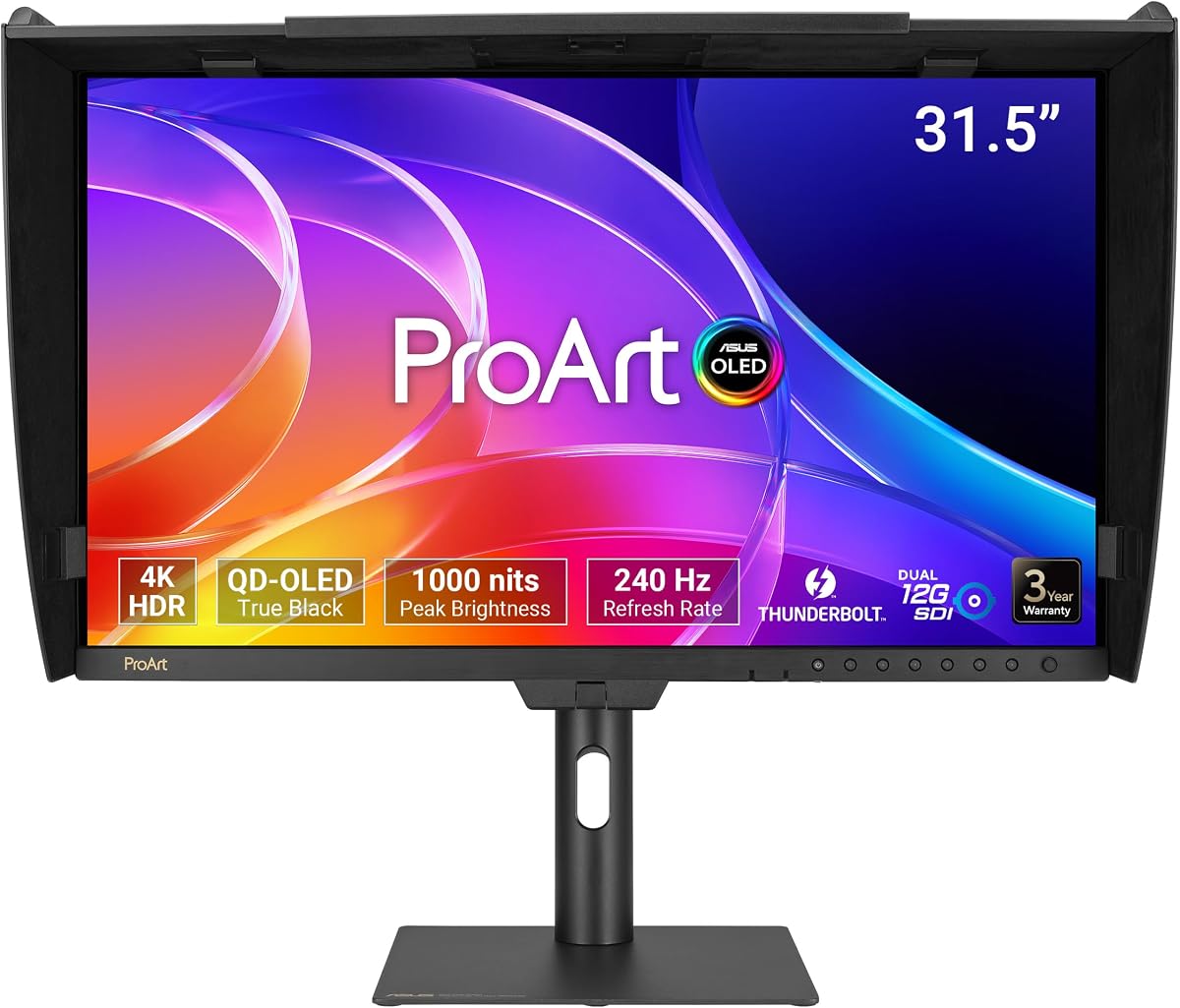
The ASUS ProArt PA32USD is a 31.5-inch 4K QD-OLED monitor built for demanding users who value contrast, speed, color depth, and professional broadcast connectivity. No numerical rating was supplied, but its specification set clearly separates it from conventional office-oriented ProArt displays: 240Hz refresh, 0.1ms GTG response, 1000-nit peak brightness, and True Black 400 HDR support.
We may earn a commission when you buy through this link, at no additional cost to you.
Its color capabilities are equally ambitious. The monitor provides 100% sRGB, 99% DCI-P3, and BT.2020 coverage with true 10-bit color, while the listed E below 1 performance and ASUS ProArt Hardware Calibration Technology support detailed color optimization, uniformity work, and profile write-back. Dolby Vision, HLG, and HDR10 compatibility expands the range of supported HDR formats.
The dual 12G-SDI inputs are the standout professional feature. They support uncompressed 4K at 60Hz real-time playback and are compatible with 6G and 3G Level A and B sources, making the monitor relevant to broadcast, live production, and high-end post-production environments. Thunderbolt 4, HDMI 2.1, DisplayPort 2.1, and a USB hub serve conventional computer workflows.
The supplied accessories are extensive, including two stands, a monitor hood, multiple cables, a color report, and cable-management clips. Prospective buyers should prepare a compatible workstation and consider the inherent demands of a premium OLED workflow. For users who need professional SDI monitoring, very high motion performance, and exceptional contrast, it is an unusually complete package.
Dual 12G-SDI inputs support uncompressed 4K playback at 60Hz and compatibility with several lower-bandwidth SDI standards, which distinguishes this display from most computer-oriented ProArt models.
A 240Hz refresh rate and 0.1ms GTG response time make the QD-OLED panel suitable for motion analysis, high-frame-rate preview work, and applications where responsiveness matters as much as color fidelity.
We may earn a commission when you buy through this link, at no additional cost to you.
The ASUS ProArt PA32UCR-K uses a 32-inch 4K mini-LED backlight with a listed 1000 cd/m2 peak brightness. Its supplied rating is 3.7, but the underlying feature set targets high-end color and HDR work, including 99.5% Adobe RGB, 98% DCI-P3, and 100% sRGB coverage.
We may earn a commission when you buy through this link, at no additional cost to you.
Quantum-dot technology supports those wide gamuts, while world-leading Delta E below 1 performance gives it an impressive stated accuracy target. ASUS ProArt Hardware Calibration Technology adds options for color optimization, uniformity, and profile write-back. The included X-rite i1 Calibrator is a meaningful inclusion because it allows the purchaser to validate or refine the display's performance.
HDR10 and HLG support make the mini-LED backlight useful for high-brightness viewing, while USB-C connectivity supports compatible laptops and Mac systems. The 4K panel also provides plenty of physical space for detailed editing, effects work, and multiple application panels.
The 3.7 rating means buyers should investigate current owner feedback carefully before ordering. It is also a specialized display, and its strengths—mini-LED brightness, wide gamuts, and professional calibration—are more important to a color specialist than to a general office user. For a high-end editing suite or mastering environment, it remains a feature-rich option.
The mini-LED backlight and 1000 cd/m2 peak specification offer more luminance headroom than standard IPS displays, while 99.5% Adobe RGB and 98% DCI-P3 coverage support demanding color projects.
The supplied X-rite i1 Calibrator is valuable for color-critical work, allowing users to check the panel and maintain a consistent calibration profile rather than relying entirely on factory settings.
We may earn a commission when you buy through this link, at no additional cost to you.
The ASUS ProArt PA278CGV combines a 27-inch QHD IPS panel with a 144Hz refresh rate, making it a strong option for creators who also play games or need a responsive display. Its supplied rating is 4.2, and the core creative features remain consistent with the ProArt range: 95% DCI-P3, 100% sRGB and Rec.709 coverage, and Delta E below 2 factory calibration.
We may earn a commission when you buy through this link, at no additional cost to you.
FreeSync Premium support and DisplayHDR 400 broaden its appeal for hybrid use. Color-critical work benefits from the calibrated panel and wide DCI-P3 coverage, while the higher refresh rate can make interactive applications and games feel more immediate than a standard 60Hz creative monitor.
The 90-watt USB-C connection provides more laptop charging power than many similarly positioned models while also carrying display and data. DisplayPort, HDMI, and a USB hub round out the ports, giving the screen a useful mix of modern and conventional connections.
Its listed ergonomic capability is more limited than that of the PA278CV, as the supplied information specifically identifies height adjustment without documenting a full range of tilt, swivel, and pivot controls. DisplayHDR 400 is also not a high-end mastering specification. For a creative professional who wants one screen for both productive work and recreation, however, the PA278CGV makes a persuasive case.
A 144Hz panel provides a noticeably more fluid experience in games and interactive applications than conventional office monitors, while QHD resolution offers enough space for professional multitasking.
The 95% DCI-P3 gamut and Rec.709 coverage create a useful middle ground for photo and video work, particularly for creators who value high refresh rate more than maximum pixel density.
We may earn a commission when you buy through this link, at no additional cost to you.
The ASUS ProArt PA32UCG-K is a 32-inch 4K mini-LED IPS monitor built around extreme brightness and extensive local-dimming control. Its 1,152 local-dimming zones deliver a listed 1600-nit peak brightness and 1000-nit full-screen sustain, making it one of the most technically ambitious models in this roundup.
We may earn a commission when you buy through this link, at no additional cost to you.
Dolby Vision, HDR-10, and HLG support cover several major HDR formats. True 10-bit color and Quantum-dot technology provide DCI-P3, Rec.2020, Adobe RGB, and sRGB coverage, while the stated Delta E below 1 performance and ProArt Hardware Calibration Technology support detailed calibration and profile write-back.
Motion performance is unusually strong for a professional mini-LED display. The listed 48 to 120Hz variable-refresh range and FreeSync 2 HDR support make it useful for real-time preview and game development in addition to conventional editing. Thunderbolt 3 and HDMI 2.1 support modern source devices, while the included calibrator adds value for color specialists.
The 3.0 supplied rating is the lowest in the guide and deserves attention before purchase, particularly if owner feedback suggests a problem affecting a specific use case. The display is also specialized: its size, brightness, local dimming, and broad format support are most valuable to high-end colorists, developers, and HDR-focused production teams. For those needs, it remains a technically exceptional choice.
With 1,152 local-dimming zones, a 1600-nit peak specification, and 1000-nit sustained full-screen brightness, the display can create strong HDR contrast and specular highlights for demanding viewing environments.
World-leading Delta E below 1 performance, hardware calibration tools, true 10-bit color, and a variable 48 to 120Hz refresh range combine professional color capability with responsive real-time performance.
We may earn a commission when you buy through this link, at no additional cost to you.
Choosing an ASUS ProArt monitor means balancing physical resolution, color capability, calibration, connection needs, HDR performance, and desk space. The right choice depends more on your software and working environment than on any single headline specification.
Resolution determines how much information fits on the screen and how finely small details appear. The 24-inch PA248QV uses a 1920 x 1200 WUXGA panel, which is comfortable for standard creative applications but offers less density than newer alternatives. The QHD models use 2560 x 1440, providing a useful middle ground for editing panels, timelines, and side-by-side application work. The 27-inch PA279CRV and the 32-inch PA329CRV-P raise the pixel count to 3840 x 2160, while the PA32QCV goes further with a 6016 x 3384 6K panel. Size also changes practical usability: a 24-inch display fits a smaller desk more easily, whereas 32-inch models benefit from viewing distance and a clear place in a multi-monitor arrangement.
Color gamut indicates the range of colors a display can reproduce, while calibration accuracy describes how closely those colors match a selected reference. The PA248QV and the 27-inch WQHD model focus on 100% sRGB and Rec.709, which works well for web publishing and general graphics. Models such as the PA278CV, PA279CRV, and PA329CRV-P cover broad DCI-P3 and Adobe RGB ranges for more demanding photo and video work. The PA32UCR-K and PA32UCG-K extend into high-end wide-gamut territory, while the PA32USD combines 99% DCI-P3 with true 10-bit color. Factory calibration to Delta E below 2 provides a strong starting point on many models. Flagship displays reach E below 1 and add hardware calibration or profile write-back for repeatable workflows.
HDR capability varies dramatically across the range. The PA279CRV is described as an HDR display, the PA329CRV-P specifies HDR400, and the PA278CGV includes DisplayHDR 400. These are useful for improved contrast and highlight presentation, but they are not equivalent to the brightness and local-dimming control of the premium mini-LED displays. The PA32UCR-K reaches 1000 cd/m2 peak brightness, the PA32UCG-K reaches 1600 nits with 1,152 local-dimming zones, and the PA32USD uses QD-OLED with a 1000-nit peak and True Black 400 support. For ordinary color editing, a standard HDR mode may be sufficient. For HDR grading, mastering, or HDR-aware game development, examine sustained brightness, local-dimming behavior, supported formats, and calibration options.
Modern laptops and Mac systems can benefit greatly from a single-cable setup, but not every USB-C monitor provides the same level of convenience. The PA278CV supplies 65 watts of power delivery, the PA278CGV raises that to 90 watts, and the PA279CRV and PA329CRV-P provide 96 watts. Thunderbolt 4 appears on the PA32QCV and PA32USD, supporting high bandwidth, daisy-chaining, and up to 96 watts of charging. The PA32UCG-K includes Thunderbolt 3. If your computer has limited ports, a built-in USB hub is also valuable. Always confirm the exact power output, supported video modes, and whether daisy-chaining is enabled through the particular port rather than assuming that every USB-C connection behaves identically.
Most of the lineup uses IPS technology, which is a familiar choice for professional color work and broad viewing angles. The PA32USD stands apart with QD-OLED, combining true 10-bit color, a 240Hz refresh rate, and very fast response. The PA32UCG-K and PA32UCR-K use mini-LED backlights to increase brightness and improve local contrast. Ten-bit color is explicitly listed for the PA32USD and PA32UCG-K, which can benefit gradients, color grading, and professional image work. Higher color depth alone does not guarantee accurate results, so it should be evaluated together with gamut coverage, calibration, and the quality of the supplied or recommended workflow.
A professional monitor should be comfortable to use for hours and easy to position with other equipment. Most ProArt models in this guide support tilt, swivel, pivot, and height adjustment, allowing the panel to be aligned with neighboring displays. The PA278CV explicitly supports a 90-degree pivot, which is useful for portrait-oriented work. The PA32USD includes two stand options, a metal handle, a monitor hood, and cable-management clips. The PA329CRV-P has a broad adjustment range and a quick-release stand. Before buying, measure the available desk area, check the base footprint, confirm your preferred orientation, and consider whether a monitor arm or VESA arrangement would better suit your setup.
Some features matter only in particular professions. The PA32USD's dual 12G-SDI inputs support uncompressed 4K playback and several SDI standards, making it especially relevant to broadcast and live-production work. The PA32QCV's Auto KVM switch and dual Thunderbolt 4 connections are useful for users who regularly move between two computers. The PA32UCR-K and PA32UCG-K include calibrators and support professional profile workflows, while the PA329CRV-P includes a factory calibration report and TAA compliance. These specialized features can justify a larger investment when they remove bottlenecks, but they are unnecessary for someone whose work is limited to documents, web graphics, and general photo editing.
The supplied information shows an extended five-year warranty structure on many models, consisting of three years of standard coverage plus two additional years with online registration. Check the exact terms for the product you choose. Included accessories also affect setup time. The PA278CV includes USB-C, HDMI, and DisplayPort cables; the PA329CRV-P includes DisplayPort, HDMI, a power cord, a quick-release stand, a calibration report, and a warranty card. The PA32USD has an especially extensive package with multiple video cables, two stands, a hood, and cable clips. The PA32UCR-K and PA32UCG-K include a calibrator. A complete package can be more valuable than a higher headline specification if it eliminates separate accessories and facilitates a professional workflow.
Begin by choosing the correct signal path for your computer. For a single-cable laptop setup, use the USB-C port on a compatible ProArt model when the computer supports display output and the monitor's power-delivery rating meets the device's charging needs. For desktop workstations, use DisplayPort for supported high-bandwidth workflows or HDMI for the intended source resolution and refresh rate. Connect video first, then attach peripherals to the USB hub, and update the computer's display settings so the native resolution and intended refresh rate are selected.
Position the panel using the available tilt, swivel, pivot, and height controls. The top edge of the display should sit near eye level, while the viewing distance should allow you to see the full panel without constant head movement. For color-critical work, avoid direct sunlight, use controlled ambient lighting, and let the display stabilize before judging images. Do not frequently switch between different color modes if consistency is important, because each mode can present a different appearance.
Keep the panel clean with a soft, lint-free cloth and avoid ammonia-based cleaners or liquid applied directly to the screen. The PA32USD's supplied hood can reduce reflections, while the bundled cable clips help route Thunderbolt, USB, and video cables away from the desk. Leave ventilation areas open, use the manufacturer-supported power and video cables, and record the product's serial information and warranty registration. Periodic factory resets, software updates, and recalibration can help maintain stable performance, particularly for displays that support hardware calibration and user-written profiles.
The best choice depends on whether your work is primarily web-oriented, print-oriented, or cinematic. The PA248QV is a practical sRGB-focused option, while the PA279CRV offers 4K detail and broad DCI-P3 and Adobe RGB coverage. High-end users can consider the PA32UCR-K or PA32UCG-K for their stated E below 1 accuracy and hardware calibration tools. Always assess a monitor in person when possible, since panel characteristics and individual expectations matter.
A 4K monitor offers more pixels and finer detail, which is valuable for large images, video timelines, and detailed design work. QHD models such as the PA278CV and PA278CGV provide a useful balance of detail, physical size, and affordability. If your computer can drive the chosen 4K model at the intended refresh rate and your screen size makes the added density visible, 4K is the stronger choice for detailed work.
Delta E measures the numerical difference between displayed colors and a reference target, and lower values indicate closer agreement. A stated Delta E below 2 means the panel has been factory calibrated to achieve that average level of accuracy. It is an encouraging starting point, but actual results can vary with the selected mode, operating system, ambient lighting, and application color management.
No. Several models in this guide use USB-C with power delivery, including the PA278CV, PA278CGV, PA279CRV, and PA329CRV-P, while others emphasize HDMI, DisplayPort, DVI, Thunderbolt, or SDI. Power delivery also varies from 65 to 96 watts. Check both the computer's port capability and the laptop's charging requirement before relying on a one-cable setup.
Neither is universally better. Mini-LED models provide very high brightness and local-dimming control, which can benefit HDR grading and bright-room use. The QD-OLED PA32USD offers exceptional contrast, deep blacks, true 10-bit color, and very fast response. The right choice depends on your need for sustained brightness, black levels, professional SDI connectivity, and the type of HDR material you handle.
Daisy-chaining lets one video output drive multiple compatible displays in sequence, reducing the number of direct video connections required from a computer. It is particularly useful when a workstation has a limited number of outputs. The computer, graphics card, monitor model, and selected port must all support the intended daisy-chain arrangement, so the feature should be verified before purchasing.
Yes, provided the selected display has a compatible input and your Mac supports the connection. USB-C models are convenient for compatible modern Macs, while HDMI and DisplayPort are broadly useful alternatives. The PA32QCV includes a specific MacBook color-matching preset, and several other models offer USB-C power delivery for streamlined laptop workflows. Check refresh-rate and resolution support when using adapters or docks.
Factory calibration is designed to provide a dependable starting point, but recalibration can be valuable in a controlled professional environment. A dedicated colorimeter, such as the calibrator included with the PA32UCR-K and PA32UCG-K, can validate the display and create a profile suited to your display, room, and workflow. Recalibrate when the operating system, application, lighting conditions, or panel settings change significantly.
The ASUS ProArt PA278CV is the most balanced recommendation for creative professionals who want accurate color, a useful QHD canvas, USB-C charging, daisy-chaining, and strong physical adjustment. The PA248QV is the sensible budget-focused option for sRGB work and smaller desks, while the PA32USD represents the premium extreme with QD-OLED performance, 240Hz motion, and professional SDI connectivity.
The right priority depends on your work. Choose sRGB and QHD for web graphics and general productivity; broad DCI-P3 or Adobe RGB coverage for serious photo and video editing; and 4K, 6K, mini-LED, or OLED when fine detail, maximum brightness, deep contrast, or advanced signal handling solves a real workflow problem. Avoid paying for specialized features that your applications and hardware cannot use.
Specifications can be compared confidently from this guide, but current pricing, availability, warranty registration terms, and package contents should be confirmed on the live product listing before purchase. Checking those details helps ensure that the selected ASUS ProArt monitor matches both your creative requirements and your desk.