
Amazon Basics Condenser Microphone
4.4Editor score
Cardioid pickup pattern
Adjustable 360-degree stand
One-touch mute control
A cheap podcast microphone can still deliver clear, focused voice audio when you understand which features matter for your setup. The right choice depends on microphone type, pickup pattern, controls, monitoring, included accessories, and compatibility with your recording device.
We compared ten popular podcast and gaming microphones using their stated specifications, compatibility, recording features, and included accessories. The list covers desktop condenser models, dynamic USB and XLR options, portable kits, and microphones designed for both first-time creators and livestreamers.
Each review highlights the strongest use case, important specifications, practical advantages, and trade-offs. Ratings reflect the supplied customer feedback, while product details and availability can change, so shoppers should confirm current specifications, device support, and prices before purchasing.
4.4Editor score

4.4Editor score

4.6Editor score
As an Amazon Associate we earn from qualifying purchases.
The comparison below organizes all ten microphones by connection, recording style, controls, compatibility, and included equipment, making it easier to identify the option that fits a particular podcast or streaming setup.




The ZealSound K66 is a USB condenser microphone built for creators who want useful recording controls without installing additional software. Its 4.4 rating reflects generally favorable customer feedback, while the listed cardioid pickup pattern, 40Hz–18kHz response, and 46kHz sampling rate support detailed vocal capture for podcasts, streaming, online classes, and voice-over work.
We may earn a commission when you buy through this link, at no additional cost to you.
The standout strength is its combination of physical controls and creator-focused features. It includes separate microphone and monitoring volume adjustments, an echo control, an instant mute button with a clear indicator, and a press-and-hold noise reduction mode designed to reduce sounds such as keyboard clicks, fan noise, air-conditioner hum, and background chatter. A 3.5mm headphone jack provides real-time, zero-latency monitoring.
Setup is designed to remain straightforward. The microphone connects by USB without drivers or companion applications, and the package includes a USB-C adapter, a Lightning adapter, a 70.87-inch cable, a foam windscreen, and a stable metal base. These are useful additions, although the broad array of knobs and modes may take beginners some time to understand. The top-addressed body is rotatable, while the weighted base is intended to limit movement and vibration.
This is an especially strong choice for someone moving between a Windows PC, Mac, iPhone, iPad, or Android device, provided the required adapter and compatible recording app are available. It is also appealing to podcasters who value live monitoring and noise reduction without software. Those wanting the simplest possible desktop microphone may prefer a model with fewer controls, but the K66 offers exceptional flexibility for the category.
Overall, the K66 earns the Editor's Choice position because it combines a broad accessory package, useful acoustic tools, flexible device support, and hands-on controls in one affordable desktop setup. It is particularly compelling for content creators who monitor their voice and want to adjust the sound physically while recording.
Independent microphone gain, headphone volume, and echo controls make it possible to shape the monitoring experience during a session. The instant mute and noise reduction modes provide additional ways to manage changing recording conditions without leaving the microphone.
USB plug-and-play operation covers major desktop platforms, while the included USB-C and Lightning adapters expand support for compatible mobile devices. Always verify that the intended recording application recognizes the selected connection method.
We may earn a commission when you buy through this link, at no additional cost to you.
The Amazon Basics Condenser Microphone is a straightforward USB option for beginning podcasters, streamers, and remote workers. It has a 4.4 rating and a concise feature set built around a 14mm diaphragm, cardioid pickup, one-touch mute, and a rotatable desktop stand. The design emphasizes ease of use rather than extensive controls.
We may earn a commission when you buy through this link, at no additional cost to you.
Its main appeal is the short path between unboxing and recording. The microphone connects through a USB data cable and requires no additional drivers. It supports Windows and Mac systems, along with common streaming and broadcasting applications. Because the microphone can be detached from its stand and installed on a tripod, boom arm, or standard 5/8-inch threaded microphone stand, it can move into a more permanent recording arrangement later.
The cardioid pattern is intended to isolate the speaker in front of the microphone and limit unwanted background pickup. Its 360-degree rotating stand allows the user to change the angle, while the built-in shock absorber and silicone rubber boot help manage vibration. The one-tap mute is synchronized with a laptop or PC, making it convenient for meetings and live broadcasts.
Compared with feature-heavy creator microphones, this model does not list headphone monitoring, a physical gain knob, or a noise reduction mode. It also does not include the same extensive adapter or cable package offered by some competitors. Those limitations are reasonable for a simple starter choice, particularly for users who already have a suitable computer, stand, and accessories.
The Amazon Basics model is best for buyers who want a small, uncomplicated microphone for podcasts, calls, online classes, and beginner streams. It is a sensible recommendation when ease of use and a compact footprint matter more than real-time monitoring or advanced hardware controls.
The rotating stand provides enough adjustment for a typical desk, while the detachable microphone body supports future use with a tripod or boom arm. This gives beginners a simple starting point without locking them into one setup.
A cardioid pattern and 14mm condenser diaphragm prioritize the voice directly in front of the microphone. That makes the model appropriate for controlled home offices and straightforward desktop recording.
We may earn a commission when you buy through this link, at no additional cost to you.
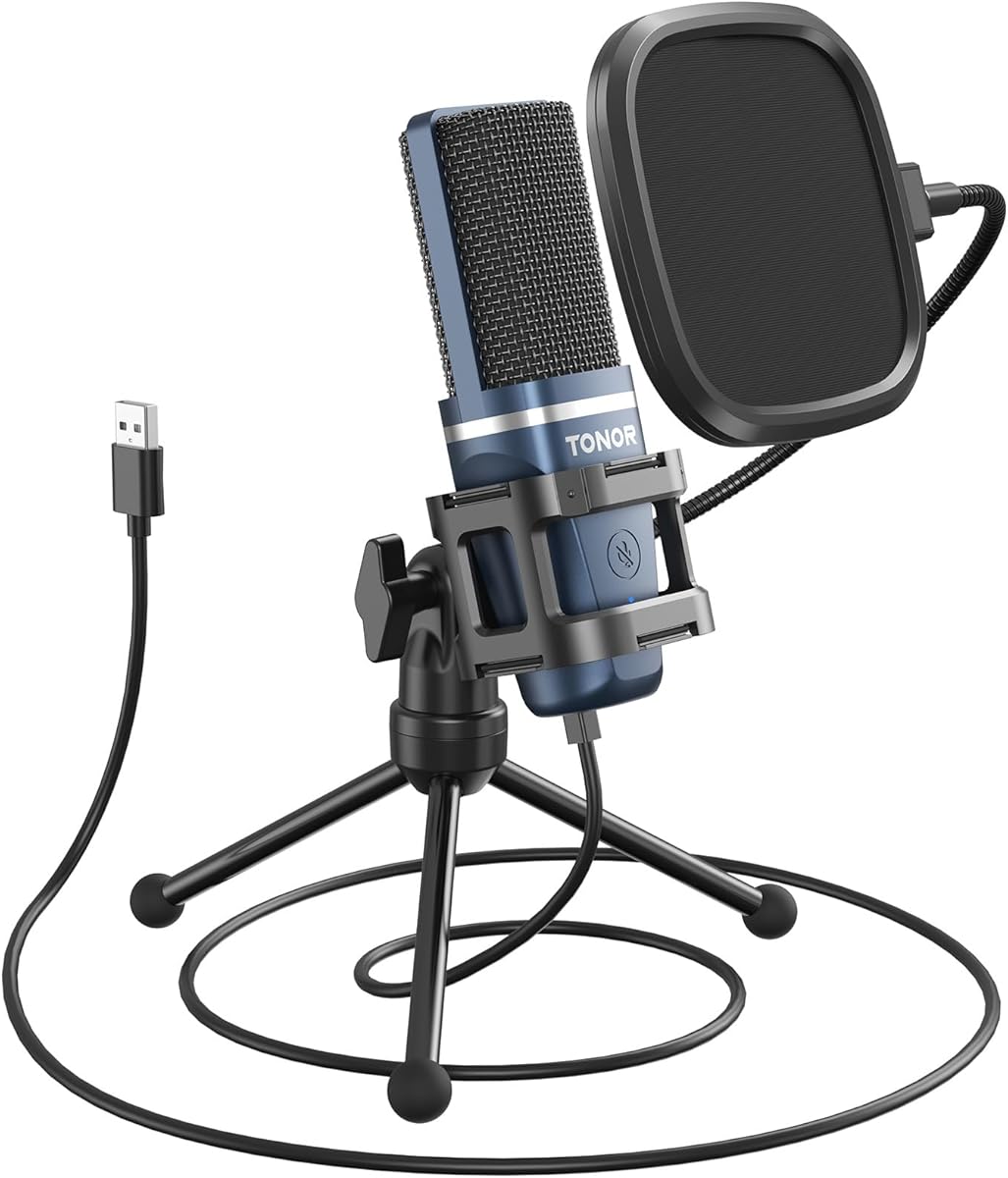
The TONOR TC-777 is a compact USB podcast microphone that combines a small desktop footprint with a useful collection of recording basics. Its 4.3 rating indicates solid customer reception, and the supplied features include a cardioid condenser microphone, one-click mute, volume control, shock mount, and pop filter.
We may earn a commission when you buy through this link, at no additional cost to you.
The included accessories help distinguish it from a bare-bones USB microphone. A foldable tripod keeps the footprint small, while the mini shock mount and pop filter address desk vibration and plosive sounds. The microphone and pop filter can both be adjusted to improve positioning, and USB 2.0 plug-and-play operation removes the need for drivers or an assembly process.
Compatibility is broad for a simple desktop model. The stated list includes Windows, Mac, PS4, and PS5, as well as recognition by Zoom, Skype, and Discord. It is not compatible with Xbox, so console users should verify platform support before buying. The model is best suited to a person who wants a ready-made podcast or call setup with minimal configuration.
Its limitations are mostly connected to simplicity. There is no stated headphone jack or zero-latency monitoring, and the physical control set is limited to mute and volume. A creator who wants to monitor a full mix while recording, adjust gain more precisely, or use a different mount may need to add accessories or choose a more specialized model.
For new podcasters working from a Windows PC, Mac, or supported console, the TC-777 offers a practical balance of compactness and included equipment. It is particularly useful for voice chat, remote meetings, gaming commentary, and basic podcast production where simplicity matters more than expansive monitoring controls.
The bundled pop filter and mini shock mount improve the out-of-box recording arrangement. They reduce the need to purchase basic accessories before making a first recording.
The folding tripod takes up little room and makes the microphone easier to store. Its stated support for major desktop systems and several common communication applications broadens the potential audience.
We may earn a commission when you buy through this link, at no additional cost to you.
The FIFINE K669B is a dependable USB condenser microphone for desktop podcasting, meetings, voice-over, and livestreaming. It carries a 4.5 rating and uses a straightforward design: a cardioid condenser microphone, a stable metal tripod, and a prominent physical volume control.
We may earn a commission when you buy through this link, at no additional cost to you.
Its strongest selling point is the combination of durable construction and uncomplicated operation. The 5.9-foot USB cable provides more freedom than a short integrated lead, and USB power eliminates the need for 48-volt phantom power. A physical knob lets the user reduce or increase the microphone level and lower it to zero when privacy is needed.
FIFINE positions the cardioid pattern as a way to emphasize the main voice source and reduce background noise. The microphone is suitable for Discord, OBS, Teamspeak, Twitch, Zoom, Webex, Amazon Chime, and Audacity, as well as voice-over and general PC recording. It also works with Mac, PS4, and PS5 when connected with the appropriate cable.
There are some boundaries to consider. The product is not compatible with Xbox or phones, and the supplied information does not list a headphone output or zero-latency monitoring. Applications with automatic volume adjustment can also change the perceived recording level, so disabling that feature may be necessary for consistent results.
The K669B is a strong option for users who value a sturdy metal body and quick physical level control. It is particularly effective for a fixed desk setup, online meetings, and content creation in OBS or similar software, provided the computer and application are compatible.
A metal body and stable tripod give this microphone a more substantial desk presence than many plastic alternatives. That makes it well suited to regular podcasting or livestreaming use.
The front volume knob provides immediate control without opening recording software. Users can raise the output, lower it, or turn it down to zero during sensitive moments.
We may earn a commission when you buy through this link, at no additional cost to you.
The FIFINE AmpliGame AM8 stands out as a more upgradable microphone because it supports both USB and XLR connections. Its 4.5 rating and feature set target gamers, streamers, and podcasters who may begin with a direct computer connection and later move into a mixer or audio interface setup.
We may earn a commission when you buy through this link, at no additional cost to you.
As a dynamic microphone, the AM8 uses a directional cardioid pattern to emphasize the voice in front of it and reject unwanted off-axis noise. Its stated frequency response is 50Hz–16kHz. The manufacturer recommends keeping the top of the end-addressed microphone facing the source and placing it approximately 2 to 6 inches away, making close positioning important to the recording style.
USB mode offers the most accessible path for beginners. It includes tap-to-mute operation, a monitoring volume control, a gain knob, a headphone jack, and an RGB ring with multiple modes and colors. In XLR mode, the microphone connects to an interface or mixer, but the required XLR cable is not included. The RGB and function key are inactive in that mode.
The built-in 3/8-inch and 5/8-inch metal threads allow use with common microphone stands, and the included noise-canceling windscreen is intended to reduce nearby electrical hum. This is a capable option for creators who value a dynamic microphone for gaming and also want room to expand into a more flexible recording chain.
The AM8 is best for a streamer or podcaster willing to learn proper placement and comfortable working close to the microphone. It is less convenient for someone who wants a simple all-in-one XLR package, since the cable and interface are separate purchases, but it provides a more future-facing setup than a USB-only model.
Direct USB operation gives new creators an easy starting point, while XLR support opens the door to an interface or mixer. The microphone can therefore grow with a developing recording setup.
The recommended 2-to-6-inch range helps the dynamic capsule capture a strong, direct voice while limiting off-axis room noise. Correct orientation and distance are central to getting consistent results.
We may earn a commission when you buy through this link, at no additional cost to you.
The Logitech Creators Blue Yeti is a well-established USB microphone for podcasting, streaming, gaming, music recording, and online meetings. It has the highest supplied rating in this group at 4.6 and stands apart through a three-capsule array, four pickup patterns, onboard controls, and Blue VO!CE software.
We may earn a commission when you buy through this link, at no additional cost to you.
Cardioid, omnidirectional, bidirectional, and stereo modes allow the microphone to handle solo speech, room conversations, two-sided interviews, and broader recording situations. A direct USB connection makes it usable on Mac or PC without the complexity of an external interface, while the desktop stand can be repositioned and the microphone can also be mounted on a compatible stand or boom arm.
The physical control set includes microphone gain, headphone volume, pattern selection, and instant mute. Real-time, no-latency monitoring helps speakers judge their own level and hear the source directly. Blue VO!CE adds vocal effects, modulation, and HD audio samples for streams and recordings, offering more software-assisted flexibility than the other models here.
The main drawback is its comparatively high price within this selection. It also occupies more desk space than compact models, and users who do not need multiple patterns or software effects may not get full value from its broader feature set. The microphone is still a particularly complete option for someone who wants one device for several kinds of recording.
The Blue Yeti is best for creators who record in more than one format, such as a solo podcast, a remote interview, and a livestream. Its strong rating, multiple patterns, easy USB setup, and monitoring controls justify the premium position for buyers who prioritize flexibility over the lowest possible cost.
The pattern controls allow a single microphone to handle focused speech, ambient room recording, two-sided conversations, and stereo sources. This is a major advantage for creators whose format changes over time.
Gain, headphone volume, pattern selection, and mute are accessible directly from the microphone. These physical controls reduce reliance on software during recording and monitoring.
We may earn a commission when you buy through this link, at no additional cost to you.
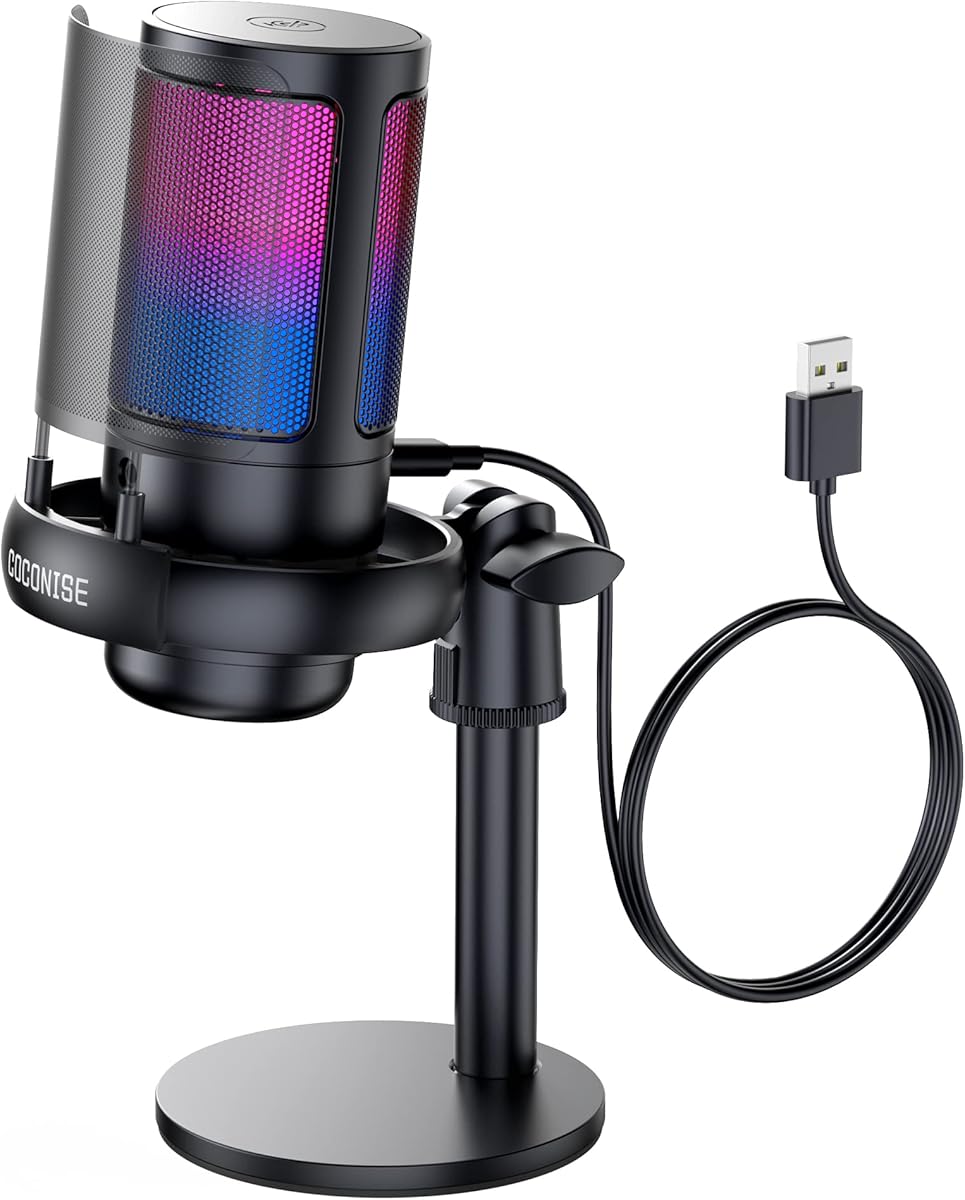
The COCONISE Gaming Microphone is built for creators who want a recording setup to look as purposeful as the rest of a gaming rig. It has a 4.3 rating, RGB lighting, a touch-sensitive mute control, a 3.5mm headphone jack, and a cardioid condenser design aimed at podcasts, videos, streaming, and console chat.
We may earn a commission when you buy through this link, at no additional cost to you.
Its 25mm diaphragm capsule and stated sampling rate of up to 192kHz provide headline specifications for detailed voice capture. The cardioid polar pattern focuses on the source in front of the microphone and reduces side pickup, which is useful in a gaming environment where fans, keyboard noise, and other background sounds are common.
A rotary volume control is located at the bottom, and the 3.5mm headphone connection allows creators to monitor their own voice in real time. The RGB lights turn off when the microphone is muted, offering a clear visual warning that can prevent accidental broadcasting. The 180cm detachable USB data cable supports placement away from the computer.
The support structure also addresses common desk problems. A weighted carbon steel base helps resist movement, a metal anti-splash screen is designed to filter plosives, and a rubber elastic band in the shock mount reduces vibration from keyboard and mouse activity. The model supports PS4, PS4 Pro, PS5, desktops, and laptops.
This microphone is best for gamers who also publish spoken content and want visual features that fit a streaming setup. It is less appropriate for someone who prioritizes understated office styling or wants fine gain control, because neither is stated in the supplied specifications. Its practical appeal lies in combining usable monitoring, a stable body, and conspicuous RGB feedback.
Turning off the RGB lights when muted gives the user an immediate visual cue. That can be more noticeable than a small recording indicator during a busy live stream.
The shock-mount band helps isolate the microphone from forceful typing and clicking, while the detachable metal anti-splash screen addresses sudden plosive consonants. Both features suit expressive gaming commentary.
We may earn a commission when you buy through this link, at no additional cost to you.
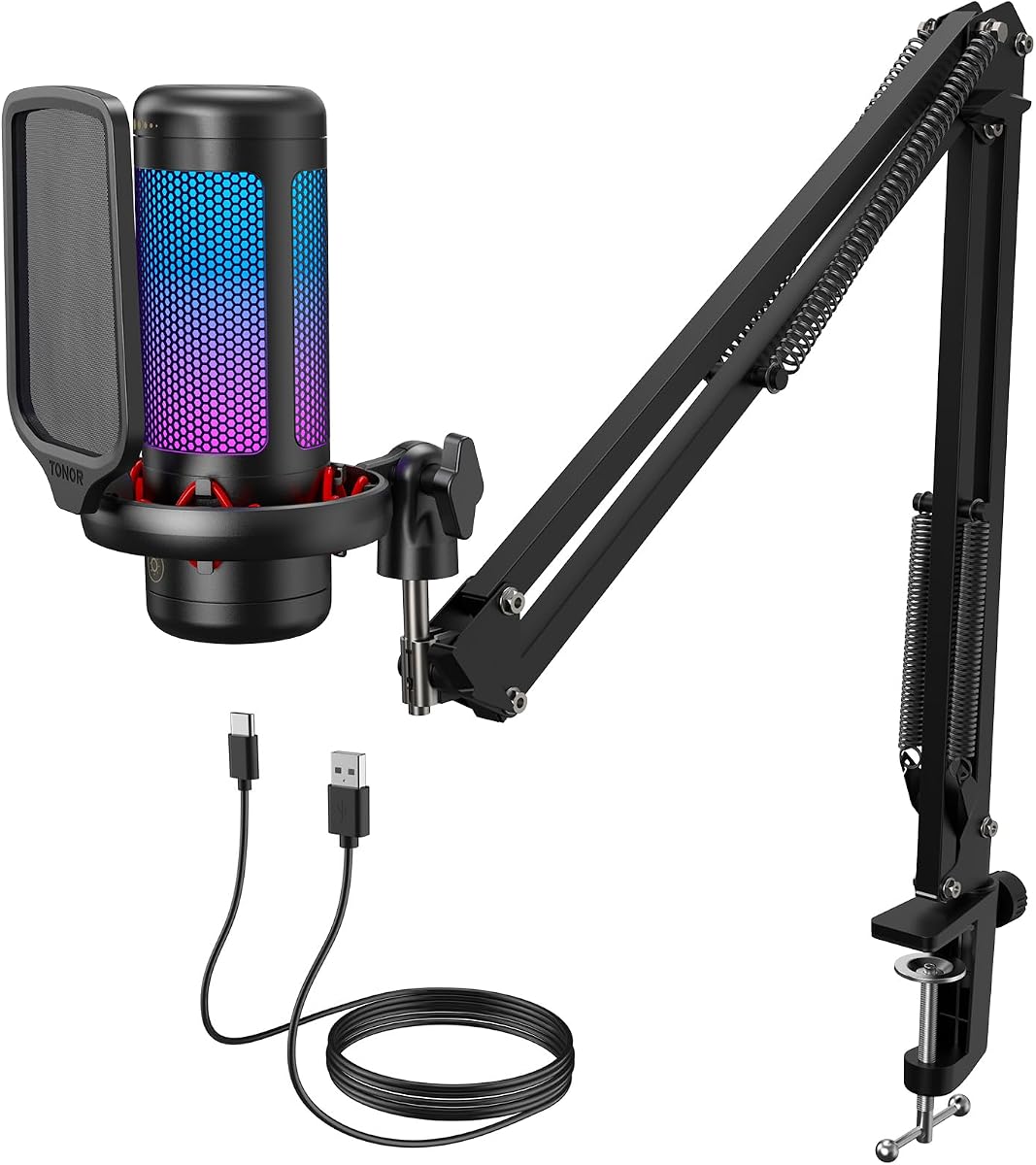
The TONOR TC310+ is a USB condenser microphone and boom-arm bundle designed for content creators and streamers. It has a 4.5 rating and packages the microphone together with a metal arm and desk clamp, making it a more complete starting arrangement than the small standalone models in this roundup.
We may earn a commission when you buy through this link, at no additional cost to you.
The boom arm has multiple adjustable joints that allow the microphone to be placed close to the speaker and away from crowded parts of the desk. Its clamp is designed to fit desks with thickness no greater than 2.36 inches. This positioning can improve consistency because the microphone does not need to compete with every other item on the desktop.
The microphone supports tap-to-mute operation and gain adjustment by rotating the top. Four RGB modes are available, including static color, single-color gradient, breathing, and mixed-color gradient. Brightness can also be adjusted by long-pressing the RGB icon, providing a degree of visual customization for livestreaming or gaming environments.
Its specifications do not mention a headphone jack, live monitoring, or a pop filter. Users who need to hear their voice while recording may need an additional monitoring solution. The included clamp may also be unsuitable for a thin, rounded, or unusually thick desk, so buyers should check the dimensions before ordering.
The TC310+ is a good fit for someone starting a podcast or stream and wanting a boom arm in the box. It reduces the need to purchase a separate arm, while the metal construction and adjustable joints support a stable, repeatable microphone position. It is particularly attractive for creators who want a polished setup without a complicated installation.
A metal boom arm and sturdy clamp create a more permanent recording position than a basic tripod. The adjustable joints help place the microphone consistently and free up desk space.
Several lighting modes and brightness adjustment make the microphone easy to coordinate with a streaming setup. Tap-to-mute offers a quick privacy control during unexpected interruptions.
We may earn a commission when you buy through this link, at no additional cost to you.
The MAONO A04 is a USB condenser podcast kit centered on high-resolution capture and a generous collection of included equipment. Its 4.5 rating and stated 192kHz/24-bit chipset make it attractive to creators who want detailed digital recording and a complete desktop setup at the same time.
We may earn a commission when you buy through this link, at no additional cost to you.
The microphone uses a 16mm electret condenser transducer and is described as having a smooth, flat, extended frequency response. A best range of approximately 2 to 6 inches is recommended, and the included magnet ring is intended to provide some protection against interference. USB plug-and-play operation means there is no need for extra drivers or an external sound card.
The package contains a metal shock mount, pop filter, foam windscreen, adjustable scissor arm, boom-arm base, and USB cable. That collection covers several common recording needs and reduces the number of separate accessories a new podcaster must purchase. The stated desk clamp thickness limit is less than 2.1 inches, which should be checked before assembly.
Compatibility includes most laptops, PCs, PS4, PS5, and compatible mobile phones, along with applications such as Discord, Twitch, and Zoom. The AU-A04 is not used with Maono Link, and MAONO recommends its upgraded A04 Gen2 for that function. The absence of stated headphone monitoring also means live voice checks may require a separate route.
The A04 is best for a podcaster who wants a high-resolution microphone, boom arm, shock mount, and filters in one package. It is particularly useful for a dedicated desk area and users who want more physical accessories than a basic USB microphone provides. Those requiring Maono Link software should select a compatible model instead.
The boom arm, base, shock mount, pop filter, windscreen, and cable create a ready-to-build podcast station. This package-oriented approach is convenient for new creators assembling a first setup.
The listed 192kHz/24-bit capability and 16mm condenser transducer prioritize fine detail in recorded vocals. Close placement around 2 to 6 inches can help the microphone capture a focused and consistent source.
We may earn a commission when you buy through this link, at no additional cost to you.
The FIFINE A6V combines a conventional USB condenser microphone with gaming-oriented features. It has a 4.5 rating, a 192kHz sampling rate, a stated 70dB signal-to-noise ratio, a cardioid polar pattern, and RGB lighting that changes automatically through seven gradient colors.
We may earn a commission when you buy through this link, at no additional cost to you.
The front-focused cardioid pattern is intended to capture the voice in front of the microphone while reducing background interference. A tap-to-mute button provides immediate control, and the RGB turns off while muted so a streamer can see whether the microphone is active. A physical gain control allows the user to maintain a comfortable speaking level.
Setup is designed around plug-and-play USB use on Windows and Mac, with compatibility also listed for PS4, PS5, desktop computers, and laptops. The detachable 6.6-foot cable gives enough reach when the computer is positioned away from the microphone, and the included shock mount and pop filter help manage desk vibration and plosives.
The microphone does not list a headphone output or zero-latency monitoring, so it is less suitable for users who require a direct live voice check through headphones. The lighting is also more relevant to gaming and streaming than to a conventional office or interview aesthetic. These are reasonable trade-offs for a model positioned primarily toward content creators and gamers.
The A6V is a strong all-around option for Discord, Team, Zoom, OBS, Streamlabs, and Twitch. Its accessories improve the basic desk arrangement, while the high sampling rate and cardioid capture provide solid specifications for voice recording. It works especially well for creators who value clear mute feedback and coordinated RGB styling.
Tap-to-mute operation is reinforced by the lighting turning off, making the microphone's status easy to identify. The nearby gain control helps keep speech at a consistent level without opening software.
A shock mount with four rubber bands limits vibration from typing and mouse movement, while the detachable pop filter addresses explosive consonants. These additions improve practical voice capture during active sessions.
We may earn a commission when you buy through this link, at no additional cost to you.
Choosing a cheap podcast microphone involves balancing capture quality, connection type, controls, accessories, and the recording environment. The most useful microphone is one that produces a clear voice, works with your equipment, and fits the way you actually publish.
A condenser microphone generally emphasizes sensitivity and detail, making it a common choice for speech in a controlled room. A dynamic microphone is less sensitive to ambient sound and can offer useful rejection of off-axis noise, but it often benefits from close placement. The FIFINE AM8 is the only dynamic model in this group and supports both USB and XLR connections, while the other choices use condenser designs.
In short, choose a condenser for a quieter desk and a dynamic for a noisier space or close-mic workflow.
A cardioid pattern concentrates on the speaker directly in front of the microphone and reduces pickup from the sides and rear. Nine products in this guide use a cardioid or cardioid-style pattern, making them sensible for solo podcasts and livestreams. The Blue Yeti adds omnidirectional, bidirectional, and stereo options, which makes it more adaptable to interviews, room recordings, and instruments.
For most desktop voice recording, prioritize a cardioid pattern unless you specifically need to capture sound from multiple directions.
USB microphones are the easiest option for most new creators because they connect directly to a computer and usually require no drivers. Confirm whether your computer has USB-A or USB-C, whether your chosen platform supports the microphone, and whether phone or console use is essential. The K669B excludes phones and Xbox, the TC-777 excludes Xbox, and several models include cables or adapters for different systems.
Check the exact device list before buying, especially if you plan to record on mobile devices or need a particular console connection.
Real-time monitoring lets a creator hear their voice while speaking, which can reveal clipping, unwanted room noise, and inconsistent levels. The K66, Yeti, AM8, and COCONISE model list headphone monitoring, while the Blue Yeti also offers no-latency monitoring. A physical gain knob is available on the K669B, AM8, TC310+, and A6V, allowing quick changes without entering software settings.
Prioritize monitoring when you can record unattended or cannot tolerate surprises during a live show. Otherwise, software gain controls may be sufficient.
No microphone completely removes a poor recording environment, but some features can make a noisy desk more manageable. The K66 has a dedicated noise reduction mode aimed at keyboard clicks, fans, air-conditioner hum, and background chatter. The AM8 includes a noise-canceling windscreen, while several condenser models include pop filters, windscreens, or shock mounts to address plosives and desk vibration.
Treat built-in noise reduction as an aid rather than a substitute for a quiet room, soft furnishings, and correct microphone placement.
A tripod is enough for a minimal recording setup, but a boom arm can place the microphone closer and make positioning more consistent. The TONOR TC310+ and MAONO A04 include boom arms, while the TC-777 includes a shock mount and pop filter. The K66 provides a long cable, mobile adapters, a weighted metal base, and a foam windscreen. Accessories can improve convenience, but the microphone's core specifications and compatibility should come first.
Count useful included equipment only after confirming that the core microphone meets your recording and device requirements.
RGB lighting and visible mute indicators are most relevant to gaming and livestreaming. The A6V, COCONISE, TC310+, and AM8 provide lighting, with the first three using the light state to help communicate mute status. The Yeti focuses on audio software instead. Lighting adds visual appeal but should not take priority over pickup quality, controls, and monitoring.
Choose a gaming model for coordinated visuals, but remain focused on the audio features and environment that will determine your recording quality.
The right microphone cannot fully compensate for reflective walls, a noisy computer, inconsistent speaking distance, or excessive keyboard movement. Position the microphone close, point it toward your mouth, and keep noisy equipment away from its pickup path. A boom arm, shock mount, and pop filter can improve consistency, but a quiet room and disciplined setup remain essential.
Before upgrading hardware, improve your room and technique. Often, modest changes in placement and distance produce a larger practical improvement.
Begin by placing the microphone on a stable surface and pointing its active side toward your mouth. For a cardioid model, this means speaking directly into the front rather than above or behind it. Keep a consistent distance, move closer if the signal sounds quiet, and use the included shock mount or boom arm when available to reduce movement and vibration.
Connect the microphone to the intended USB port, open the recording application, and select the microphone as the input. Check the input meter before speaking, then adjust the hardware gain, application gain, or software volume without letting the meter reach its maximum. Test the headphone monitoring, mute control, and any noise reduction mode in a short recording before starting a full session.
After recording, review a brief sample for plosives, room echo, background noise, clipping, and inconsistent level. Store the microphone in a dry area, handle the stand and connectors gently, and avoid pulling the cable by its plug. Clean removable foam or mesh parts according to the manufacturer's guidance, and do not allow moisture to enter the microphone body.
Yes, an affordable USB microphone can produce clear, usable voice audio for podcasts, meetings, streaming, and online lessons. Its results depend heavily on microphone placement, the room, background noise, and post-production. A model with monitoring, gain control, a pop filter, and a stable mount gives beginners more tools for achieving a polished result.
Most of the microphones in this guide connect directly to a computer by USB and do not require an interface. The FIFINE AM8 is the exception because its XLR mode requires an audio interface or mixer and a separate XLR cable. Its USB mode works directly with a computer, so an interface is optional unless the user wants to build a more flexible recording chain.
A condenser is often better for detailed speech in a quiet, controlled room because it is more sensitive to subtle sound. A dynamic microphone can be easier to manage in a noisier environment and may benefit from being placed only a few inches from the speaker. The right choice depends on the room and the creator's ability to maintain consistent positioning.
A cardioid microphone primarily captures sound from the front and reduces pickup from the sides and rear. An omnidirectional microphone captures sound from all directions, which can be useful for group conversations and room ambience but often records more unwanted noise. Most of the microphones reviewed here use cardioid capture, while the Blue Yeti offers both patterns along with bidirectional and stereo modes.
A pop filter helps soften abrupt plosive sounds caused by letters such as P and B, while a shock mount reduces vibrations transmitted through a desk stand. Some models include one or both accessories, but others require separate purchases. Even with these tools, careful placement and a quiet room remain important because no accessory can remove every source of noise.
Most models are designed to work with common recording, meeting, and streaming applications, and several explicitly list Zoom, Discord, OBS, Streamlabs, Twitch, Skype, Audacity, or similar programs. Application support does not guarantee that every device mode will behave identically, so test the microphone after installation and check for automatic gain or automatic volume settings.
A USB microphone is often sufficient for a first podcast, remote meeting, or livestream because it connects directly to a computer and reduces setup complexity. Upgrading becomes worthwhile when you need better monitoring, more precise control, multiple pickup patterns, a complete boom-arm system, or an XLR connection for a larger audio chain. The room and recording technique should be considered before upgrading.
Positioning depends on the model, but a common starting point is roughly 2 to 6 inches from the microphone. The MAONO A04 and FIFINE AM8 specifically list that range. Speaking close improves the direct signal relative to room noise, while keeping the microphone slightly off-axis can make plosives and sibilance easier to control.
The ZealSound K66 is the most feature-rich choice for creators who want physical controls, monitoring, noise reduction, and broad device support. The Amazon Basics Condenser is a straightforward budget option for a simple desktop setup, while the Logitech Creators Blue Yeti is the premium pick for its four pickup patterns, onboard controls, Blue VO!CE features, and strong customer rating.
Prioritize the details that affect your actual work: choose a cardioid microphone for focused speech, add a boom arm and shock mount if your desk is crowded, and consider real-time monitoring if you record live or cannot easily check your levels afterward. Pay close attention to device compatibility, included accessories, and whether you need a quiet-room condenser or a close-position dynamic microphone.
Prices, availability, and product configurations can change over time, so check the current listing before buying. Comparing the microphone with your computer, recording application, room, and speaking habits will produce a more satisfying result than choosing on specifications alone.