
8Bitdo Ultimate 2C
4.4Editor score
Windows and Android support
One-thousand-hertz polling rate
Remappable R4 and L4
Hall Effect sticks and triggers
Built-in Turbo function
Compare Android Joystick Controller options for gaming, weighing Hall Effect sticks, wireless connection, phone fit, comfort, customization, and compatibility
An Android joystick controller can transform touch-based games by adding physical sticks, triggers, buttons, and a more secure grip. The best models combine accurate sensing, reliable Bluetooth or wired connections, comfortable ergonomics, and enough flexibility to handle mobile, cloud, and remotely streamed games across different devices.
The products in this guide were compared using their published specifications and feature descriptions, with particular attention to stick technology, connection options, supported platforms, charging, customization, motion controls, battery life, and phone compatibility. The list includes full-size mobile controllers, stretchable designs, and compact travel options rather than restricting the search to one design.
Each review identifies the particular strengths that make a controller appealing for different gaming situations, while also noting relevant limitations. The GameSir X5 Lite stands out for its lightweight wired approach, the 8Bitdo Ultimate 2C for gaming flexibility, and the KICKDOT for advanced features. Product specifications and shopping conditions can change, so readers should verify current details before purchasing.
4.4Editor score
4.1Editor score

4.4Editor score
The comparison below highlights the most important differences among all ten controllers, including their connection methods, control technology, portability, special features, and range of supported devices. It is designed to make it easier to narrow the field before considering the detailed individual reviews.


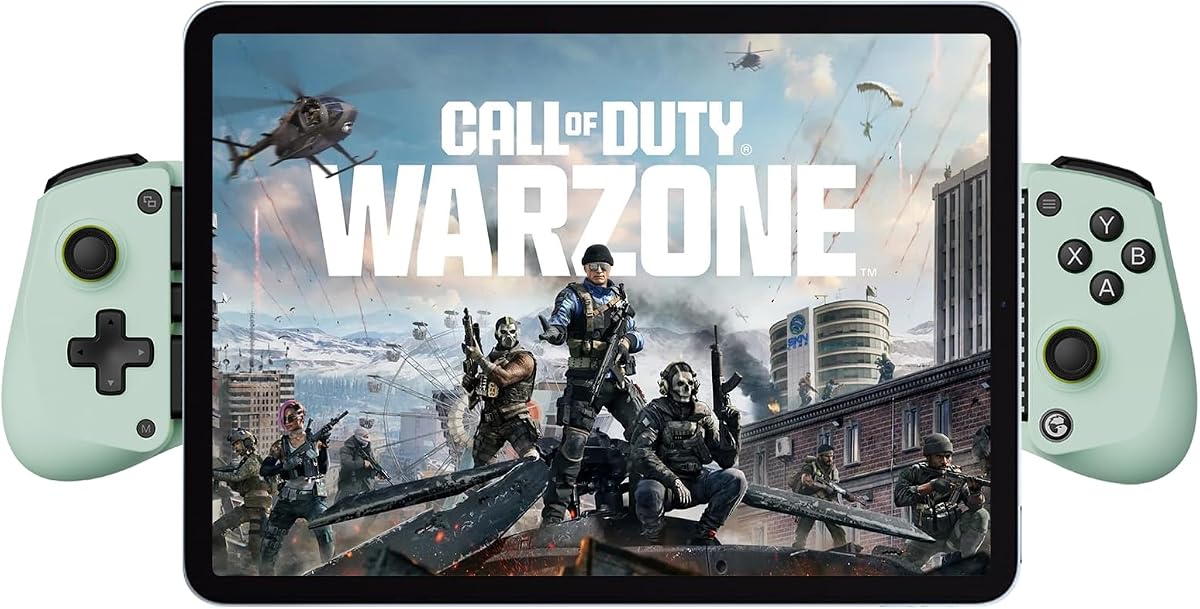

The GameSir X5 Lite is a lightweight mobile controller built around a direct USB-C connection and a stretching phone cradle. It carries a 4.1 rating, but its defining qualities are portability, broad device support, and a feature set designed for mobile, cloud, and remote-play sessions. At 135.4 grams, it is among the lighter full-size-style options in this guide and avoids the bulk associated with many console-inspired controllers.
We may earn a commission when you buy through this link, at no additional cost to you.
The most useful feature is pass-through charging, which allows the connected phone or tablet to keep charging while the game continues. That makes the X5 Lite particularly suitable for longer mobile sessions, remote play, and streamed console or PC games. Hall Effect sticks provide smooth 360-degree movement, while cushioned membrane triggers and buttons offer quieter feedback than many conventional mechanical controls. The controller can stretch to 213 millimeters, allowing it to accommodate compatible Android phones, recent iPhone models, and compatible tablets rather than limiting it to a narrow phone size.
Its wired design also comes with trade-offs. Players need a compatible USB-C port, and the X5 Lite cannot offer the cable-free freedom of a Bluetooth controller. Its app-based customization is also described as Android-only, which may be less useful for someone who moves between Apple and Android devices. Another consideration is that the flexible cradle and physical controls may not feel as natural for games designed exclusively around touch gestures, but for controller-compatible action, shooter, and adventure titles, that limitation matters less.
The GameSir X5 Lite is a strong recommendation for mobile gamers who prioritize low weight, charging continuity, and a broad device fit. It is particularly well suited to Android users who want Hall Effect sticks without carrying a full console-style gamepad. Choose it when dependable wired input, a broad cradle range, and long-session comfort matter more than wireless convenience.
The 135.4-gram frame and laser-engraved grips reduce bulk while maintaining a secure hold. Its cushioned membrane buttons and triggers also favor quieter operation in shared spaces, making the controller practical for travel and late-night play.
USB-C pass-through charging keeps the phone or tablet connected to power while gameplay continues. This is especially helpful for cloud gaming, remote play, and extended mobile adventures where an ordinary battery would otherwise determine the length of the session.
We may earn a commission when you buy through this link, at no additional cost to you.
The 8Bitdo Ultimate is an officially licensed Xbox mobile controller that combines a Bluetooth connection with a stretchable design for phones from 100 to 170 millimeters. Its 4.3 rating reflects a balanced mix of polished controls, broad platform support, and features that extend beyond ordinary mobile games. It can be used with Apple and Android devices while also supporting Xbox Cloud Gaming.
We may earn a commission when you buy through this link, at no additional cost to you.
Hall Effect joysticks and triggers are joined by tactile bumpers, a responsive D-pad, an Xbox button, and two professional-style rear paddles. Those paddles can provide additional actions in games that support remappable inputs, reducing reliance on cramped shoulder controls. The 8Bitdo Ultimate Software V2 adds another layer of configuration, allowing supported settings to be personalized for different games. Wear-resistant metal joystick rings add a more durable feel around the stick openings.
The primary limitation is that the controller does not include a way to charge the phone while it remains connected. Users also need to remove particularly thick or irregular cases, depending on how the device interacts with the extending cradle. It is designed for stretchable phones and tablets rather than acting as a universal holder for every device. Even so, it is more flexible than a basic compact gamepad and less visually conspicuous than many full-size alternatives.
The 8Bitdo Ultimate is a compelling choice for Android and Apple users who want a wireless controller with familiar console-style inputs. It works especially well for Xbox Cloud Gaming and games with remappable rear buttons. Users seeking a polished mobile gamepad without a full-size console layout should give it strong consideration.
Tactile bumpers, a D-pad, analog triggers, and two rear paddles create a familiar console-style layout. That makes the controller useful for games requiring several inputs and for players who want more actions available without crowding the face of the phone.
Official Xbox Cloud Gaming support and compatibility with both Apple and Android devices make this a practical shared controller. Its 100–170 millimeter stretch range accommodates many modern phones while remaining less cumbersome than a rigid full-size pad.
We may earn a commission when you buy through this link, at no additional cost to you.
The Mocagen MC1 is a Bluetooth mobile controller that combines a 4.4 rating with a particularly broad set of everyday features. It supports iPhone and Android devices, includes a Hall Effect joystick rated for a five-million-cycle lifespan, and provides several controls aimed at competitive play. Its ergonomically shaped body, anti-slip laser-engraved texture, and adjustable cradle position it as a practical travel controller as well as a home gaming option.
We may earn a commission when you buy through this link, at no additional cost to you.
Three-level Turbo can repeat a selected button at 5, 12, or 20 shots per second, while dual vibration motors provide tactile feedback. The 600mAh battery is advertised for up to six hours in brightness mode, and the adjustable RGB ring offers seven color choices. KeyLinker app support lets users customize the controller and adjust vibration intensity. The design also accommodates cases up to 0.47 inches thick and includes a 0.2-inch recess for the phone camera.
Compatibility is the main constraint. The controller works with controller-supported native games, cloud services such as Xbox Game Pass and GeForce NOW, Xbox Remote Play, and emulators, but it does not support PS Remote Play. Games must also accept controller input; touch-only experiences remain outside its capabilities. The six-hour battery estimate applies to brightness mode, and actual runtime can vary with lighting, connection behavior, and use.
The Mocagen MC1 is an excellent value-oriented choice for players who want much more than a basic gamepad. Its combination of case support, lighting, programmable behavior, vibration, and turbo functions makes it especially versatile for travel, car gaming, and quick mobile sessions. It is a strong fit for Android and iPhone owners who do not need PlayStation remote-play compatibility.
The adjustable cradle accepts phones with cases up to 12 millimeters thick, avoiding the need to remove protection for every session. A dedicated camera recess adds another practical touch for phones whose lenses would otherwise press against the grip.
Turbo rates of 5, 12, or 20 shots per second give players more than a single auto-fire setting. Dual vibration and adjustable intensity add immersion without requiring additional hardware.
We may earn a commission when you buy through this link, at no additional cost to you.
This version of the Mocagen MC1 offers the same core concept as a compact, wireless mobile gamepad with a 4.4 rating. It connects over Bluetooth, supports iPhone and Android devices, and uses Hall Effect joysticks intended to resist drift. The controller is designed for both dedicated gaming and portable situations such as car travel or leisure use, with an ergonomic grip that should feel more natural than touchscreen-only input.
We may earn a commission when you buy through this link, at no additional cost to you.
Its standout specification is the claimed five-million-cycle Hall Effect stick lifespan, presented as two and a half times that of standard carbon-film sticks. An adjustable seven-color ring surrounds the joystick, while the ABXY lighting can be disabled. The 600mAh battery is rated for up to six hours in brightness mode. Three Turbo levels support continuous button input, and dual motors add vibration that can be adjusted through the KeyLinker app.
As with the other MC1 listing, compatibility depends on the title accepting controller input. The controller supports cloud gaming, Xbox Remote Play, emulators, and native games, but explicitly not PS Remote Play. Its case allowance extends to 0.47 inches, and the camera recess is 0.2 inches deep, which may not suit every large camera module. The six-hour runtime is also a brightness-mode claim rather than a universal maximum.
The second MC1 is a well-rounded selection for gamers who prioritize ergonomics, lighting, customization, and practical phone accommodation. It may appeal especially to users who want physical controls during short travel sessions but do not want a bulky console-style controller. For Android and iPhone gaming with broad software support, it remains a convincing recommendation.
The Hall Effect stick is advertised with a five-million-cycle lifespan and zero-drift behavior. That makes it a sensible choice for players who value consistent directional input over a long ownership period.
The adjustable RGB ring adds visible feedback without requiring a separate accessory. A 600mAh battery is rated for up to six hours in brightness mode, making the controller suitable for several shorter sessions as well as an extended outing.
We may earn a commission when you buy through this link, at no additional cost to you.
The XPT Portable Mini is built for people who want a game controller that is smaller than a conventional gamepad and easier to carry. It carries a 3.9 rating, the lowest in this roundup, and its main attraction is portability rather than premium hardware. The controller can be used with Switch 2 or Switch 1, PC, iOS devices, and Android 9.0 or later smartphones and tablets.
We may earn a commission when you buy through this link, at no additional cost to you.
It supports Bluetooth 5.0 with a stated range of 10 meters and a wired USB-C connection, giving users more than one way to play. A dedicated mode switch handles Switch and X-INPUT modes, and the Home button can wake a Switch console. Two 3D joysticks, a six-axis gyroscope, dual rumble motors, and an adjustable Turbo function covering 5, 10, or 20 shots per second cover the essential features of a compact controller.
Its small format is the most important compromise. The sticks and buttons are necessarily more compact than those on full-size mobile controllers, which can reduce comfort during long sessions. It also does not include a phone cradle, so users must find a separate way to hold a phone while using the controller. Older Android devices below version 9.0 and iOS devices below version 14.0 fall outside the stated compatibility range.
The XPT Portable Mini is ideal for travel, commutes, shared spaces, and quick gaming sessions where carrying a full-size controller would be inconvenient. It is less compelling for long sessions or for users who want a built-in, case-friendly phone holder. Its versatility across Switch, PC, iOS, and Android gives it a clear place among compact alternatives.
The compact body is designed to fit into a pocket or small bag without the weight of a full-size gamepad. That makes the controller more likely to be carried and used during spontaneous gaming sessions.
Bluetooth 5.0 provides cable-free convenience, while USB-C offers a dependable wired alternative. The platform switch and dedicated Home function also make the controller more practical for users who move between a Switch and other devices.
We may earn a commission when you buy through this link, at no additional cost to you.
The GameSir G8 Plus takes a more traditional console-gamepad approach than most controllers in this guide. It holds phones, tablets, and Switch systems with an extendable design and uses full-size sticks and buttons for players who prioritize comfort and control. Its 4.3 rating reflects a capable premium-style package featuring Hall Effect sticks, Hall Effect triggers, motion sensing, and strong dual-motor vibration.
We may earn a commission when you buy through this link, at no additional cost to you.
The six-axis gyroscope can be useful in motion-oriented Switch games, while the console-like control layout makes the G8 Plus easier to adapt to for players accustomed to traditional gamepads. Interchangeable magnetic components allow some personalization of the controller's appearance and functionality. Each side contains a 500mAh battery, and Bluetooth handles mobile devices, whereas PC use requires a wired connection.
The large design is less convenient for travel than a compact controller such as the XPT. It may also be unnecessary for users who want only the basics, because motion controls and interchangeable components add complexity relative to a straightforward phone gamepad. The supplied information does not detail phone width limits, case accommodation, or exact battery duration, so buyers should verify fit and runtime against their own device and routine.
The GameSir G8 Plus is a strong option for gamers who want a substantial controller that feels closer to a console gamepad. It is particularly attractive for mobile or Switch sessions where larger sticks, triggers, vibration, and motion control improve the experience. Users seeking maximum portability should look elsewhere, but those prioritizing comfort and control should find this model compelling.
Larger sticks and buttons reduce the cramped feeling associated with some small mobile pads. That makes the G8 Plus a more natural option for extended play when a full-size footprint is manageable.
A six-axis gyroscope adds motion input where supported, while dual motors provide distinct vibration feedback. Hall Effect sensing in both sticks and triggers supports precise, durable control across mobile and Switch use.
We may earn a commission when you buy through this link, at no additional cost to you.
The KICKDOT Mobile Gaming Controller is the most technically advanced option in this guide, using TMR rather than conventional Hall Effect sensing for its joysticks. It carries a 4.4 rating and is aimed at players who want very precise aiming, extensive customization, and long battery life. The telescopic clamp, full-size grips, rear paddles, RGB lighting, and macro recording make it look and function more like a premium console accessory than a basic mobile pad.
We may earn a commission when you buy through this link, at no additional cost to you.
The TMR sticks are advertised at 3,000 points of resolution per axis with 4,096-level sampling. Because the sensors avoid physical contact, the manufacturer describes them as drift-free and says they use considerably less power than Hall sensors. A built-in 1,000mAh battery is advertised for up to 15 hours. Players can also record macros, choose three Turbo speeds, program two M1 and M2 paddles, and customize RGB modes on the joysticks and ABXY buttons.
Compatibility is broad, covering Switch 2, Switch 1, iPhone, Android, and iPad mini through Bluetooth. Xbox Cloud Gaming, Steam Link, GeForce Now, and Apple Arcade are also supported. The clamp holds most phones with standard cases, but bulky or irregular cases may need to be removed, reducing the convenience of the otherwise case-friendly design. The feature set may also be excessive for casual users who only need standard directional input.
The KICKDOT is a premium recommendation for competitive players, macro enthusiasts, and anyone who values stick precision above minimal size and cost. Its advertised 15-hour battery life and extensive programmability make it particularly compelling for long sessions. Buyers should confirm their case shape and preferred games work with its advanced controls before committing.
TMR sensing is presented as a higher-resolution alternative to Hall Effect sticks, with 3,000 points per axis and no physical contact between internal components. This design targets smooth aiming, consistent movement, and long-term reliability.
Programmable M1 and M2 paddles, adjustable Turbo, and macro recording allow players to automate or remap actions beyond the standard face buttons. RGB lighting adds further personalization for desktop or bedside setups.
We may earn a commission when you buy through this link, at no additional cost to you.
The Wasabi edition of the GameSir X5 Lite offers a 4.3-rated combination of a lightweight body, direct Type-C connection, and a broad 105–213 millimeter device range. It supports Android devices, iPhone 15 and 16 series models, and the USB-C version of iPad mini 7. Like the related X5 Lite, it prioritizes phone-to-tablet versatility and uninterrupted play rather than wireless flexibility.
We may earn a commission when you buy through this link, at no additional cost to you.
Hall Effect sticks offer smooth 360-degree control, while cushioned membrane buttons and triggers are designed for quiet, comfortable repeated input. Pass-through charging lets the connected device charge during play, a meaningful benefit for long cloud-gaming, remote-play, and mobile sessions. Turbo can be assigned across the A, B, X, Y, LB, RB, LT, and RT buttons, allowing users to match the feature to different genres.
The wired connection requires a compatible USB-C port, and the GameSir app is explicitly limited to Android for customization. Some functions can still be changed through on-the-fly button combinations, which helps compensate for the lack of iOS app access. The wide length range does not mean every width or case will fit, so users with unusually large phones should verify the physical dimensions before buying.
The Wasabi X5 Lite is a good choice for Android players who want a light controller that can handle many supported games without an ordinary battery limiting the session. It also suits Apple users with recent compatible devices who value pass-through charging. Its direct plug-and-play connection makes setup straightforward, while the lightweight construction improves portability.
The extending cradle accommodates device lengths from 105 to 213 millimeters, offering more flexibility than a fixed phone holder. That makes the controller useful for both a standard smartphone and a compact tablet.
Nearly every major face and shoulder control can receive a Turbo function. This allows players to configure automated input for shooters, action games, or whichever buttons they use most often.
We may earn a commission when you buy through this link, at no additional cost to you.
The Wireless Phone Controller uses an Xbox Wireless Controller protocol that allows compatible iPhone and Android systems to recognize it as a standard gamepad. Its 4.3 rating and wide software support make it appealing to players who want one device for native mobile games, cloud services, and remote play. It supports Xbox Game Pass, Steam Link, GeForce NOW, Apple Arcade, and numerous controller-enabled applications.
We may earn a commission when you buy through this link, at no additional cost to you.
Hall Effect joysticks are described as precise and drift resistant, while dual vibration motors provide feedback during compatible games. Turbo offers 5, 12, or 20 shots per second. The 600mAh battery is advertised for more than eight hours of play and can be fully charged in two to three hours. An adjustable, textured cradle fits devices from 10 to 17.5 centimeters and can remain compatible with many phone cases.
The protocol creates an important limitation: services that specifically require Sony's PlayStation input protocol, including PS Remote Play, are not supported. The supplied guidance also describes a reset process for connection, charging, or joystick-offset problems, suggesting that some users may need to troubleshoot the Bluetooth pairing. A stable, low-latency network is also essential for responsive cloud gaming.
This controller is a practical choice for users who already rely on Xbox-style input or cloud services. Its native protocol recognition can simplify game compatibility, and the adjustable case-friendly cradle makes it straightforward to begin playing. Android owners should pair it before opening a game, while PlayStation remote-play users should consider a controller designed for that protocol instead.
The Xbox Wireless Controller protocol allows compatible systems to identify the device without requiring a custom translation layer. This broad native recognition is useful across cloud gaming services and controller-supported mobile titles.
A 600mAh rechargeable battery and an advertised runtime exceeding eight hours support longer outings. The textured grip and adjustable cradle help keep the phone stable while preserving a comfortable hold.
We may earn a commission when you buy through this link, at no additional cost to you.
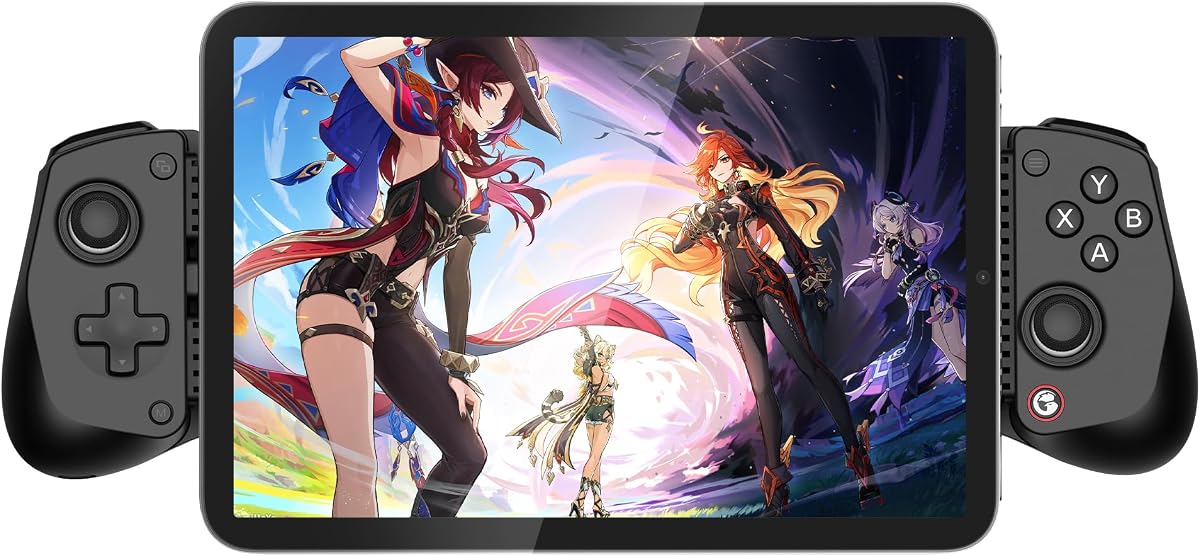
The 8Bitdo Ultimate 2C is a wireless controller designed for both Windows PCs and Android devices. It carries a 4.4 rating and is especially interesting for competitive or fast-paced games because its 2.4GHz and wired connections support a 1,000 Hz polling rate. That higher polling capability is one of the main reasons the controller stands apart from many mobile-focused gamepads in this roundup.
We may earn a commission when you buy through this link, at no additional cost to you.
Hall Effect joysticks and Hall Effect triggers offer precise sensing, while wear-resistant metal joystick rings add durability around the stick openings. Extra R4 and L4 bumpers can be remapped without relying on companion software, and the built-in Turbo function supports automated input. Refined bumpers and a tactile D-pad complete a layout that should feel familiar to desktop players.
Its platform focus is narrower than several mobile controllers in the guide. The stated compatibility covers Windows and Android, not iPhone, and there is no built-in phone cradle. Android users therefore need to position the phone separately or use another holder. It also lacks the broad cloud-service and device compatibility emphasized by some competing models, making its strongest case in fast local Android and PC games.
The 8Bitdo Ultimate 2C is a strong recommendation for Android and Windows users who value responsiveness above maximum portability. The 1,000 Hz polling rate, Hall Effect controls, remappable bumpers, and straightforward Turbo function target players who want console-like input for competitive sessions. It is less appropriate for cross-platform Apple households, but it delivers a focused and capable gaming experience.
A 1,000 Hz polling rate reduces the interval between input and reporting over supported 2.4GHz or wired connections. That can be especially valuable in fast action and competitive games where immediate response matters.
The R4 and L4 bumpers can be remapped directly, avoiding a complicated setup for basic reassignment. A dedicated Turbo function and tactile D-pad make the controller adaptable without extra configuration tools.
We may earn a commission when you buy through this link, at no additional cost to you.
Choosing an Android joystick controller involves balancing connection method, control precision, phone fit, ergonomics, battery life, and game compatibility. The most important step is to identify how and where you play, because a controller ideal for competitive Android games may be less convenient for travel, cloud gaming, or mixed-device use.
Choose Bluetooth for convenience and mobility, or wired Type-C for a stable, always-connected experience. Consider pass-through charging carefully if your sessions are long, and verify that your phone port and the controller cable are compatible.
In short: pick the connection style that matches your device, game library, and tolerance for separate charging cables.
Hall Effect sticks are now common in this category because they use magnetic sensing rather than a direct physical contact between components. TMR sensing goes a step further, with the KICKDOT advertising 3,000 points of resolution per axis and no physical stick contact. Trigger technology also matters in shooters and action games, so checking whether the controller uses Hall Effect triggers can help buyers understand the precision of its aiming controls.
The right sensing system depends on budget and priorities. Advanced precision is useful for competitive aiming, while reliable Hall Effect sticks are often sufficient for broader mobile gaming.
Prioritize precise, drift-resistant sensing for competitive play, but do not overlook comfort, triggers, and button placement.
A useful controller must hold the phone securely without pressing the screen, camera, or case edges. Some products use extendable clamps that cover a broad range of device lengths, while others require a separate phone holder. Case clearance is another important detail: the Mocagen MC1 supports cases up to 0.47 inches thick, whereas the KICKDOT notes that bulky or irregular cases may need to be removed. Users should also consider the width of large phones, even when a product states that it fits a wide device length range.
Measure the phone and case before purchasing if possible. A broad length range is useful, but physical clearance around the camera module and side buttons can determine whether the controller is comfortable in daily use.
Check length, width, case thickness, camera position, and side-button access instead of relying on broad compatibility language alone.
A controller that feels precise on paper can still become uncomfortable after an hour of play. Full-size sticks and buttons generally reduce hand strain but take up more space, while compact models are easier to carry but may place controls closer together. Grip texture, trigger spacing, and the general shape of the handles also influence fatigue. For travel or car use, a compact option such as the XPT may be more realistic than a full-size console-style controller.
Players who game for extended periods should favor larger sticks, secure grips, and well-spaced shoulders. Those who value portability may accept smaller controls in exchange for a controller that fits easily into a pocket or bag.
Choose the smallest layout you can comfortably use rather than automatically selecting the most compact or the largest controller.
Wireless controllers need enough battery life to avoid interruptions, and their published estimates can depend on lighting, vibration, connection strength, and use. Advertised runtimes in this roundup range from up to six hours in brightness mode for the Mocagen MC1 to up to 15 hours for the KICKDOT. Wired controllers sidestep this concern for the controller itself, although a phone that runs out of power can still end the game. A pass-through charging port is especially valuable when the controller remains physically attached to the device.
For travel, compare the stated battery life with the length of a typical session and consider how often the controller can be recharged. For stationary use, a wired model or a controller with pass-through power may be the simplest choice.
Prioritize a battery rating that exceeds your normal session length, and decide whether lighting and other features are worth their power cost.
A controller can only improve games that accept physical input. Native mobile titles, emulators, cloud services, and remote-play systems may each use different protocols and offer different levels of support. The 8Bitdo Ultimate and KICKDOT cover several cloud and device platforms, while the Mocagen MC1 supports Xbox Remote Play but excludes PS Remote Play. The Wireless Hall Joystick Controller uses the Xbox Wireless Controller protocol, which is broad for compatible games but not for PlayStation-specific services.
Make a list of the games and services you use and compare their input requirements with the controller's stated compatibility. Confirm whether the device appears as a supported gamepad, whether remapping is available, and whether any needed service is explicitly excluded.
Choose by game and service first, then by hardware. A feature-rich controller is only useful if the titles and platforms you enjoy recognize its input method.
Turbo functions, programmable paddles, macro recording, remappable bumpers, and companion apps can make a controller much more useful in specific genres. Auto-fire may be helpful in selected action titles, while rear paddles and macros can expand the command set without crowding the phone screen. App-based customization is convenient but adds a setup step and can create platform restrictions, as seen with the Android-only customization noted for the GameSir X5 Lite Wasabi.
Avoid paying attention to a long feature list unless those features apply to the games you play. Simple remapping without required software may be more convenient, while macro tools are valuable for players willing to spend time configuring them.
Prioritize programmable features that solve a real control problem, and check whether customization requires an app, a computer, or a specific mobile operating system.
The GameSir G8 Plus and KICKDOT include six-axis gyroscopes for supported motion-controlled games. Dual vibration motors provide physical feedback in many mobile and console games, and several controllers add RGB lighting around the joystick or face buttons. These extras can improve immersion, but they are secondary to accurate controls and reliable connectivity. Lighting also affects battery consumption, so users should not judge runtime only by the largest advertised figure.
Motion controls matter for a narrower set of games than standard buttons, while vibration and lighting mainly improve feel. Consider them after confirming that the core stick, trigger, trigger layout, and platform support meet your needs.
Treat motion, rumble, and RGB as enjoyable refinements rather than essential selection criteria unless they are central to your gaming routine.
Begin by fully charging the controller and installing the phone game, cloud service, or remote-play client. For a Bluetooth model, enable Bluetooth on the phone, put the controller into pairing mode using its specified Home-button process, and select the displayed controller name. Once the connection is recognized, open a game that explicitly supports controller input. Wired Type-C controllers should be connected directly to a compatible port, with the game launched only after the device confirms the input.
Adjust the phone's position in the cradle before beginning a long session. Center the screen, leave the camera and side buttons unobstructed, and ensure the case does not interfere with the controller. For controllers with an app, configure stick sensitivity, Turbo behavior, vibration intensity, lighting, remapping, and macros before entering competitive play. Test the controls in a practice area to learn the turbo rate or paddle assignments that suit each game.
To maintain the controller, keep it away from moisture, excessive heat, and crushing pressure, and remove the phone before moving the device in a bag. Charge the controller with the appropriate cable, clean textured grips with a lightly damp cloth, and avoid liquid cleaners around electronic controls. If a Bluetooth connection becomes unstable, check the pairing procedure and restart the controller and phone. Users of models with a reset hole should follow the manufacturer's reset instructions rather than using forceful pressure.
No. A controller only works with games that support external or virtual gamepad input. Many action, racing, adventure, shooter, and emulator titles include controller support, but some games are designed exclusively for touchscreen controls. Always check the game's input options and the controller manufacturer's compatibility list before buying.
Bluetooth provides greater freedom because the phone can be held or placed without a cable between the device and controller. A wired Type-C connection can be simpler and may be attractive for stationary use, especially if it offers pass-through charging. The better choice depends on mobility, device port, charging needs, and personal preference.
Hall Effect joysticks detect movement through magnetic sensing rather than physical contact between a carbon-film contact and an underlying sensor. This design is commonly associated with reduced wear and resistance to drift. Actual performance also depends on the entire controller, software, and game, so stick technology should be considered alongside triggers, buttons, and build quality.
It depends on the controller. The GameSir X5 Lite listings specifically support USB-C pass-through charging, allowing the phone to charge while the controller remains connected. Bluetooth controllers and other wired models do not necessarily provide this function, so check the specification and connection method before planning an extended session.
That depends on the case thickness and shape. The Mocagen MC1 supports cases up to 0.47 inches thick, while the KICKDOT notes that bulky or irregular cases may need to be removed. Measure the overall case width and check camera clearance as well, because a controller can accept the case length while still pressing against a camera bump or side control.
That depends on the game and its rules. Some competitive titles restrict automated input, macros, or externally mapped actions, while other games permit or support them. Players should use the responsible settings allowed by each game and avoid any feature that could violate tournament or service rules.
Many do, but compatibility must be checked for each service and platform. The guide includes controllers that support Xbox Cloud Gaming, Steam Link, GeForce Now, and Apple Arcade, but remote-play protocols vary. In particular, controllers using the Xbox Wireless Controller protocol are not suitable for PS Remote Play because PlayStation requires a different input protocol.
Choose a compact model for travel, short sessions, and limited bag space, accepting smaller sticks and the possible need for a separate phone holder. Choose a full-size or stretchable model for comfort, additional buttons, and a more secure integrated grip. The best choice is the smallest controller whose controls remain comfortable for your typical session length.
The GameSir X5 Lite is the most practical all-rounder for users who value a light body, broad device accommodation, Hall Effect sticks, and pass-through charging. The 8Bitdo Ultimate 2C serves Android and Windows players who want fast 1,000 Hz polling, while the Mocagen MC1 offers a generous collection of travel-friendly features such as lighting, vibration, case clearance, and adjustable Turbo.
The KICKDOT is the clear premium option for players who want advanced TMR precision, programmable paddles, macro recording, and an advertised 15-hour battery life. The 8Bitdo Ultimate mobile gamepad is another versatile choice with official Xbox Cloud Gaming support, and the GameSir G8 Plus suits gamers who prefer large console-style controls. Prioritize accurate sticks, a secure fit, reliable connectivity, and support for the exact games you play before considering secondary extras.
Before making a final purchase, verify the controller's current platform support, device dimensions, case clearance, charging method, and required software. Product specifications and shopping conditions can change, and individual game updates can alter remapping or controller behavior. Checking those details against your phone and gaming routine will help avoid an unsuitable purchase.