
Lexar ES3 1TB Portable SSD
4.4Editor score
Up to 1,050MB/s read speed
Compact 42g aluminum design
Broad device compatibility
Our guide compares 10 external SSDs for Xbox Series X storage, covering speed, capacity, compatibility, portability, and everyday setup.
Expanding an Xbox Series X game library requires a storage device that balances speed, capacity, compatibility, and convenience. External SSDs can make downloaded games easier to organize, while some models also support direct play under specific console conditions. The best choice depends heavily on your collection size and how you expect to use it.
We compared all ten products using the supplied specifications, including interface generation, stated transfer speeds, capacity, console support, physical design, and included features. The list covers conventional external SSDs, portable gaming drives, and one official Xbox expansion card so readers can distinguish the different types of storage clearly.
Each review explains where the product stands out, where its limitations matter, and who is most likely to benefit. Product details and availability can change, so check the current listing and Xbox requirements before purchasing. The ratings reflect the supplied customer feedback rather than individual hands-on testing.
4.4Editor score
4.6Editor score

4.7Editor score
The table below compares all ten options by storage type, capacity, maximum stated read speed, and Xbox support. Remember that a fast interface does not guarantee direct play, and the official expansion card functions differently from a removable USB drive.


The Seagate 2TB Game Drive combines a large portable capacity with a design made specifically for an Xbox setup. Its 4.5 rating reflects a generally favorable response, while the key attraction is simple: 2TB of room for downloaded games, updates, and less frequently played titles. It supports Xbox Series X, Xbox Series S, and every generation of Xbox One.
We may earn a commission when you buy through this link, at no additional cost to you.
Its USB 3.0 connection is appropriate for a game-storage drive, and the supplied information highlights the ability to move games between internal storage and the Seagate drive without sacrificing existing titles. The bold enclosure and illuminated green LED bar also help it fit naturally beside a Series X or Series S rather than looking like a generic computer accessory.
The important limitation is explicit in the product information: games cannot be played directly from this external hard drive. It is therefore a storage organizer, not a substitute for the console's internal SSD. Hard-drive mechanics also make it less suitable for functions where immediate responsiveness is essential. Those trade-offs matter most to collectors with a large but infrequently accessed library.
This is a sensible recommendation for anyone who wants more organization and room for completed games without replacing the console's internal drive. It is less appropriate if direct play is the main goal or if fast transfers of enormous game files are a priority. For a straightforward Xbox-branded archive with 2TB of capacity, it remains one of the most practical options in the list.
The Game Drive is built around Xbox storage management rather than general-purpose file transfer. Its cross-generation compatibility makes it useful for owners who retain older Xbox One libraries while also making room for Series X and Series S downloads.
The 2TB capacity is the decisive advantage, but this remains a mechanical hard drive. Use it for titles that can stay in an archive and reserve fast removable storage for games you expect to launch quickly.
We may earn a commission when you buy through this link, at no additional cost to you.
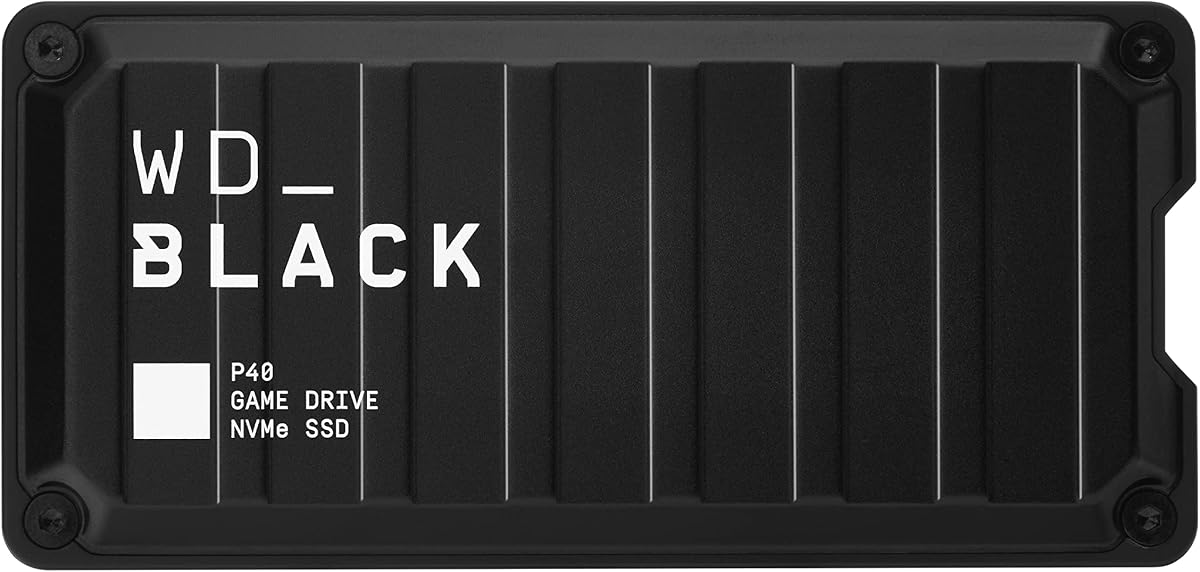
The Western Digital 1TB P40 combines a high stated read speed with a design clearly aimed at gamers. It carries a 4.6 rating and uses a USB 3.2 Gen 2×2 interface for speeds up to 2,000MB/s. Its compatibility list includes Xbox Series X|S, Xbox One, PlayStation 5, PlayStation 4, PCs, and Macs.
We may earn a commission when you buy through this link, at no additional cost to you.
The P40 also introduces features rarely seen on a basic storage drive. Downloadable WD_BLACK Dashboard software allows users on Windows to customize the RGB lighting, while the shock-resistant structure is designed to survive drops of up to two meters. Those details make it more than a simple file container and give it a distinctive place in a gaming setup.
Capacity is the main compromise. One terabyte can be useful for active games, but it will not hold the largest possible modern library, especially when several large titles are installed simultaneously. Performance also depends on the host device, conditions, capacity, and other factors, as stated in the product information. A console must provide a compatible connection to realize the full interface potential.
The P40 is a strong choice for gamers who want quick transfer performance, coordinated lighting, and broad device support in a compact SSD. It is particularly suitable for users with a focused collection or a secondary drive for transferable titles. Buy additional storage if your library regularly exceeds 1TB, and verify the Xbox function required for each game before relying on direct play.
The advertised 2,000MB/s read speed can shorten the time required to move large game files between compatible devices. Actual results vary with the host, usage conditions, and drive capacity, so the console's connection remains an important part of the equation.
Customizable RGB lighting gives the P40 a deliberate gaming appearance, while its two-meter drop resistance supports use in a frequently moved setup. The Windows-only dashboard requirement is the only limitation associated with lighting control.
We may earn a commission when you buy through this link, at no additional cost to you.
The Lexar ES3 1TB is a small, fast portable SSD aimed at users who want one drive across consoles, computers, phones, cameras, and tablets. It has a 4.4 rating and offers read speeds up to 1,050MB/s and write speeds up to 1,000MB/s over USB 3.2 Gen 2, according to the supplied specifications.
We may earn a commission when you buy through this link, at no additional cost to you.
Its physical design is one of its strongest features. The silver enclosure weighs only 42g and measures 10.5mm thick, making it easy to carry between locations. A Type-C cable is included for plug-and-play convenience, while Lexar DataShield 256-bit AES encryption software adds a layer of file protection for users who keep sensitive documents on the same device.
Compatibility is broad, including Xbox Series X|S and several other platforms, but the 1TB capacity is less generous than the 2TB and 4TB alternatives. Performance can also be lower on Mac and other systems that do not support USB 3.2 Gen 2. The drive is a general-purpose portable SSD, so buyers who need specific Xbox game-play behavior should verify current console requirements.
The ES3 is a compelling pick for travelers, students, and console owners who value pocketable size. It handles everyday file movement and game transfers efficiently while remaining versatile enough to use away from the gaming room. Choose it when portability matters more than maximum storage, and use the encryption feature to protect data carried between devices.
At 42g and 10.5mm thick, the ES3 is easy to carry without sacrificing SSD transfer performance. The included Type-C cable also reduces the need to carry a separate accessory for compatible devices.
Compatibility with Xbox Series X|S, computers, mobile devices, cameras, and other platforms makes this a flexible choice. Verify the particular connection and game function required for your intended device.
We may earn a commission when you buy through this link, at no additional cost to you.
The WD_Black 1TB C50 is not a conventional external USB drive; it is an official Xbox storage expansion card. Its 4.8 rating is the highest among the supplied products, reflecting a particularly strong customer response. The card is designed for Xbox Series X|S and adds 1TB of NVMe solid state capacity directly to the console.
We may earn a commission when you buy through this link, at no additional cost to you.
Its defining advantage is integration. The card is optimized for Xbox Velocity Architecture, supports Quick Resume, and is designed to reduce waiting and transition delays. That makes it a more natural fit for the console than a general-purpose drive that must be connected through USB and configured as extra storage.
The trade-off is portability. The C50 installs into the console's dedicated expansion slot, so it cannot move between a Series X, a Series S, and a computer in the same way as an external SSD. Console model and slot support should therefore be checked before ordering. It also does not provide the familiar advantages of a drive that can hold files from several platforms.
This is the recommendation for an Xbox Series X or Series S owner whose priority is seamless internal expansion and Quick Resume rather than a removable accessory. It is less suitable for Xbox One users, people who need a portable drive, or gamers who want one storage device for consoles and computers. Within its specialized category, the C50 is the most integrated and technically focused choice.
The C50 works within the console's own storage architecture instead of behaving like an attached peripheral. Official licensing and optimization for Xbox Velocity Architecture support a more integrated experience.
Quick Resume support lets players move among suspended games and return to where they left off. This feature is a major reason to favor an expansion card over a basic removable drive.
We may earn a commission when you buy through this link, at no additional cost to you.
The Seagate 1TB Game Drive SSD delivers external solid state storage in a package designed to coordinate with an Xbox console. It has a 4.5 rating and is listed as compatible with Xbox Series X|S, all generations of Xbox One, and Game Pass. The enclosure has the same bold visual language as Seagate's larger Game Drive.
We may earn a commission when you buy through this link, at no additional cost to you.
A built-in green LED bar provides an unmistakable Xbox-themed accent. More importantly, the solid state format offers a different performance profile from the mechanical Game Drive, making the smaller capacity less noticeable for frequently accessed titles. The supplied specifications also mention three years of Rescue Data Recovery Services and a three-year limited warranty.
USB 3.2 Gen 1 is the main technical limitation. It is a functional connection for storage management, but it cannot offer the theoretical bandwidth of the USB 3.2 Gen 2×2 drives elsewhere in this guide. The one-terabyte capacity can also become restrictive if large games and frequent updates fill the drive quickly.
Choose this SSD when a cohesive Xbox appearance, solid state performance, and broad console compatibility matter to you. It is well suited to organizing a manageable collection or separating active and archived games. For a much larger library, consider a higher-capacity alternative, and confirm the current Xbox play, store, and archive functions for your selected titles.
The matching industrial design and green illumination make the drive visually consistent with a modern Xbox setup. That presentation is a meaningful advantage over a generic external SSD.
Using SSD rather than hard-drive mechanics makes this option better suited to games that move between internal and external storage. The one-terabyte capacity still calls for routine library management.
We may earn a commission when you buy through this link, at no additional cost to you.
The Samsung T7 1TB is a premium portable SSD with a 4.7 rating, a compact aluminum body, and speeds up to 1,050MB/s read and 1,000MB/s write. It uses USB 3.2 Gen 2 and PCIe NVMe technology, making it a strong general-purpose option for moving large files among compatible devices.
We may earn a commission when you buy through this link, at no additional cost to you.
The T7 is particularly well suited to storage that travels. Its solid aluminum unibody construction provides shock resistance and fall protection of up to six feet, while the compact form factor is easier to carry than a desktop drive. Samsung also states that its firmware and components, including DRAM and NAND, are produced in-house.
Although the product information describes broad compatibility with computers, phones, cameras, and similar devices, the supplied listing does not explicitly identify Xbox compatibility. That distinction matters because an external drive may work perfectly for file transfer without being approved for a particular console game function. Capacity and console support should be confirmed before purchase.
The T7 is best for users who want one premium drive for active files, backups, creative work, and console-related transfers rather than a dedicated Xbox-branded game vault. Its speed, durability, and portability make it a strong all-purpose companion. Xbox owners should verify current platform support and the intended game behavior, while larger libraries may need more than 1TB.
The compact aluminum body and stated six-foot fall protection make the T7 a durable traveling companion. It can hold active project files, backups, and transferable game data without occupying much space.
Up to 1,050MB/s read and 1,000MB/s write speeds are well suited to large transfers. The USB 3.2 Gen 2 interface means host-device support will influence the speed users actually see.
We may earn a commission when you buy through this link, at no additional cost to you.
The Western Digital 4TB P50 is built for substantial game libraries, combining a large solid state capacity with a stated read speed of up to 2,000MB/s. Its 4.7 rating places it among the strongest options in the group, while the capacity offers much more room than the one-terabyte models.
We may earn a commission when you buy through this link, at no additional cost to you.
The product information identifies compatibility with Xbox, PlayStation, PCs, and Macs. Its USB 20Gb/s interface is designed for high-speed access to a growing game collection, and the shock-resistant portable form factor helps balance capacity with durability. The result is a drive that can serve as a substantial secondary library rather than a temporary holding area.
The included 18-inch USB Type-A to Micro-B cable may be less convenient with newer devices, and the drive's larger body is not as pocketable as the Lexar ES3. Speed also depends on the host device and operating conditions. Capacity can divide itself into multiple storage locations on some systems, so the available user-facing space may be lower than the nominal figure.
This is the most compelling choice in the list for a large Xbox game collection that needs fast, portable SSD storage. It is better suited to enthusiasts than to someone wanting a tiny one-drive solution. Ensure the selected games support the required external-drive function, and use compatible connections where the full stated transfer speed matters.
A 4TB capacity can accommodate numerous large games, updates, and other files. It is especially useful for players who regularly move, archive, and regroup a substantial collection.
The USB 20Gb/s interface and stated 2,000MB/s read speed suit large game files. Because performance varies by host and usage conditions, connecting the drive through a suitable port is essential.
We may earn a commission when you buy through this link, at no additional cost to you.
The Lexar ES3 2TB increases the capacity of the portable ES3 line while retaining a 1,050MB/s stated read speed and 1,000MB/s write speed. It carries a 4.5 rating and is positioned as a compact, durable drive for backups, file transfers, and storage expansion across PCs, Macs, tablets, and smartphones.
We may earn a commission when you buy through this link, at no additional cost to you.
Thermal management is a notable feature. Built-in double-layer graphite sheets are designed to conduct heat away from the internal components, helping the drive remain cool during sustained transfers. It also offers drop resistance up to two meters, and the supplied 2-in-1 USB-C to USB-A cable makes it easier to connect to devices with different ports.
The drive uses USB 3.2 Gen 2 and is rated as much as nine times faster than hard disk drives, according to the product information. This makes it a substantial improvement for file movement, although it does not match the 2,000MB/s headline figure of newer Gen 2×2 gaming drives. Xbox compatibility is not explicitly stated in the supplied details, so that should be verified.
The 2TB ES3 is a strong general-purpose choice for someone who wants more capacity than a one-terabyte portable SSD without moving to a large desktop drive. It suits backups, work files, and console-related transfers where supported. For a dedicated Xbox game vault, confirm direct-play or archive behavior in the current product documentation before ordering.
Doubling the capacity to 2TB gives users more room for backups, media, and game files while retaining a portable SSD format. The dual-interface cable improves connection flexibility.
Double-layer graphite sheets are intended to dissipate heat during demanding transfers. This design focus helps the drive maintain performance when moving sizable files.
We may earn a commission when you buy through this link, at no additional cost to you.
The ADATA SE880 is a lightweight 1TB portable SSD built around the USB 3.2 Gen 2×2 interface. Its stated speed reaches up to 2,000MB/s, placing it among the faster products in this comparison, and the supplied information says it supports new-generation game consoles and multiple operating systems.
We may earn a commission when you buy through this link, at no additional cost to you.
Its portability is equally important. The drive is described as lightweight, compact, and finished in titanium, making it suitable for users who carry storage between a console, computer, or other compatible system. The Gen 2×2 interface can deliver excellent transfer rates when the host device and connection support it.
The primary limitation is capacity. One terabyte is adequate for a curated collection, but a large modern game library can occupy that space quickly. The supplied product details also do not identify specific Xbox Series X|S functions, so users should confirm direct-play, storage, and archive requirements for their games before making a purchase based on general console support.
The SE880 is a good fit for travelers and performance-conscious users who want high transfer speeds in a compact form. It can complement a console library or serve as a fast general-purpose drive. It is less compelling than 2TB or 4TB alternatives for archive-heavy use, and a larger-capacity model may be more economical over time.
The combination of Gen 2×2 transfer support and a compact titanium enclosure balances speed with portability. It is a useful drive for users who frequently move data between locations.
Support for multiple operating systems and new-generation consoles increases the potential uses of the drive. Specific Xbox game functions still need to be confirmed for the titles in your library.
We may earn a commission when you buy through this link, at no additional cost to you.
The WD_Black 6TB P10 leads this group in raw capacity, with enough room for approximately 150 games according to the supplied information. It carries a 4.7 rating and is a 2.5-inch portable hard drive with a sleek metal top, designed to provide fast access to a growing game library.
We may earn a commission when you buy through this link, at no additional cost to you.
Compatibility includes Xbox Series X|S and PlayStation 5. The detailed listing explains that the drive can play and store Xbox One games and archive Xbox Series X|S games, while offering the corresponding PS4 and PS5 functions on PlayStation. This makes it a useful cross-platform archive rather than an Xbox-only accessory.
The 130MB/s speed is dramatically lower than the SSD options. That is acceptable for titles that are primarily stored, transferred, or archived, but it is not the ideal choice for repeatedly moving active games or working with a large number of small files. The mechanical format also differs from the responsiveness of a solid state drive, despite the generous storage volume.
The P10 is ideal for dedicated collectors who want to preserve a huge number of games without managing several smaller drives. It can also serve as a shared archive across supported platforms. Choose a faster SSD when immediate access and frequent transfers matter most; choose the 6TB P10 when maximum capacity and long-term library organization are the priorities.
A 6TB drive can accommodate approximately 150 games, according to the supplied listing. It reduces the need to divide large collections among several external devices.
Support for Xbox Series X|S, PlayStation 5, and PC makes the P10 useful to multi-platform owners. Games still need to meet the archive and play requirements for the specific console.
We may earn a commission when you buy through this link, at no additional cost to you.
Choosing the right Xbox storage involves more than comparing headline speeds. Capacity, the type of drive, supported Xbox functions, connection requirements, and how often games must move should guide the decision.
An external SSD is the best fit when fast file movement, compact construction, and responsive access are priorities. A mechanical external hard drive may provide greater capacity at a lower cost, but it is better suited to games that will remain in storage. The WD_Black C50 is a third category: an internal-style expansion card for Series X|S consoles rather than a portable USB accessory.
Compatibility labels describe more than physical fit. A drive may support storing or archiving one generation of games while another product can play and store Xbox One games on a Series X|S. Some products can only archive newer Series X|S titles. Because supported functions vary, check the current Xbox instructions and the requirements of every game you intend to place on the drive.
A 1TB drive is useful for a focused or regularly pruned collection, while 2TB and 4TB SSD options provide room for multiple large games. The 6TB hard drive can accommodate approximately 150 games according to its listing. Remember that system files, updates, and application data also consume space, and the usable amount may be lower than the advertised capacity.
USB 3.2 Gen 1, Gen 2, and Gen 2×2 describe different levels of bandwidth. Gen 2×2 products here list read speeds up to 2,000MB/s, while Gen 2 models list up to 1,050MB/s. The console's port and the device performing the transfer can limit real-world performance, and manufacturers note that results vary with the host, usage conditions, capacity, and other factors.
Direct play means launching a game from supported external storage rather than moving it back to the console's internal drive. The Seagate 2TB hard drive explicitly cannot support direct play, and other products' supported functions vary. If your priority is immediate access to games without repeated transfers, select a drive and title combination that explicitly supports the required behavior.
The Lexar ES3 is exceptionally compact at 42g and 10.5mm thick, while the WD_BLACK P40 is rated for drops of up to two meters and the Samsung T7 for six feet. Capacity usually makes a drive bulkier, so there is a tradeoff between library size and pocketability. Select a form factor based on whether the drive stays beside the console or travels with you.
RGB lighting, encryption software, downloadable dashboards, and data recovery services can add practical value even though they do not determine core compatibility. The WD_Black P40 includes customizable lighting, the Lexar ES3 offers 256-bit AES encryption, and Seagate products include Rescue Data Recovery Services. Prioritize these extras after confirming the drive meets your capacity and Xbox requirements.
Before connecting a drive, consult the Xbox storage instructions and the drive's current compatibility information. Format the device as directed by the console, then use the Xbox storage interface to designate it for game installation, movement, or archiving. Avoid disconnecting it while a transfer or game launch is in progress, and confirm that the selected game supports the intended function.
Organize the library before adding a large collection. Move completed or less frequently played titles to the external drive, retain the most active games on internal storage, and leave enough open space for updates. The 1TB models may need frequent pruning, whereas 2TB to 6TB options provide more breathing room. A clear naming and sorting routine makes future moves faster.
Protect the drive by handling it gently, keeping ports free from dust, and avoiding operation in hot or wet conditions. Back up irreplaceable game files if appropriate, use the supplied encryption tools for sensitive data, and consider the stated drop-resistance ratings when the device travels. Periodically check the drive's health and the current Xbox software requirements.
Yes, some supported external storage configurations and games allow direct play on Xbox Series X|S. Support depends on the drive, console software, and the title, so check the requirements of each game before moving it. A hard drive such as the Seagate 2TB Game Drive cannot be used for direct play, while an official expansion card like the WD_Black C50 is designed to integrate directly with the console.
An external SSD generally offers faster transfers and quicker file access, making it better for games that move frequently between internal and external storage. A hard drive is still useful for large archives because it often provides more capacity for the same storage class. The best choice depends on whether speed, capacity, or direct-play support matters more to your library.
It can, but the answer depends on the size of your games and how much internal storage you want to preserve. Modern titles and updates can consume considerable room, so a 1TB drive may need regular pruning. Larger libraries often benefit from a 2TB, 4TB, or 6TB option, with SSDs favoring active titles and hard drives favoring archives.
A Gen 2×2 drive can provide faster transfers when connected to a host that supports the full interface. However, the Xbox connection and host-device support determine the speed you actually receive, so the highest advertised figure may not be reached. Capacity, compatibility, and supported game functions can matter more than the difference between interface generations.
Many of the listed SSDs support multiple platforms, allowing one drive to hold game files, backups, and other data. Formatting requirements can differ between systems, so verify that the file system and partition layout remain suitable for every device. Always eject the drive safely and avoid changing its format without a backup of important data.
The WD_Black C50 is an officially licensed NVMe expansion card installed in an Xbox Series X|S console, not a USB drive. It integrates with Xbox Velocity Architecture and supports Quick Resume, but it cannot be carried between devices like a portable SSD. A USB drive is more flexible, while the C50 offers tighter console integration.
Keep frequently played and currently updating games on the console's internal storage, then move completed or less active titles to the external drive. This reduces repeat transfers and leaves internal space for new downloads. Leave additional room for patches and allow time for large game files to move before launching them.
No. Stated speeds are maximum read figures based on internal testing, and performance can vary with the host device, usage conditions, drive capacity, and other factors. The Xbox port may not support the full interface speed, so consider the connection, file size, and workflow alongside the headline number.
The Western Digital 1TB P40 stands out as the feature-rich gaming choice, combining a stated 2,000MB/s read speed with RGB lighting and broad platform support. The compact Lexar ES3 1TB prioritizes portability, while the Western Digital 4TB P50 offers the strongest balance of large solid state capacity and speed. For a console-integrated solution, the officially licensed WD_Black C50 offers an entirely different approach.
Your priority should guide the purchase. Choose direct-play compatibility and a fast interface for active games, generous capacity for a large archive, or maximum portability for a drive that travels. Do not overlook the distinction between storing, archiving, and playing games, because those functions are not identical across every device in this guide.
Ratings, product details, and availability can change, so review the current listing before buying. Compare the latest capacity, interface, and console support, then check the requirements for the specific games you want to move. Current prices also fluctuate, making it worthwhile to compare current offers and choose the drive that best matches your actual storage workflow.
