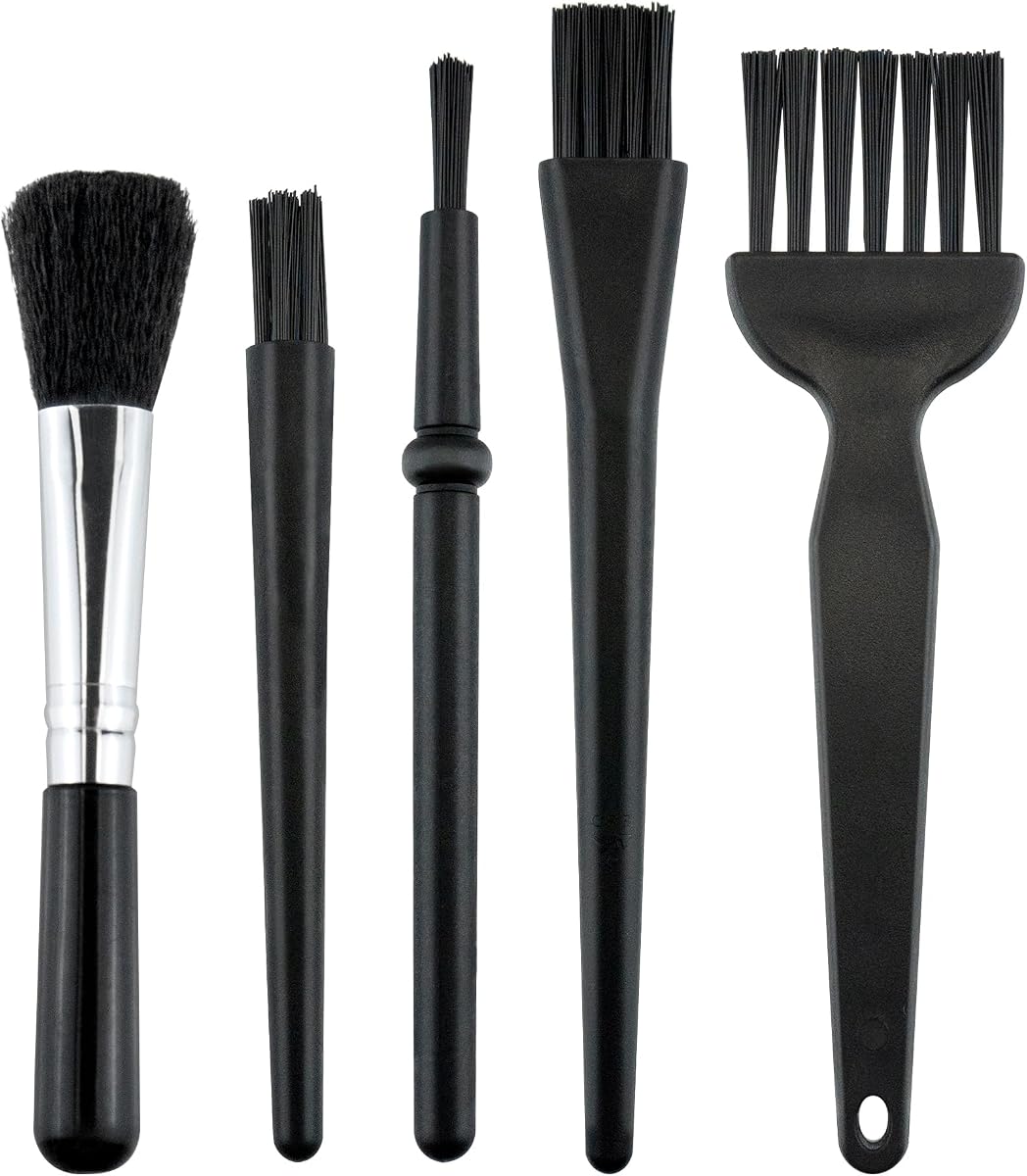
5 PCS Mini Keyboard Brushes
4.6Editor score
Five different brush shapes
Anti-static nylon bristles
Lightweight portable size
Useful for narrow electronics gaps
Our PC Cleaning Kits guide compares ten air dusters, brush sets, and electronics cleaning tools to help you choose the right kit for PCs, keyboards, and
PC cleaning kits combine air blowers, brushes, cloths, and precision tools for removing dust, crumbs, fingerprints, and trapped debris from computers and related electronics. A genuinely useful kit should suit the surfaces you need to clean, offer manageable attachments, and avoid making delicate components harder to maintain.
We compared ten PC cleaning kits by examining their intended cleaning tasks, included accessories, airflow or brush specifications, portability, charging details, and customer ratings. The list covers rechargeable electric air dusters, anti-static brush sets, and all-in-one tools for keyboards, screens, cameras, cars, and household electronics.
Each pick reveals what its design is best suited for, from powerful airflow for computer towers to compact brushes for desk drawers and small devices. Ratings and product details reflect the supplied information, while prices and availability can change, so confirm the current listing before ordering.
4.6Editor score

4.6Editor score

4.5Editor score
The table below compares all ten kits by cleaning method, core capability, included accessories, and portability, making it easier to identify the right tool for a desktop PC, keyboard, monitor, camera, car interior, or general electronics.





The WOLFBOX MegaFlow 50 is an electric air duster rated 4.6 by customers, and it stands out as the most balanced all-around option in this guide. Its motor reaches up to 110,000 RPM, while three adjustable speed settings allow the user to move from gentle dusting around sensitive electronics to stronger airflow for crumbs, vents, and equipment.
We may earn a commission when you buy through this link, at no additional cost to you.
The most important benefit is control. The lowest gear provides a gentler option for keyboards, cameras, and delicate devices, while the higher gears are better suited to a desktop tower, car vents, fans, and other areas where stubborn debris needs more force. Four included nozzles help direct the airflow into narrow spaces or sweep across broader surfaces without directly touching them.
Portability is another strength. At only 0.45 pound, the MegaFlow 50 is easy to hold during a longer cleaning session and simple to keep in a desk drawer, camera bag, or car. The included lanyard also supports convenient handling. Charging is handled through a Type-C cable, with a stated full charge time of 3.5 hours and up to 240 minutes of use on the lowest setting.
The main limitation is that it only blows air; it does not vacuum collected debris or include the screen-cleaning tools found in the larger manual kits. Runtime also naturally depends on the selected speed, with the longest operating time available on the lowest gear. Even so, it offers a strong combination of airflow, adjustability, portability, and reusable construction, making it the most versatile pick for typical PC owners.
This is the kit to choose if you want one device for routine maintenance across a keyboard, computer case, camera, game controller, car dashboard, and other electronics. Start on a low or medium speed, select the nozzle that fits the space, and reserve the strongest setting for deeply embedded debris.
Three gears make the MegaFlow 50 adaptable without forcing one airflow setting on every device. Use a lower gear around sensitive screens and open components, then increase the speed for keyboards, cooling fans, car vents, and other locations that can tolerate stronger airflow.
The reusable battery and Type-C charging make the duster practical for recurring cleaning rather than occasional use of a disposable compressed-air can. Its compact 0.45-pound body also makes it easier to move from a workbench to a desktop, car, or travel bag.
We may earn a commission when you buy through this link, at no additional cost to you.
The Ordilend Keyboard Cleaner and Laptop Cleaning Kit has a 4.6 customer rating and appeals to users who want more than a single brush or blower. Its broad collection includes a retractable large brush, two polishing cloths, a keycap puller, a metal pen tip, a flocking sponge, a thin soft brush, a soft plastic lens-cleaning pen, five replacement cloths, and a large microfiber cloth.
We may earn a commission when you buy through this link, at no additional cost to you.
The keycap puller is particularly useful for mechanical and gaming keyboards, allowing individual caps to be removed for a more thorough cleaning. Different brush forms then address flat key surfaces, narrow gaps between flatter laptop keys, and other recessed areas. The metal pen tip is intended for carefully lifting stains, giving the user more control than a single broad brush.
Screen care is another central feature. The thickened, angled polishing cloth is designed to fit screen corners more closely, while the included cleaning spray is intended to help absorb stubborn marks without leaving discoloration, streaks, or fiber shedding. Additional soft tools can also be used on camera screens, lenses, earbud cases, and other delicate surfaces.
This kit does not provide the concentrated airflow of an electric duster, so loose dust deep inside a computer case will not move as quickly. The liquid cleaning component also calls for careful application rather than spraying directly onto an electronic device. Even with those trade-offs, the extensive accessory set gives it exceptional value for keyboard owners and users who maintain many types of electronics.
Choose the Ordilend kit when your priority is organized, hands-on cleaning of keys, screens, charging cases, and small devices. It is particularly appealing for dorm rooms, offices, and households where one compact kit can cover several kinds of frequently touched equipment.
The included keycap puller and multiple brush designs make the kit more useful for mechanical keyboards than a basic sweeper. A retractable brush handles general surfaces, while finer tools can reach between keys, around flatter laptop keys, and into recessed areas.
Replacement cloths, a soft lens pen, a flocking sponge, and a metal tip extend the kit beyond keyboards. These additions make it practical for screens, cameras, earbud charging cases, and other frequently handled electronics in one portable package.
We may earn a commission when you buy through this link, at no additional cost to you.
The WOLFBOX MF60 is a cordless electric air duster with a 4.5 rating and a maximum speed of 110,000 RPM. Like the MegaFlow 50, it uses three gears, but its more detailed settings distinguish electronics care from routine dusting: Gear 1 operates at 25,000 RPM, Gear 2 at 60,000 RPM, and Gear 3 at 110,000 RPM.
We may earn a commission when you buy through this link, at no additional cost to you.
That graduated control is useful around computers, where blowing every component at maximum intensity is rarely necessary. The lowest gear is intended for delicate electronics, the middle setting handles daily dust, and the top gear tackles stubborn debris in computer cases and around radiator fans. The supplied long nozzle reaches into keyboard gaps and car vents, while the flat nozzle works across a PC case or desk.
The MF60 includes two 2500mAh batteries and states up to 240 minutes of runtime on Gear 1. Full charging takes approximately 3.5 hours. At 0.5 pound, it remains light and portable, and its compact size is appropriate for a camera backpack, car glove box, or regular tech-care kit.
Five nozzles provide more versatility than many compact electric dusters. The round and flat nozzles cover general cleaning, the long nozzle reaches narrow spaces, and a swim-ring or air-mattress nozzle adds an outdoor inflation function. That broader role is helpful, although it does not turn the product into a full household cleaning kit.
The MF60 is best for users who want a rechargeable, adjustable blower for repeated PC care without carrying a separate set of screen tools. Its strongest advantages are the clearly defined speed levels, long stated low-speed runtime, and five nozzles that work well across computer, keyboard, camera, car, and outdoor tasks.
The 25,000, 60,000, and 110,000 RPM settings make it easier to match the airflow to the task. Fine electronics can use the lowest gear, while deeper keyboard debris and radiator areas benefit from the higher settings.
The five-nozzle set includes options for broad surfaces, narrow spaces, and general-purpose airflow. A dedicated inflation nozzle also extends the product beyond PC maintenance when camping or handling air mattresses.
We may earn a commission when you buy through this link, at no additional cost to you.
The ten-piece ESD brush set carries a 4.8 customer rating, the highest among the products in this guide, and it focuses on precise manual cleaning. It includes brushes in a range of sizes and stiffness levels, allowing the user to move from delicate lens surfaces to tight ports, computer fans, motherboards, cameras, and other sensitive electronic equipment.
We may earn a commission when you buy through this link, at no additional cost to you.
The anti-static bristle design is central to its appeal. Rather than merely pushing dust from a keyboard, the set is presented as a way to clean sensitive gear while helping avoid static buildup. Different profiles also reduce the temptation to force one brush into an unsuitable opening, where softer or stiffer bristles may perform poorly.
Its scope goes beyond PCs. The set is marketed for 3D printers, motherboards, keyboards, fans, and cameras, making it useful for hobbyists, repair professionals, and users with varied equipment. The included zippered mesh bag keeps the ten brushes separated and organized, which is particularly helpful when moving the collection between a workbench, drawer, or travel case.
What it lacks is equally important. This is not an electric duster, so it will not create the sustained airflow needed to move loose debris from deep inside a case. It also does not include cloths or screen-cleaning solution, meaning fingerprint removal and complete workstation care require another product.
Despite that limitation, the high rating, varied brush selection, anti-static emphasis, and tidy storage pouch make this a compelling precision toolkit. Choose it when dust is concentrated around ports, boards, fans, and delicate components, or when you want a dedicated brush for each narrow area of a computer.
Multiple sizes and stiffness levels help prevent a single brush from being used on every surface. Softer choices can address delicate areas, while firmer profiles are better for stubborn dust in tighter openings.
The zippered mesh pouch keeps the collection together and protects the individual brushes during storage. That convenience is valuable for repair work, hobby benches, and cleaning kits used across several electronic devices.
We may earn a commission when you buy through this link, at no additional cost to you.
The MiaEpic Z3 is the most feature-oriented premium option in this roundup, with a 4.5 rating and a stated maximum speed of 280,000 RPM. Its brushless motor, four adjustable speed settings, and high-pressure airflow make it suited to clearing stubborn debris from PC components, premium electronics, and detailed equipment.
We may earn a commission when you buy through this link, at no additional cost to you.
Two integrated displays improve usability. The smart LCD screen shows real-time battery status and the selected speed, helping users avoid an interrupted cleaning session because the charge is low. The bright LED light illuminates dark corners inside a PC tower, beneath keyboards, around consoles, and within other enclosed areas where a normal room light may not reach.
Accessories broaden its usefulness. Four precision nozzles support different airflow directions, while two cleaning brushes can handle surfaces or narrow areas that benefit from contact rather than a jet of air. The product is also described as a camera-lens blower, car-dashboard duster, portable fan, and air-mattress inflation tool, giving it a wider role than a standard desktop cleanup device.
Its battery provides a stated runtime of 90 to 150 minutes and supports Type-C charging in approximately 2.5 to 3 hours. That is not as long-running as the stated low-speed figures offered by some competitors, and the product does not collect debris like a vacuum. It also occupies a higher tier than more basic air dusters.
The Z3 is a good fit for serious enthusiasts, photographers, and owners of elaborate gaming setups who appreciate visible operating information and an integrated work light. The 280,000-RPM maximum is the headline attraction, but the LCD, LED, and broad accessory package are what make it a polished cleaning kit rather than merely a powerful blower.
The LCD screen keeps battery level and speed selection visible throughout use. This reduces guesswork and makes it easier to choose a lower setting around sensitive components or reserve the strongest airflow for stubborn debris.
The integrated LED reveals dust in dark PC cases, keyboard gaps, console areas, and detailed workspaces. It is a particularly useful feature during repairs or inspections where visibility matters as much as airflow.
We may earn a commission when you buy through this link, at no additional cost to you.
The five-piece Mini Keyboard Brush set has a 4.6 customer rating and offers a straightforward, budget-conscious approach to electronics cleaning. Its five different shapes are designed to address deep and hard-to-clean areas, giving users more control than a single brush that must handle every gap.
We may earn a commission when you buy through this link, at no additional cost to you.
The handles are made of polypropylene, while the bristles are nylon. According to the product information, the bristles are designed not to shed or break easily and will not generate static electricity during use. That anti-static characteristic is useful around keyboards, mobile phones, cameras, circuit boards, car interiors, vents, and other electronic devices.
Because the set is small and light, it can be kept in a desk drawer, carried in a work bag, or moved between home and office. It needs no power, and there is no battery to charge or motor to maintain. It is therefore ready for quick cleanups of crumbs, dust, and surface debris whenever they appear.
The clear trade-off is that brushes move debris only when they physically contact it. They do not create the airflow needed to dislodge particles suspended inside cooling fans, narrow radiator fins, or other spaces that are difficult to reach. Screen smudges also require a cloth or cleaning fluid, neither of which is included.
For basic keyboard and desk upkeep, however, this set covers a surprising amount of ground. It is an easy recommendation for students, office workers, travelers, and anyone who wants a few dedicated brushes without buying a powered tool or a large all-in-one package.
The assortment includes five distinct brush types, making it possible to match the tool to the opening. This is more adaptable than a single compact sweeper and especially helpful for laptop keys, vents, and recessed device surfaces.
The anti-static nylon bristles are designed for electronics cleaning without generating static during use. This makes the set relevant for circuit boards, cameras, phones, and computer equipment where ordinary dust tools may be less appropriate.
We may earn a commission when you buy through this link, at no additional cost to you.
The 2-in-1 Compressed Air Duster and Vacuum has a 4.1 customer rating, the lowest listed in this guide, but it delivers the broadest combination of cleaning functions. Its brushless motor reaches up to 320,000 RPM for blowing, while a separate suction function collects dust, crumbs, and debris.
We may earn a commission when you buy through this link, at no additional cost to you.
That combination is valuable because blowing and collecting are two different parts of computer care. Airflow can dislodge dust from a keyboard, cooling fan, or narrow PC area, while suction is better for material already sitting on a desk, seat, filter, or other surface. Three adjustable speed modes offer more precise control over both tasks.
The accessory list is extensive: three nozzles, two brush heads, three cleaning brushes, a dust cup, and an extension tube. The kit is intended for computers, keyboards, air-conditioning filters, car seats, furniture, pet hair, and household surfaces. It can also function as a mini blower, portable air pump, computer vacuum, and electric duster.
Its 7800mAh battery is stated to provide up to 180 minutes of runtime on low speed, with full charging through USB Type-C taking approximately 3.5 hours. The aluminum alloy body, ergonomic grip, carrying bag, overheat protection, short-circuit protection, and battery temperature control add to its practical design.
The tradeoff is added complexity and a lower 4.1 rating compared with the other products. Buyers who only need to blow dust from electronics can find a simpler dedicated duster, while those who regularly clean desks, car interiors, furniture, and computer components may value the two-in-one design enough to accept the extra bulk and controls.
The duster mode clears loose dust from electronics, while the vacuum mode gathers surface debris. This makes the kit practical for users who want to clean both computer components and the surrounding desk, car, or furniture.
Nozzles, brush heads, cleaning brushes, a dust cup, and an extension tube support a broad range of environments. They make it easier to switch from a narrow keyboard gap to a car seat, filter, or larger household surface.
We may earn a commission when you buy through this link, at no additional cost to you.
The handheld 170,000 RPM electric air duster combines a 4.8 customer rating with a clean, focused feature set. Its brushless motor produces strong, steady airflow for removing dust, crumbs, and debris from keyboards, PC cases, fans, vents, and other hard-to-reach spaces without requiring the tool to touch the debris.
We may earn a commission when you buy through this link, at no additional cost to you.
Four airflow levels are the defining feature. They extend from gentle dusting around delicate electronics and camera gear to more forceful cleaning of computer cases, car interiors, and stubborn debris. Multiple nozzles then direct that airflow between keys, around heatsinks, past ports, and into narrow cooling-fan areas.
The cordless design removes the restriction of a power cable during use. It can be moved between a home desk, office, vehicle, or travel location, and it recharges through a Type-C port. The package includes four nozzles, a cleaning brush, a lanyard, a storage bag, and a charging cable, covering both the cleaning and storage needs of a frequently used tool.
Compared with the most elaborate duster in the roundup, this product does not have an LCD, integrated LED, or broad inflation feature. It also blows rather than collects debris. Those are meaningful omissions, but they keep the design focused and make it easier to understand.
For someone seeking a capable cordless blower with fine airflow control, this is a strong recommendation. Its 4.8 rating, 170,000-RPM maximum output, four speeds, and useful nozzle set place it between basic single-speed models and feature-heavy premium units.
Four levels make it practical to move from a cautious stream around cameras and delicate electronics to powerful airflow for cases and vents. This flexibility is useful when one speed would be either too weak or unnecessarily aggressive.
The included cleaning brush, lanyard, storage bag, charging cable, and four nozzles cover more than the basic blower itself. The bag is especially useful for keeping the kit organized and protected during travel or storage.
We may earn a commission when you buy through this link, at no additional cost to you.
The UltraBlow VC023 has a 4.4 rating and combines 130,000-RPM airflow with a status display, an LED light, five nozzles, and three brushes. It is designed as an approachable cordless duster for PCs, keyboards, car seats, sofas, printers, air conditioners, and other electronics or household surfaces.
We may earn a commission when you buy through this link, at no additional cost to you.
Three airflow modes are selected through the control, with the product claiming the ability to remove a substantial amount of dust in about one minute. The advertised blowing power ranges from 1.86 to 2.51 ounces, and the 130,000-RPM motor provides enough force for crumbs, hair, and dust lodged in common equipment gaps.
The built-in HD LED display shows remaining battery level and the current wind gear. An LED light also illuminates the cleaning area when activated, which is useful inside a computer case, beneath a desk, or around equipment in a dim workspace. The 6000mAh battery is stated to run for 20 to 40 minutes and fully charge in 3 to 4 hours through the included Type-C cable.
The battery includes temperature, current, and short-circuit protection, while the ABS shell is described as impact- and wear-resistant. Five nozzles and three brushes make the accessory set unusually versatile for this category. Inflation functions are also included, although the instructions advise using only the first speed to protect the battery.
The UltraBlow is a good general-purpose choice for users who want a visible battery gauge, several attachments, and a moderate maximum speed without moving to the largest premium models. Its stated operating time is shorter than the low-speed figures given for some competitors, so it may require more frequent charging during an extensive cleaning session.
The high-definition display provides the remaining battery level and active wind mode, reducing uncertainty during use. It is especially convenient when planning a larger cleanup or moving the device between several work locations.
Five nozzles and three brushes support airflow and contact cleaning across keyboards, car seats, sofas, printers, air conditioners, and computer equipment. The broad set also enables light inflation tasks when operated at the recommended low setting.
We may earn a commission when you buy through this link, at no additional cost to you.
The Tounee 20-in-1 Keyboard Cleaner Kit has a 4.4 rating and offers one of the broadest accessory collections in the guide. Its tools are intended for phones, tablets, computers, PC monitors, televisions, camera lenses, earbuds, and other frequently handled electronics.
We may earn a commission when you buy through this link, at no additional cost to you.
The retractable keyboard brush can sweep flat surfaces such as keyboards and desktops, while a dual-bristle brush reaches laptop and keyboard crevices. A keycap puller and shaft puller make it possible to remove parts for deeper access, and the extension rod helps users reach farther into the supplied tools.
Camera care receives dedicated attention. A lens-cleaning pen is described as suitable for digital and film cameras, binoculars, telescopes, and other optical products. The air blower and camera brush address dust and debris, while the lens pen is intended for fingerprints and marks that can affect image quality.
The kit also includes an AirPods and earbud cleaning pen with a metal tip, plush brush, and soft and hard charging-port brushes. These tools are designed for acoustic mesh, shallow holes, cracks, and charging recesses that are difficult to clean with a cloth. For screens, the package includes a 2.5 ml mist spray, microfiber cloth, and anti-static care aimed at grease and fingerprints.
Its limitations are the absence of powered airflow and the practical need to keep many small parts together. The manual spray also requires careful use around openings. Even so, the Tounee kit is ideal for users who clean several categories of electronics and want specialized tools instead of a single general-purpose brush.
Earbud and camera tools address acoustic mesh, charging ports, lenses, and narrow cracks that ordinary cloths cannot reach. These specialized attachments give the kit an advantage for owners of many small, frequently handled devices.
The retractable brush, dual-bristle tool, keycap puller, shaft puller, spray, and microfiber cloth cover both physical debris and screen smudges. An extension rod adds reach when the work area is otherwise difficult to access.
We may earn a commission when you buy through this link, at no additional cost to you.
The right PC cleaning kit depends on the surfaces involved, the type and location of debris, and whether you value powered airflow, precise manual tools, or both. Use the following factors to compare the options without overlooking essential accessories or safe operation.
In short, choose airflow for hidden debris and brushes for precision work.
In short, favor multiple airflow levels over a single high-speed setting.
In short, compare low-speed runtime, charging time, and battery warnings before choosing.
In short, match each nozzle and brush to the specific gaps and surfaces you clean.
In short, prioritize anti-static materials and soft, purpose-built surface tools.
In short, choose a size and storage solution that encourage routine use.
In short, choose accessories that support the other devices and spaces you own.
In short, value displays and lights when you work in dark or extended cleanup sessions.
Before cleaning, switch off and disconnect the computer or electronic device when appropriate, allow hot components to cool, and move the system to a stable surface. If a PC case is being cleaned, use compressed air in short controlled bursts while holding the fans so they do not spin from the airflow. Keep liquid cleaners away from openings and never spray a screen directly; apply the product to the included cloth according to its instructions.
For keyboards, remove the power cable and use a brush or low-speed airflow to dislodge crumbs and dust between the keys. A keycap puller can provide deeper access on a mechanical keyboard, but the caps, switches, and stabilizers should be reassembled carefully. For monitors, use a soft microfiber cloth and a lightly dampened cleaning method that prevents moisture from entering the display or bezel.
To maintain an electric duster, follow the charging guidance, clean loose debris from the intake and nozzles with a dry brush, and avoid blocking ventilation openings. Store the device in its bag or pouch with the nozzles protected. Brushes should be wiped clean and kept in their case, while cleaning sprays and lens pens should be closed or capped to reduce drying or accidental contact.
The most useful kit depends on where the dirt is located. A powered air duster is ideal for dust inside cases, cooling fans, keyboard gaps, and vents, while a brush and cloth kit is better for crumbs, surface dirt, screens, and delicate components. A comprehensive set that includes both approaches gives you the most flexibility for routine computer care.
Electric air dusters provide reusable, controlled airflow without relying on disposable cans. They are particularly convenient for repeated maintenance because they can be charged and used again. A can may still offer a simple, disposable way to blow dust, but an electric model can be more economical over time and offers adjustable speed settings for different tasks.
You can, but use a soft microfiber cloth and avoid spraying liquid directly onto the display. A dedicated lens-cleaning pen or lightly dampened cloth is preferable to a stiff brush or a powerful air jet. Keep liquid away from the bezel, ports, keyboard, and vents, and check the device manufacturer’s cleaning guidance before proceeding.
Look for anti-static or ESD-safe bristles, soft options for delicate surfaces, and firmer brushes for stubborn debris in tight openings. A varied set is useful because ports, keyboard gaps, cooling fans, camera bodies, and circuit boards require different approaches. Always avoid hard brushes, metal scraping tools, and excessive pressure on delicate components.
A vacuum is optional for most internal PC cleaning because powered airflow is generally more effective at dislodging dust from fans, heatsinks, filters, and narrow spaces. A two-in-one duster and vacuum can be useful for keyboards, desks, car interiors, and furniture. If using a vacuum near electronics, keep the nozzle away from spinning fans and use appropriate attachments.
The appropriate interval depends on dust levels, airflow, and how often the system operates. Desktop computers in dusty or carpeted environments may need inspection more often, while a quiet office PC may require less frequent attention. Review airflow, fan noise, visible buildup, and temperatures, and schedule cleaning before excessive dust accumulation becomes apparent.
Yes, but use controlled bursts and keep the keyboard powered off or disconnected. Hold down affected keycaps so the airflow does not spin switches unnecessarily, and direct debris out of the keyboard rather than deeper into it. A brush and keycap puller can then remove remaining crumbs, providing a more thorough cleaning than air alone.
Choose a two-in-one model if you regularly clean both electronics and surrounding household or automotive surfaces. Pure air dusters are simpler and better suited to internal computer components, while vacuum functions are more convenient for crumbs, hair, and dust already resting on a surface. Consider storage, weight, and the number of accessories before making the decision.
The WOLFBOX MegaFlow 50 is the strongest all-around choice because it combines 110,000-RPM airflow, three speeds, four nozzles, a lightweight body, and rechargeable operation. The five-piece Mini Keyboard Brushes offer the best budget path for precise manual cleanup, while the MiaEpic Z3 is the premium pick for users who value a 280,000-RPM maximum, an LCD status display, and an integrated LED work light.
Prioritize the type of debris and surfaces you actually need to clean. Hidden dust in a PC tower calls for adjustable electric airflow, visible crumbs and narrow electronics gaps call for anti-static brushes, and fingerprints or smudges call for a soft cloth and suitable cleaning solution. Matching the tool to the task prevents an expensive kit from going unused and makes routine maintenance easier.
Before purchasing, confirm the current price, availability, included accessories, and warranty details on the product listing, since these details can change. The ratings and specifications in this guide reflect the information available for the October 2026 comparison, but current customer feedback and product revisions may offer additional insight.
