
Gwolves Skoll Mini SK-S
4.4Editor score
50g ultralight construction
16,000 DPI sensor
Detachable cable design
Our claw grip gaming mouse for small hands guide compares 10 compact mice for shape, weight, sensors, wireless performance, switches, grip comfort, and control.
A claw grip gaming mouse for small hands needs more than a compact appearance. The shape must support the fingers without forcing constant contact, the weight should remain easy to reposition, and the controls should respond cleanly during rapid movements. These ten options cover wired and wireless designs for right- and left-handed players.
The comparison considers dimensions, stated weight, grip positioning, sensor specifications, polling capabilities, switch technology, adjustment options, and the intended role of each mouse. It also considers practical details such as cable behavior, battery information, compatibility, and the inclusion of skates or a wireless receiver, without treating every specification as equally important.
Each review explains where a model stands out, who is most likely to benefit from its design, and what compromises should be considered. The selections include general-purpose mini mice, highly lightweight wireless options, a dedicated left-handed model, and compact products for fingertip or claw play. Prices and availability can change, so check the current listing before buying.
4.4Editor score

4.6Editor score

4.3Editor score
The table below compares all ten compact gaming mice by weight, grip design, connection, and primary control hardware, making it easier to identify the model that best matches your preferred play style.


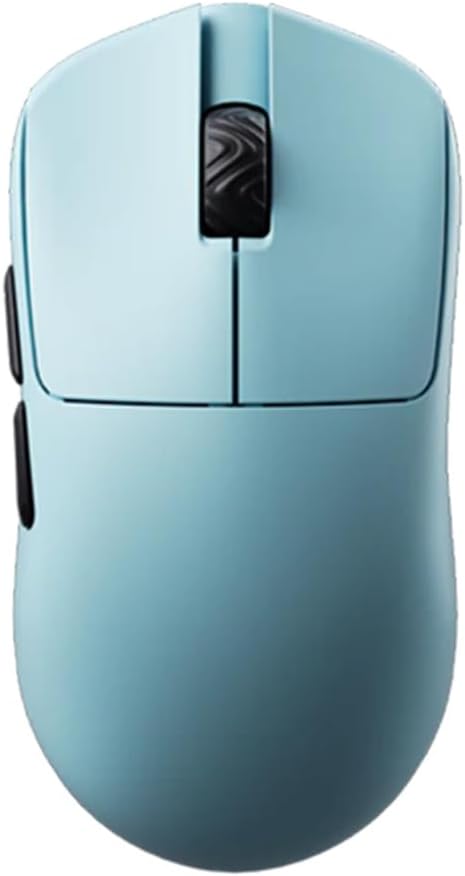

The Gwolves Skoll Mini SK-S is a compact, 50g wired gaming mouse designed for players who want a lightweight claw setup without moving into the wireless or enthusiast end of the category. It carries a 4.4 rating, while its stated 16,000 DPI sensor, ergonomic small-hand shape, PTFE skates, and detachable cable give it a practical feature set. The honeycomb shell also reinforces the model's lightweight positioning.
We may earn a commission when you buy through this link, at no additional cost to you.
Its strongest qualities are centered on manageable size and uncomplicated movement. A 50g body is light enough to encourage quick repositioning, which is valuable when a claw grip relies on repeated fingertip adjustments. The 16,000 DPI sensor provides ample sensitivity for common gaming needs, and the detachable cable can make storage and transport easier than a permanently attached lead would. PTFE skates help the mouse glide smoothly while reducing the chance of catching.
The main limitation is that this is a wired design without the convenience of wireless freedom. It also offers fewer documented control features than models that explicitly highlight programmable buttons, adjustable polling, or extensive software support. Those omissions do not undermine its core purpose, though, because its appeal lies in a straightforward combination of low weight, compact proportions, responsive tracking, and a flexible cable.
This is an especially sensible choice for small-handed claw players who want to begin with a lightweight mini mouse or prefer a reliable wired connection. It may be the most accessible option in this guide for players who do not need wireless polling, extensive macros, or custom lighting. Overall, it offers a convincing balance for value-focused gaming, general computer use, and fast competitive movement.
At 50g, the Skoll Mini reduces the effort required to lift and reposition the mouse. For claw grip users, that low mass can support the quick directional changes that separate a relaxed hand position from a rigid, anchored one.
The detachable cable keeps the basic wired experience while making the mouse easier to pack away. PTFE skates support smooth movement and provide a useful, conventional alternative to the larger skates found on some premium mini models.
We may earn a commission when you buy through this link, at no additional cost to you.
The Lamzu Atlantis Mini Champion Edition combines a 51g weight with a symmetrical hourglass shape, making it one of the most complete answers to the small-hand claw grip search. Its 4.6 rating is the highest among these ten products. The PAW3950 sensor supports up to 30,000 DPI and 750 IPS, while the Nordic 52840 platform, optical switches, and 8K dongle compatibility target players who care about responsive wireless control.
We may earn a commission when you buy through this link, at no additional cost to you.
The shape deserves particular attention. Its broad back and curved top are intended to prevent finger cramps and provide support for claw players, while the symmetrical construction remains approachable for various hand positions. At 51g, it is light enough for rapid movement without reaching the extreme 36g class. That combination of light weight, balanced proportions, and a flexible symmetrical design may be more practical for many users than choosing the absolute lightest option available.
Its wireless hardware strengthens the performance proposition. The PAW3950 sensor is rated for 30,000 DPI, 750 IPS, and up to 8K polling when the compatible dongle is used. The Nordic 52840 microcontroller supports fast processing and accurate motion detection, while the optical switches are described as providing quick response, tactile feedback, and rapid rebound. A dustproof encoder is also included to help preserve consistent wheel behavior over time.
The trade-offs are the usual ones associated with an enthusiast wireless mouse: the 8K receiver is an additional component, and the specification set may be more than a casual user needs. Even so, the Atlantis Mini offers a balanced package rather than relying on one headline number. It is a strong recommendation for small-handed players who want wireless freedom, a proven high-resolution sensor, and a shape explicitly designed to support claw grip without looking or feeling excessively specialized.
The Atlantis Mini does not pursue the lowest possible weight at any cost. Its 51g construction, broad rear, and curved top aim to balance fast repositioning with enough support for a claw grip, which can make it an easier daily recommendation for small hands.
The PAW3950 sensor, Nordic 52840 processor, optical switches, and optional 8K polling form a coherent performance package. These features are most valuable to players who regularly adjust sensitivity and want minimal delay during rapid corrections.
We may earn a commission when you buy through this link, at no additional cost to you.
The Bloody V7 is the most explicitly claw-focused model in this roundup. Its full name identifies an ergonomic claw grip shape, and the design includes a rubberized black coating, eight programmable buttons, and support for macros, scripting, and automation. It holds a 4.4 rating and differentiates itself through control versatility rather than extreme low weight or headline sensor resolution.
We may earn a commission when you buy through this link, at no additional cost to you.
The software is an important part of the proposition. Bloody 6 supports CPI adjustment from 100 to 12,000 and report-rate choices of 125, 250, 500, or 1000Hz. That gives users a meaningful way to tune responsiveness, while the programmable buttons add value in games that benefit from shortcuts or in productivity tasks. The additional next and previous controls also make the mouse useful for routine browsing.
Its 3200 DPI optical sensor is less dramatic than the 30,000 or 32,000 DPI specifications of several newer competitors, and the product information does not present it as an ultralight model. That is not automatically a weakness, however. A grippy rubberized shell and a shape created around claw positioning may be more important than minimizing every gram, particularly for players who want the fingertips to remain in contact with distinct button and body surfaces.
Compatibility is broad, with support stated for modern and older Windows versions, Vista, Linux, and Mac systems. The Bloody V7 is a compelling option for small-handed players who place a premium on claw-specific ergonomics, programmable controls, and mature adjustment options. It is less suited to buyers whose sole priority is the lightest possible body or the highest published DPI number, but for customization-focused users it delivers a distinctive and practical package.
Eight programmable buttons, scripting support, and navigation controls make the V7 extend beyond gaming. The extra inputs can reduce repeated keyboard shortcuts, although beginners should dedicate time to learning their assigned functions.
The black rubberized coating adds texture to a shape that is already designed around claw placement. A tactile surface can make the mouse feel more secure during competitive sessions, especially when quick mouse repositioning is routine.
We may earn a commission when you buy through this link, at no additional cost to you.
The Pulsar Gaming Gears X3 LHD Crazylight is a compact 43g mouse built specifically for left-handed players. Its 4.3 rating is supported by a feature set that includes a 32,000 DPI XS-1 sensor, 750 IPS tracking speed, optical switches, and 16 UHMW-PE skates. The RelaxClaw shape blends palm and claw positioning, offering a more sculpted alternative to a fully symmetrical mini mouse.
We may earn a commission when you buy through this link, at no additional cost to you.
The asymmetric design is the defining element. It follows the hand while retaining symmetrical button height, creating a shape intended to deliver control without requiring a very different placement strategy from a conventional ergonomic mouse. The listed 43g mass is among the lightest in the guide and should make the mouse easy to move through wide aiming corrections, rapid turns, or frequent repositioning.
Its performance components are also designed for demanding use. The XS-1 sensor offers 32,000 DPI, 750 IPS, and 50g acceleration, while optical switches are intended to minimize unintended double-clicks. The included TTC Golden encoder provides a tactile wheel rotation, and the dustproof structure supports long-term consistency. Sixteen 6.6mm UHMW-PE skates create a low-friction glide optimized for hard pads and glass according to the product information.
The obvious limitation is handedness: this is not a choice for a right-handed user unless they are prepared to adapt to a left-sided control scheme. It is also a specialized premium model with a specification level that may exceed what casual players need. For a left-handed player with small hands who wants a true claw-oriented shape and minimal weight, however, the X3 LHD Crazylight is one of the strongest and most relevant matches in the entire guide.
Unlike an ambidextrous shell, the X3 LHD follows a left hand's natural contours. That dedicated geometry can reduce the awkwardness of using a standard right-handed mouse with the opposite hand, particularly when the player prefers a firm claw or relaxed-claw position.
The 16-piece UHMW-PE skate set, optical switches, and XS-1 sensor target both smooth movement and dependable input. Together they create a performance package intended for competitive players who value low friction and fine cursor control.
We may earn a commission when you buy through this link, at no additional cost to you.
The renewed Pulsar Gaming Gears X2H Mini provides a lighter-weight approach to wireless gaming with a 52g body, symmetrical shell, and raised rear hump. It carries a 4.1 rating. Its main features include the PixArt PAW3395 sensor, programmable sensitivity up to 26,000 DPI, a 1000Hz polling rate, optical switches, and a stated battery life of up to 100 hours.
We may earn a commission when you buy through this link, at no additional cost to you.
The X2H name is important because the shape differs from the standard X2 mini. A more elevated rear and narrower waist are intended to provide better stability for aggressive claw grip while still supporting the palm when it rests on the mouse. That makes it a more purposeful option for players who want a small symmetrical body but also want some of the anchoring benefits associated with a rear hump.
Internally, the mouse is described as having an upgraded, sturdier structure and indirect wheel clicks intended to reduce rattling. The optical switches minimize the risk of unwanted double-clicks, while the dustproof Pulsar Blue encoder supplies a tactile rotation. The PAW3395 includes Motion-Sync technology, 650 IPS tracking speed, 50g acceleration, and 4K polling readiness in addition to its stated 1000Hz operation.
The renewed designation is the main point of caution. It indicates that the product is not new, and its rating is also the lowest among the three lightweight Pulsar mini mice included here. Even so, the combination of aggressive-claw support, wireless convenience, 52g weight, and extensive sensor features makes it a practical option for a budget-conscious buyer who accepts renewed condition. Verify the listing details carefully and favor sellers with clear return information.
The higher rear section gives this mini mouse more palm support than a completely flat symmetrical design. That added support can help stabilize a claw grip while retaining the compact footprint required by smaller hands.
A 2.4GHz connection, 1000Hz polling, 4K readiness, and a stated 100-hour battery life create a useful balance of responsiveness and efficiency. The Nordic MCU is also credited with accurate battery-status readings and efficient power use.
We may earn a commission when you buy through this link, at no additional cost to you.
The Corsair IRONCLAW Wireless SE is a right-handed ergonomic mouse with a 3.9 rating, ten programmable buttons, a 26,000 DPI CORSAIR MARKSMAN sensor, and both 2.4GHz and Bluetooth connectivity. It is not a dedicated small-hand model; the product information explicitly says the shape is intended for larger-hand players who prefer a palm grip.
We may earn a commission when you buy through this link, at no additional cost to you.
Its strengths center on long-session comfort, extensive control, and battery life. The asymmetric body supports a natural right-hand placement, while ten programmable buttons allow macros, key bindings, and productivity shortcuts to be assigned through iCUE. Surface calibration helps the MARKSMAN sensor adapt to different setups, and customizable RGB lighting applies to the scroll wheel, logo, and front grill.
The battery specifications are particularly notable. Corsair states up to 285 hours over 2.4GHz and up to 532 hours when using Bluetooth. That makes the mouse appealing for players who value a dependable wireless connection without wanting to recharge it frequently, while the three-stage indicators provide visual information for DPI and profile status.
The mismatch with the search is more important than the technical shortcomings. Small hands may find the sculpted body too large to grip comfortably, and the stated palm-grip design does not offer the same fingertip-led control sought by many claw players. This recommendation is therefore best understood as a comparison point: a well-equipped wireless ergonomic option, but not a strong match for users who explicitly need a compact claw grip mouse.
Ten programmable buttons and iCUE support make this a flexible choice for games and productivity. Profile switching, assigned commands, lighting effects, and sensor calibration can organize the mouse around a broader workflow.
Dual wireless options allow the player to choose between low-latency 2.4GHz operation and Bluetooth. The exceptional stated battery figures also make it practical for users who prefer infrequent charging intervals.
We may earn a commission when you buy through this link, at no additional cost to you.
The Scyrox V8 is built around extreme lightness, with a stated weight of 36g plus or minus 3g. It has a 4.5 rating and includes a 36g symmetrical shell, Kailh optical switches, a Nordic 52840 MCU, a PixArt PAW3950 sensor, and an 8K dongle. The shape is expressly intended for claw and fingertip players, making it one of the most relevant models for the keyword.
We may earn a commission when you buy through this link, at no additional cost to you.
At roughly 40g according to the supplied feature description, the V8 can be moved with very little resistance. That can be attractive for competitive players who make frequent corrections, lift the mouse often, or prefer a light fingertip-and-claw style. The symmetrical shell gives both sides similar geometry and is described as supporting a wide range of hand sizes, offering a simpler alternative to a deeply sculpted ergonomic shape.
The sensor and switch specification supports the lightweight approach rather than compensating for it. The PAW3950 provides accurate tracking and low latency, while the Kailh optical switches are designed for instant actuation, near-zero debounce delay, consistent clicks, and improved durability. A stable 2.4GHz connection and the included 8K dongle support low-latency wireless play, while the web-based driver makes configuration more convenient than installing conventional software.
A potential drawback is that a very light mouse may feel less stable to players who anchor their palm or apply substantial downward pressure. A symmetrical shape also provides fewer natural stopping points than a hand-specific ergonomic design. Even with those considerations, the V8 is a compelling match for a small-handed player who prioritizes almost weightless movement, claw support, high sensor resolution, and modern wireless controls over palm sculpting or extensive physical buttons.
The 36g plus-or-minus 3g specification places the V8 in an exceptionally light class. This can make quick lifts, direction changes, and wide corrections feel effortless for players who naturally use a light claw grip.
The web-based driver allows settings to be adjusted through a browser rather than requiring a conventional local application. For players who want configuration without an installation process, that convenience complements the 8K dongle and 2.4GHz connection.
We may earn a commission when you buy through this link, at no additional cost to you.
The Pulsar Gaming Gears X2H Mini is a 52g wireless mouse whose raised rear hump and narrow waist are designed to improve stability for an aggressive claw grip. It has a 4.2 rating and combines that more purposeful silhouette with a 26,000 DPI PAW3395 sensor, 1000Hz polling, optical switches, and readiness for 4K polling.
We may earn a commission when you buy through this link, at no additional cost to you.
Its shape makes it an interesting middle ground. A completely flat symmetrical mini mouse can be flexible across grip styles, but it may not provide the same sense of support. The X2H's elevated rear offers a natural stopping point for the palm while the narrower waist helps the index and middle fingers curl into a claw position. That combination makes it relevant to players who want a compact mouse but still value stability.
Pulsar also revised the internal structure to improve rigidity and click consistency, while indirect wheel clicks are intended to produce smoother rotation with less rattling. The optical switches reduce the chance of accidental double-clicks, and the dustproof Blue encoder preserves a tactile wheel feel. Sensor performance is supported by 650 IPS tracking speed, 50g acceleration, Motion-Sync technology, and 4K polling readiness.
Compared with the renewed X2H Mini, this new version is the safer purchase for someone who wants the model without accepting a renewed item's condition. Its limitations are that the normal polling rate is 1000Hz and the symmetrical upper shape may feel less distinctly sculpted than the left-handed Pulsar X3. For small hands seeking an elevated-hump claw position, however, it remains a refined and well-equipped option.
The higher hump gives the palm a place to rest while the narrow waist keeps the front compact. Small-handed players can use that support to stabilize a claw grip without moving to a full-size ergonomic mouse.
The stated focus on shell rigidity and consistent clicks addresses two common sources of dissatisfaction in compact mice. Smoother wheel rotation and a dustproof optical-switch setup further support dependable daily use.
We may earn a commission when you buy through this link, at no additional cost to you.
The Scyrox V6 is a 40g wireless gaming mouse with a 4.6 rating, one of the highest customer scores in this roundup. Its symmetrical shell supports fingertip, claw, and palm styles, while the PixArt PAW3950 sensor delivers up to 30,000 DPI. The package includes an 8K dongle, and concave main buttons are designed to help the fingers find a consistent click position.
We may earn a commission when you buy through this link, at no additional cost to you.
The V6 is less aggressively specialized than the 36g Scyrox V8. It adds a little weight in exchange for a shape that is presented as comfortable for both claw and palm players, as well as a wider range of hand sizes. That broader positioning can be valuable for buyers who move between gaming and ordinary desk use or are not yet sure how firmly they anchor their hand.
The concave buttons are a practical ergonomic detail. By shaping the top surface to fit the fingers, the design aims to improve repeat-click consistency during rapid bursts. The PAW3950 is credited with accurate tracking, low latency, stable performance, and no noticeable acceleration or spin-outs, while the stable 2.4GHz connection is intended for responsive competitive play.
Its main limitations are the absence of a stated battery figure and a symmetrical shell that does not mirror the natural contours of either hand as closely as a dedicated ergonomic design. Nevertheless, the V6 offers an effective balance of 40g weight, modern sensor resolution, hybrid grip compatibility, and straightforward wireless operation. It is an especially appealing choice for a small-handed player who wants claw control but appreciates some flexibility to rest the palm.
The symmetrical body and 40g weight create a useful middle ground between fingertip-only ultralight mice and larger palm-oriented models. It can suit players who alternate between a raised-finger claw and a relaxed palm position.
The shaped main buttons help guide the index and middle fingers toward a natural resting position. That can make rapid repeated clicking more consistent while preserving the mouse's symmetrical silhouette.
We may earn a commission when you buy through this link, at no additional cost to you.
The BenQ Zowie S2-C is a compact, symmetrical gaming mouse created for players who want direct hardware control without installing driver software. It has a 4.3 rating and is specifically offered in a small size. Its 3360 optical sensor, four selectable DPI levels, adjustable polling rates, and paracord cable create a straightforward competitive setup for small hands.
We may earn a commission when you buy through this link, at no additional cost to you.
This model is built around simplicity. Rather than requiring a software suite for every adjustment, the mouse supports DPI levels of 400, 800, 1600, and 3200, with polling options of 125, 500, or 1000Hz. That approach can be especially useful for players who want to change settings quickly or prefer a mouse that works consistently on different computers without a complicated configuration process.
The shortened symmetrical shell is designed to work with palm and claw grip, offering a balanced alternative to deeply sculpted ergonomic mice. Its paracord cable is intended to reduce drag and pull during movement, which helps preserve clean cursor motion. The 24-step scroll wheel provides fine adjustment, and additional mouse feet in the box give the user replacement surfaces for long-term use.
The clear compromise is that this is a wired mouse with a 1000Hz maximum polling rate, so it does not compete with 8K wireless models on headline specifications. It also lacks the programmable-button ecosystem associated with many modern gaming mice. For a small-handed player who values compact proportions, immediate control, reliable wired tracking, and zero installation, however, the S2-C remains a focused and proven alternative.
Four DPI presets and selectable polling rates can be changed directly without a driver. This keeps setup simple, makes the mouse portable, and avoids unnecessary software on a competitive gaming system.
The paracord cable is designed to minimize the tug and pull that can interfere with precise movement. Combined with the compact symmetrical body, it gives claw players a controlled, uncluttered wired experience.
We may earn a commission when you buy through this link, at no additional cost to you.
The right compact claw mouse should fit the hand naturally, remain light enough to reposition easily, and provide the sensor, connection, and control options needed for the intended games. These factors help narrow the field before focusing on individual features.
Prioritize compact dimensions and a short front edge. A properly sized claw mouse supports the fingers without encouraging a full-palm hold.
Symmetrical shapes suit flexible grips, while raised humps and sculpted bodies add stability. Choose the geometry that matches your actual hand position.
Choose a low weight for effortless movement or a moderate weight for stability. Test several weights if possible.
Prioritize accurate tracking and stable connectivity. Use higher polling only when your system and playing style benefit from it.
Choose wired for simplicity and consistent connectivity, or wireless for freedom of movement. Check receiver and battery details carefully.
Optical switches suit fast actuation, while tactile preferences vary. Match click feel to button shape and your clicking frequency.
Extra buttons are useful for power users, while hardware controls suit simplicity. Choose based on how often you adjust settings.
Use smooth skates on a compatible hard surface, and replace worn feet promptly. The right pad improves control and consistency.
Begin with a neutral hand position rather than immediately adopting a dramatic arch. Place the mouse beneath the center of your hand, rest the index and middle fingers over their corresponding buttons, and keep the ring and little fingers relaxed along the sides. Adjust the main buttons, wheel position, and rear support until you can lift the mouse without pulling it from the pad. Spend a short session testing a moderate sensitivity and gradually make small changes rather than changing several settings at once.
Set the DPI, polling rate, and button assignments for the games and applications you use most. Wireless models should be paired according to the manufacturer's instructions, and any high-polling receiver should be connected only when the higher mode is needed. For a wired mouse, route the cable so it does not catch the wrist or forearm. Take advantage of the included or replacement skates and ensure they are aligned correctly, since uneven feet can cause unwanted resistance and inaccurate movement.
Keep the mouse free of dust and debris, particularly around the buttons, wheel, sensor, and skates. Unplug the cable or switch the mouse off before cleaning it, and use a soft, dry cloth or compressed air intended for electronics. Avoid dragging the feet over rough surfaces, and replace worn skates as a set when possible. Periodic cleaning, careful storage, and a stable software profile will help maintain the feel of the mouse and make long-term performance more consistent.
A claw grip usually works best with a compact mouse that is short and narrow enough for the fingertips to arch without stretching. The rear should not force the wrist forward, and the side edges should not require a tight squeeze. A raised-hump or asymmetric shape can add stability, while a symmetrical design offers more flexibility for fingertip and claw play.
A mini mouse is usually the better starting point for small hands because its shorter body prevents the fingers from reaching too far forward. The best size still depends on the individual hand, so compare dimensions rather than relying only on a product label. Some players who use a very light claw contact may feel comfortable in a full-size shape, while others find the extra length tiring.
No. A lighter mouse is easier to lift and reposition, which can benefit players who frequently make quick corrections. However, a very low weight may feel unstable if the player expects palm support or applies substantial downward pressure. A moderate ultralight design around 40g to 52g can provide a useful balance for many claw grip users.
Optical switches use light to detect actuation, which can provide faster response, lower debounce, and improved resistance to unintended double-clicks. They do not change the physical fit of the mouse, however. The shape and button placement still determine whether the click feels comfortable for the fingertips during long sessions.
8K polling can reduce the interval between motion reports and may appeal to players who prefer extremely responsive wireless input. It requires compatible hardware and can increase power use, so the practical benefit depends on the system, game, and player. A stable 1000Hz connection with accurate tracking may satisfy many users at a lower complexity.
It depends on your games and workflow. Standard controls are enough for many players, while extra buttons can be valuable for abilities, communication, and shortcuts. Models such as the Bloody V7 and Corsair IRONCLAW emphasize programmability, whereas the BenQ Zowie S2-C focuses on direct hardware controls without requiring a driver.
Use it for a realistic session rather than judging only the first minute. Check that the index and middle fingers can reach the buttons without pinching, the ring and little fingers remain relaxed, and the rear of the mouse does not press into the wrist. Adjust the hand position gradually, and consider both a fast game and ordinary desktop use before deciding whether the shape works.
Yes, but the available area around the mouse can affect the experience. A compact mouse needs less room for ordinary adjustments, yet a larger pad remains useful when the game involves wide movements or when the player lifts and resets the mouse frequently. Match the skates to the surface and keep the pad clean for consistent tracking.
The Gwolves Skoll Mini SK-S is the strongest value-oriented choice, combining a 50g weight, compact ergonomic shape, 16,000 DPI sensor, PTFE skates, and a detachable wired connection. The Lamzu Atlantis Mini Champion Edition is the most complete overall recommendation, offering a 51g symmetrical body, 30,000 DPI sensor, optical switches, and optional 8K wireless polling. For left-handed players, the Pulsar X3 LHD Crazylight adds a dedicated shape, 43g weight, 32,000 DPI sensor, and premium skate set.
Prioritize the fit before every specification. A short, narrow body that supports the fingers without stretching matters more than a high DPI number, and a weight that feels easy to reposition but still controlled may be preferable to the lightest option available. Sensor quality, polling, switches, button count, and wired or wireless operation should then reflect how you play rather than which specification is largest. The Bloody V7, Scyrox V6, and BenQ Zowie S2-C are particularly useful for players who prioritize claw-specific shape, hybrid grip flexibility, or driverless operation.
Before purchasing, compare the current product details, supported connection mode, dimensions, hand orientation, and condition. Prices, ratings, and availability can change over time, so use the listings to confirm the latest information. A return-friendly purchase can also reduce the risk involved when adapting to a new small-hand shape, especially if you are moving between fingertip, claw, and palm positioning during the day.