
Eyoyo 3.5-Inch Portable Magnifier
4.6Editor score
2X to 25X magnification
Eight viewing color modes
Foldable desktop bracket
A digital magnifier for low vision can make small print easier to inspect by placing printed material beneath a camera and viewing it on an enlarged screen. Useful features include adjustable magnification, high-contrast color modes, flexible lighting, image capture, external display support, and a stable handle or stand.
We compared all ten products using the supplied specifications, focusing on screen size, magnification range, color and brightness controls, camera capability, viewing comfort, portability, power, and added functions such as OCR. The list covers compact reading aids, larger-display models, dual-lens devices, and an OCR-focused magnifier for text-to-speech.
Each review explains who the product may suit and where its compromises lie. The top picks represent a practical budget option, a feature-rich overall choice, and a premium model with defined magnification levels. Product specifications and availability can change, so readers should verify current details and prices before purchasing.
4.6Editor score

4.3Editor score

4.4Editor score
As an Amazon Associate we earn from qualifying purchases.
This side-by-side comparison highlights each magnifier's screen, zoom range, viewing controls, portability, and standout functions, making it easier to identify the model that matches your reading needs and routine.




The Eyoyo 3.5-Inch Portable Digital Video Magnifier combines a compact body with a useful 2X-to-25X zoom range and a 4.6 customer rating. It is designed for short-term reading assistance rather than continuous book viewing, making it a practical option for labels, forms, menus, maps, and quick checks of fine print.
We may earn a commission when you buy through this link, at no additional cost to you.
Its strongest feature is the combination of eight color modes and a foldable bracket. Users can move from full color to high-contrast combinations such as black on white or white on blue, which may make faded or poorly printed material easier to distinguish. The small screen keeps the device portable, while photo capture, screen locking, and playback through a supported TF card offer ways to preserve useful information.
The main compromises are the 3.5-inch display and the lower ceiling of 25X magnification. Compared with 5-inch models offering ranges as high as 48X, it may feel less suitable for prolonged reading or very small type. Its stated purpose as a short-term reading aid helps set realistic expectations, but buyers seeking a large visual field should look at larger options.
This is our best budget pick for readers who value portability, a strong rating, and adjustable contrast without wanting a complex device. It is particularly suitable for quick household tasks, travel, dining, shopping, and occasional document inspection. For long sessions, a 5-inch or 12-inch model will generally provide a more comfortable viewing experience.
The compact screen, folding support, and modest weight make this magnifier easier to carry than larger desktop-oriented alternatives. It can rest on a page or be moved across documents without requiring a separate stand.
Eight selectable viewing modes give users practical control over faint, dark, or colored print. The screen-lock function can also reduce the need to keep adjusting the image while inspecting a word or label.
We may earn a commission when you buy through this link, at no additional cost to you.
The Digital Magnifier 5 Inch is a 5-inch reading aid with a 2X-to-32X zoom range, 26 color modes, and a 3.9 rating. Its simplified controls are aimed at making everyday operation accessible to older adults and children with amblyopia while retaining the adjustments needed for different visual conditions.
We may earn a commission when you buy through this link, at no additional cost to you.
The integrated handle and foldable bracket allow the screen to rest at an angle over a page, reducing the need to hunch forward. Settings can be remembered between sessions, which is useful for someone who has found a dependable combination of color, magnification, and focus. A supplied cable also permits connection to a television or computer for a larger image when needed.
Its 800×480 LCD and image-processing system are designed to preserve the shape of enlarged fonts and restore color and detail. That makes it useful for menus, magazines, books, shopping, and everyday labels, although the basic resolution may not look as refined as displays marketed as Full HD. The 3.9 rating also suggests more mixed customer experiences than the top-ranked models.
This magnifier suits users who value accessible buttons, broad color selection, and adjustable viewing angles more than the highest specification sheet. It is a sensible choice for general low-vision support and family use, but buyers who prioritize sharper display resolution should examine newer Full HD alternatives in the comparison.
Saving preferred adjustments means a user can power on the device and return to a familiar viewing configuration. This is especially helpful when the same control sequence is used for newspapers, prescriptions, or household mail.
The folding bracket can hold the magnifier over a page at a practical angle. Its reversible handle arrangement also accommodates different hand preferences and reduces the strain associated with holding a camera over a flat surface.
We may earn a commission when you buy through this link, at no additional cost to you.
The 5-inch Foldable Video Magnifier is our editor's choice because it balances a generous 2X-to-32X range, 26 color modes, an ergonomic folding handle, and a 4.3 customer rating. Its specification set supports books, menus, labels, and office material without the bulk of a larger desktop magnifier.
We may earn a commission when you buy through this link, at no additional cost to you.
Color preferences can be stored, reducing repetitive adjustments for the user. The foldable bracket positions the display over a page, and the integrated handle can be arranged according to left- or right-handed use. An 800×480 color LCD and DSP image processing are intended to preserve font shapes and deliver clearer, less distorted enlargement at higher levels.
Compared with devices advertising Full HD or 13MP cameras, the screen specification is more basic. It also lacks the OCR and text-to-speech functionality of the Zoomax SNOW 12. However, those omissions do not undermine its core purpose: providing a practical, portable magnifier with generous zoom and contrast controls for ordinary low-vision assistance.
This is the most balanced recommendation for someone seeking a general-purpose digital magnifier with a larger display than the compact Eyoyo, a wide selection of viewing modes, and comfortable page positioning. It should appeal to readers who want useful everyday flexibility without paying for specialized OCR features.
A 2X-to-32X range spans comfortable enlargement for familiar print and greater magnification for fine details. The broad range makes the device relevant to books, labels, documents, receipts, menus, and visually impaired users with differing contrast needs.
The magnifier can retain preferred color settings between uses. Combined with the folding support, this creates a convenient routine for readers who want consistent magnification and contrast as they move through different pages.
We may earn a commission when you buy through this link, at no additional cost to you.
The 5-Inch Auto Focus Magnifier provides 2X-to-32X magnification, 26 viewing modes, and simplified controls for users who may find dense electronic interfaces difficult. Its 3.9 rating reflects a generally useful specification set, although customer feedback appears less strongly favorable than that of the leading picks.
We may earn a commission when you buy through this link, at no additional cost to you.
Automatic focusing is the defining convenience for reading different types of print without repeated manual adjustments. The device includes an 800×480 color screen, digital signal processing intended to maintain font shape, and the ability to connect to a television or computer for a larger visual field. Color choices can also be retained after shutdown.
Its foldable bracket supports a page-facing angle and can be set for either hand. This helps prevent the hunched posture that sometimes develops when a person holds a magnifier directly above a document. The trade-off is that the core hardware closely resembles several competing 5-inch models, while its rating does not stand out.
For users prioritizing simple operation, automatic focus, and retained settings, this is a practical choice. It may be especially appropriate for gift buyers or older adults who need an uncomplicated daily reading aid. Comparing it against newer Full HD devices is advisable if display sharpness is the primary concern.
Automatic focus helps keep printed words clear as the magnifier moves between pages with different spacing or surfaces. The simplified buttons reduce the number of actions needed for routine daily use.
The integrated handle and foldable bracket can be arranged around the user's preferred hand. This flexibility improves comfort during reading, writing, menu review, and other close visual tasks.
We may earn a commission when you buy through this link, at no additional cost to you.
The VEVOR 5-Inch Dual Lens Magnifier stands apart on paper with a 5-inch Full HD screen, 13MP near-and-far dual cameras, 2X-to-48X magnification, and both AV and HDMI outputs. Its 3.4 rating is the lowest in this group, so buyers should consider the complete feature set rather than rating alone.
We may earn a commission when you buy through this link, at no additional cost to you.
Two cameras are particularly useful because the near lens can inspect books, documents, and newspapers while the far lens can view signs, boards, or other distant objects. Twenty-six color modes, five brightness levels, adjustable LED lighting, and horizontal or vertical curtain modes provide detailed control over the displayed image.
The rechargeable 2500mAh battery supports portable use, while the foldable stand makes the magnifier easier to position. TF card support allows saved images to be reviewed later. The downside is that the numerous controls and outputs may feel excessive for a buyer who only needs straightforward page enlargement, and the lower rating suggests caution.
This model is worth considering for users who want one device to handle both nearby documents and more distant visual information. It is especially relevant to travelers, students, and people who work across varied settings. Those prioritizing simplicity or a more established customer rating may prefer a less elaborate alternative.
The dual-camera design reduces the need to swap between separate lenses. Users can move from page-level detail to distant signs or boards while retaining the same screen and control system.
AV and HDMI outputs make it possible to use a television or monitor for a much larger image. This is useful for shared viewing, writing, and extended periods when the handheld screen may become tiring.
We may earn a commission when you buy through this link, at no additional cost to you.
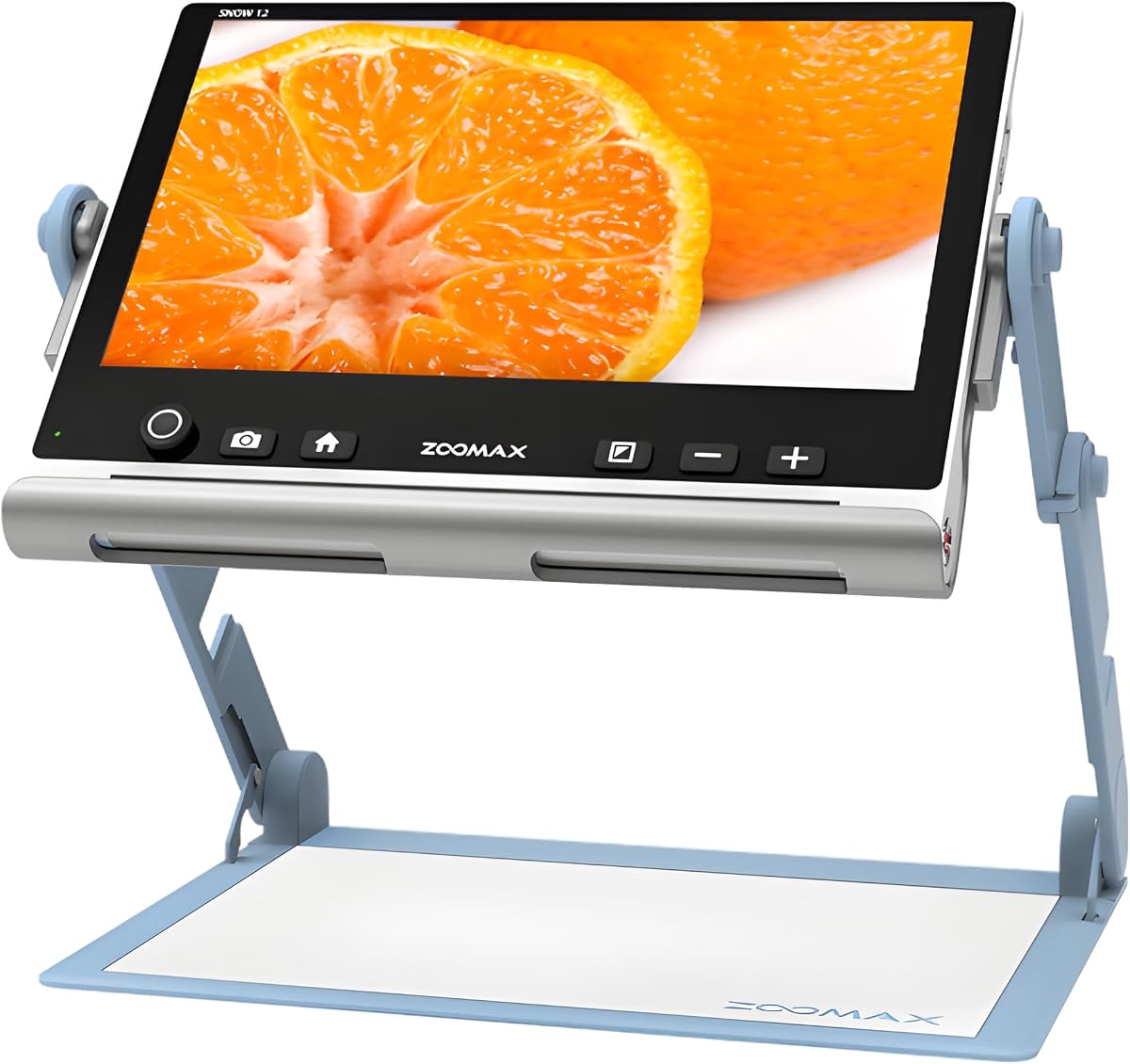
The Zoomax SNOW 12 is the clear specialist in this list because it combines a 12-inch HD display with OCR, text-to-speech, and support for more than 20 languages. Its 19X magnification is narrower than many 5-inch competitors, but its larger screen and reading assistance add a different kind of value.
We may earn a commission when you buy through this link, at no additional cost to you.
OCR can recognize printed text and convert it to spoken words, potentially reducing the effort required to read small print, labels, instructions, or documents. The foldable stand provides stability and multiple viewing angles, while the HD camera supports reading, writing, and other visual tasks. Portability remains possible, but the large panel is naturally bulkier.
The main trade-off is that 19X may not provide the intense close-up magnification available in 32X or 48X models. OCR accuracy can also depend on document layout, lighting, print clarity, and language, so it should be viewed as an assistive feature rather than a replacement for all visual inspection. Despite these limits, the language support and speech output distinguish it clearly.
This premium magnifier is best for readers who want spoken text or a large display for extended document work. It may be particularly useful for multilingual households, students, and anyone who benefits from combining visual enlargement with an audio reading option. Buyers who only need occasional label inspection may find smaller devices more convenient.
The 12-inch HD panel creates a broad view that can reduce frequent camera repositioning on dense pages. Its larger proportions are especially useful for writing, reviewing forms, and prolonged document work.
OCR and text-to-speech support in more than 20 languages add a distinct audio dimension. This can make unfamiliar printed material easier to access when visual enlargement alone does not provide sufficient comfort.
We may earn a commission when you buy through this link, at no additional cost to you.
The Eyoyo 5-Inch Magnifier has a 4.0 rating and combines 4X-to-32X zoom with a 5-inch LCD, 17 color modes, and five brightness levels. Its 4500mAh battery is listed as supporting more than four hours of continuous operation, making it a compelling option for extended reading sessions.
We may earn a commission when you buy through this link, at no additional cost to you.
The folding handle offers a comfortable grip and an angled position over books or newspapers. Automatic preference saving reduces setup time, while photo capture and playback can save important pages through a TF card of up to 32GB. The TF card itself is not included, so buyers should account for that separately if storage is important.
AV output permits connection to a television or larger screen, which is helpful for extended reading or when another person needs to see the displayed image. HDMI is not listed, however, and the 17 color modes are fewer than those offered by several 32X competitors. The rating and feature mix suggest a solid middle-ground device rather than a category leader.
This Eyoyo model is well suited to users who want a battery with a substantial stated operating duration and a comfortable folding handle. It works well for newspapers, books, writing, and photo review. Those who require 26 color modes, a near-and-far lens, or HDMI connectivity should compare the VEVOR and other 5-inch alternatives.
The stated battery capacity and more-than-four-hour operating time reduce the likelihood of interruption during a long reading session. It is a meaningful benefit for users who read continuously rather than checking isolated labels.
Seventeen color modes and five brightness levels allow users to tune the display for their specific vision and lighting conditions. Remembered settings further streamline the experience.
We may earn a commission when you buy through this link, at no additional cost to you.
The 5-Inch 26-Mode Magnifier offers 2X-to-32X magnification, a 5-inch color LCD, and 26 selectable viewing modes. Its 4.0 rating reflects a balanced package aimed at users with low vision, color blindness, amblyopia, or macular degeneration who need flexible page enlargement.
We may earn a commission when you buy through this link, at no additional cost to you.
One of its most useful distinctions is the ability to switch between near and far cameras. The near view supports books, documents, and newspapers, while the far view can cover objects at a distance. Large, prominent buttons and retained settings make the controls approachable for elderly users or people with limited dexterity.
Its foldable bracket positions the camera over a page at an angle, and the handle can be arranged for either hand. Digital image processing is designed to retain font shapes while restoring color and detail, and a television cable can expand the view. The screen remains limited to 800×480, and the supplied information gives no detailed battery specification.
This magnifier is a good fit for readers who need both document and distance viewing without moving to another device. It offers more mode choices than many competitors and thoughtful physical controls. Buyers prioritizing longer battery documentation, sharper resolution, or OCR should consider the VEVOR, newer 5-inch models, or Zoomax SNOW 12.
Near and far cameras broaden the device beyond conventional close-page reading. That versatility can help with signs, labels, and other objects while preserving dedicated document magnification.
Prominent buttons are easier to identify than dense or touch-heavy interfaces. The ability to remember settings means routine adjustments can be minimized after the first use.
We may earn a commission when you buy through this link, at no additional cost to you.
The Eschenbach SmartLux is a compact HD magnifier with a 4.4 rating, image capture, five viewing modes, and four clearly defined magnification settings: 5X, 7X, 9X, and 12X. Its restrained feature set makes it appealing to buyers who prefer straightforward operation over a large menu of options.
We may earn a commission when you buy through this link, at no additional cost to you.
The handheld format supports portable reading, and the included Liberty cleaning cloth helps maintain the lens and screen during regular use. Image capture allows users to preserve an item for later viewing, while the different magnification presets provide predictable choices rather than requiring fine-grained adjustment through a wide numerical range.
Its 12X maximum is the clearest limitation. Models offering 32X or 48X may be better for extremely small print, whereas the SmartLux prioritizes lower, easier-to-manage magnification levels. Five viewing modes are fewer than the 17 or 26 options found on several competitors, and no external display, OCR, or detailed battery specification is stated.
For a buyer seeking a focused, portable HD magnifier with established magnification presets, the SmartLux is our premium pick. It is well suited to menus, labels, mail, and everyday reading where moderate enlargement is sufficient. Users who need maximum zoom, extensive color customization, or speech features should look elsewhere in the list.
Four selectable levels remove much of the uncertainty associated with continuously variable zoom. Users can choose a familiar level quickly and move between reading and close inspection without extensive menu navigation.
The lightweight handheld design makes the magnifier suitable for carrying between rooms or taking on trips. Image capture adds a way to revisit a document or label without having to locate it again.
We may earn a commission when you buy through this link, at no additional cost to you.
The 5-Inch 3X-48X Magnifier combines a wide 3X-to-48X range with 26 color modes, simplified buttons, and a 4.0 rating. Its broad zoom ceiling makes it one of the strongest choices for inspecting tiny labels, instructions, maps, receipts, and other short printed items.
We may earn a commission when you buy through this link, at no additional cost to you.
A foldable handle supports both handheld and angled reading, while the external battery is stated to last more than four hours. The device can remember viewing habits, capture photos, and play them back through a supported TF card of up to 32GB. An 800×480 LCD with digital signal processing is designed to maintain font shape during enlargement.
The manufacturer explicitly advises against using the product for long books or novels, so it should be treated as a close-detail tool rather than a full-page reading station. The 48X maximum can make movement over text more demanding, and the basic screen resolution limits fine visual refinement. Its 4.0 rating indicates a generally capable but not outstanding customer reception.
This magnifier is best for users who need strong close-up power for short visual tasks rather than extended reading. It suits pharmacy labels, menus, recipes, price tags, maps, and small instructions. For prolonged book reading, the larger Zoomax SNOW 12 or a comfortable 5-inch model may be more appropriate.
The 48X ceiling provides useful magnification for text that would be difficult to inspect at lower levels. It is especially relevant for ingredients, serial numbers, dosage directions, and fine print on packaging.
The lightweight body, folding handle, and external battery support use while shopping, dining out, or traveling. The stated limitation against long books helps position it accurately for quick visual assistance.
We may earn a commission when you buy through this link, at no additional cost to you.
The right digital magnifier depends on the size and condition of the print, the duration of use, mobility needs, comfort preferences, and the importance of speech or external-display features.
A useful maximum magnification is only one part of the equation. Lower settings around 2X to 5X are often more comfortable for ordinary reading, while 24X to 48X can help with tiny labels or fine print. The Zoomax SNOW 12 tops out at 19X, while several 5-inch models reach 32X or 48X. Consider whether the device will inspect short items, scan a page, or support extended reading.
Choose a range that matches your actual tasks. Very high zoom does not automatically create a better full-page reading experience and may require more frequent repositioning.
Screen size affects how much text appears at once and how often the camera must move. The 3.5-inch Eyoyo supports portability, 5-inch models balance display area and compactness, and the Zoomax SNOW 12 offers a spacious 12-inch panel. For prolonged reading, a larger screen can reduce strain, but it also increases bulk and may be less convenient to carry.
Prioritize a screen large enough for comfortable viewing without making portability impossible. A foldable handle or stand can materially improve comfort even when the display itself remains compact.
Users with low vision often benefit from changing the way text is presented rather than simply making it larger. High-contrast combinations can reveal faint print, reduce glare, or make colors easier to distinguish. Available modes range from five on the Eschenbach SmartLux to 26 on several 5-inch devices. Brightness levels and adjustable LED lighting can also compensate for uneven surroundings.
Look for several high-contrast modes and the ability to retain preferred settings. The best control scheme is one that offers useful choices while remaining simple enough for regular operation.
Automatic focus can make a magnifier easier to use across books, receipts, photographs, and uneven surfaces. Some models also provide separate near and far cameras, allowing users to inspect a document and then view a sign or another distant object. These features expand everyday versatility but may add controls that are unnecessary for reading alone.
For frequent document work, automatic focus and an angled stand are valuable. For travel or general observation, a dual-camera system may offer more flexibility than a single-camera model.
A magnifier should be ready for the routine in which it will be used. The Eyoyo 5-inch model lists a 4500mAh battery and more than four hours of operation, while the 5-inch 3X-48X model uses an external battery with a similar stated duration. The VEVOR includes a 2500mAh rechargeable battery. Foldable handles and compact bodies are especially valuable for shopping, dining, and travel.
Balance battery endurance against screen size and weight. A larger model may be ideal at home but less appealing for carrying through an airport, restaurant, or store.
Connecting a magnifier to a television or monitor can provide a much larger image for extended reading, writing, or shared viewing. AV output is common among the 5-inch options, while the VEVOR supports both AV and HDMI. The Zoomax SNOW 12 is differentiated by OCR and text-to-speech rather than the same kind of external-display emphasis.
Check the included cables and the type of connection available before buying. External viewing is particularly helpful when the handheld screen becomes uncomfortable or when another person needs to follow along.
OCR converts visible printed characters into machine-readable text, while text-to-speech reads that text aloud. The Zoomax SNOW 12 is the only model in this guide with those functions explicitly listed, and it supports more than 20 languages. Such features can complement magnification for users who benefit from auditory access.
Treat speech output as an additional aid rather than a guaranteed substitute for visual inspection. Recognition performance can vary with lighting, page layout, font quality, and language, so previewing the function is advisable.
Image capture lets users freeze, save, and revisit important labels, pages, or visual details. Several products support playback through a TF card of up to 32GB, although the card is generally not included. This is useful for comparing instructions, retaining a difficult page, or sharing information during an appointment.
Confirm card compatibility and the availability of included storage before purchasing. If saving images is peripheral to your needs, a model without extensive storage features may provide a simpler experience.
Begin by charging the device according to its instructions, then choose a well-lit surface without glare. Turn on the magnifier, set the magnification to a comfortable starting level, and place the camera or stand over the printed area. Move the device gradually rather than jumping between settings, allowing the focus system to settle whenever you change pages or surfaces.
Adjust color mode, brightness, and lighting to improve contrast without making the image harsh. Use the folding handle or stand to hold the screen at a comfortable angle, and position yourself so you can look into the display without repeatedly bending toward the page. For menu labels or mail, start at a lower magnification and increase it only as needed.
To preserve performance, clean the lens and screen with the supplied cloth or another soft, dry cloth. Avoid abrasive materials and moisture near openings. Store the magnifier in its foldable or protective configuration, keep the charging contacts clean, and remove or secure an inserted TF card before transporting the device. Check the current manufacturer instructions for battery handling and software updates.
The best level depends on the size of the print, viewing distance, and personal comfort. Lower settings within the device's range are often more suitable for full pages, while higher levels help with fine print or small labels. A model with a folding stand and a larger screen may also provide more comfort than maximum magnification alone.
Many users with macular degeneration use electronic magnifiers to enlarge print and improve contrast. Several products in this guide are specifically designed for that purpose, with adjustable color modes, brightness, focus, and magnification. Vision needs vary, so a device that suits one person may not work equally well for another.
No. A 48X maximum is useful for tiny labels and fine details, but it does not necessarily make full-page reading easier. Lower magnification can provide a wider, steadier view, while higher magnification often requires more careful positioning. The most useful product covers both ordinary reading and occasional close inspection.
No, but an external screen can make some tasks more comfortable. Models with AV or HDMI output can show the magnified image on a television or monitor, creating a larger viewing area for extended reading or shared viewing. This is optional and depends on compatible connections and the included or required cable.
Regular magnification enlarges the camera image so you can see it visually. OCR recognizes printed characters and can convert them into selectable or spoken text. The Zoomax SNOW 12 offers OCR and multilingual text-to-speech, making it different from the other products that primarily provide visual enlargement.
They can be very helpful, especially with faded, thin, or unevenly printed material. High-contrast modes such as black text on white or white text on black can make letter shapes easier to distinguish. The ideal setting varies by person, which is why adjustable modes and remembered preferences are valuable features.
Several listed models state that their multiple viewing modes support people with color blindness. Color transformations can increase the separation between text and its background or make differently colored details easier to compare. However, results depend on the severity of the condition and the particular document being viewed.
Image capture is useful when you want to preserve a page, label, or note for later. TF card support adds storage, although a compatible card is generally sold separately. Readers who only need live magnification can prioritize screen size, focus, contrast, and comfort instead of paying attention to capture features.
The Eyoyo 3.5-Inch Portable Digital Video Magnifier is the best budget option because it combines a strong customer rating, 2X-to-25X magnification, eight color modes, and a genuinely compact format. The 5-Inch Foldable Video Magnifier is the best overall choice, pairing a 2X-to-32X range with 26 modes, comfortable positioning, and a balanced set of features.
The Eschenbach SmartLux stands out as the best premium pick for buyers who prefer clear magnification presets, five viewing modes, image capture, and a focused handheld design. Beyond these winners, prioritize the task you perform most: maximum zoom for tiny labels, a large screen and OCR for longer documents, dual lenses for variable distance, or a lightweight body for travel.
Specifications, ratings, promotions, and product availability can change over time. Before purchasing, verify the current screen size, zoom range, color modes, power details, included accessories, external-display support, and compatibility with any storage card. Comparing the current listing with your most common visual tasks will lead to the most satisfying choice.