
Rocketbook Core Reusable Smart Notebook
4.5Editor score
Reusable erasable paper
App-based cloud uploads
Smart Titles and Tags
Our expert guide compares 10 smart notebooks with cloud sync, evaluating capture, organization, handwriting, portability, offline use, and integrations to help
Smart notebooks with cloud sync combine the familiar feel of writing on paper with the convenience of searchable, portable digital records. The best systems capture handwriting automatically, organize pages in an app, and make notes available across devices without forcing users to abandon a satisfying pen-and-paper routine.
We compared all ten products by examining capture method, app experience, cloud destinations, handwriting recognition, audio features, offline reliability, page formats, and reusability. The list includes smart pens that capture strokes as they happen, reusable notebooks that digitize pages through an app, and hybrid planners designed for schedules and recurring goals.
Each pick highlights a different path into paperless organization, from straightforward reusable notebooks to advanced systems with handwriting-to-text conversion and synchronized recordings. Ratings, features, compatibility, and app behavior can change, so buyers should verify the current product listing and account requirements before making a final selection.
4.5Editor score

4.5Editor score
3.7Editor score
The comparison below shows how the ten notebooks differ in capture method, digital features, format, and organization tools, making it easier to identify the system that best matches your writing habits and cloud workflow.


The Noteorius Smart Pen and Folio is a digital writing system built around a simple idea: put down ink, and the note appears in an app without a scanning step. It carries a 3.5 rating, placing it behind several more highly rated products, but its core design remains appealing for anyone who wants automatic capture to feel invisible. Uncapping the smartpen powers it on, and strokes are stored securely until they sync.
We may earn a commission when you buy through this link, at no additional cost to you.
Its strongest feature is the balance between physical writing and digital organization. The folio is designed to feel balanced in the hand, while the smooth writing surface supports notes, sketches, diagrams, and brainstorming. The included app organizes pages into a searchable library and can send content to Google Drive, OneNote, Evernote, or Dropbox. That range of destinations makes the system relevant to users who already rely on different services for work, study, and personal records.
There are some important limitations to understand. The smartpen only captures writing made on the compatible notepad, so it is less flexible than a general-purpose digital pen. The product also has the lowest rating in this roundup, which may reflect variability in setup, app experience, or customer expectations. It should not automatically be interpreted as evidence of poor writing quality, but it does make checking recent customer feedback especially sensible.
Noteorius is best for users who value minimal workflow friction and want their writing to be captured as it happens. It is less suitable for someone who needs extensive handwriting OCR, synchronized audio, broad export formats, or a conventional bound notebook. For those priorities, the Ophaya, SyncPen, or YUAN systems offer more specialized digital tools, while the Rocketbook options provide a simpler app-based approach.
The automatic capture experience removes the most familiar weakness of paper: notes can remain in the physical notebook instead of being transcribed later. A tap on the page arrow starts synchronization, and the writing surface can then be cleared for the next page.
Sending notes to Google Drive, OneNote, Evernote, or Dropbox lets users place digital pages inside established systems. The app includes the core workflow without a recurring subscription, which is an important distinction for long-term use.
We may earn a commission when you buy through this link, at no additional cost to you.
The Ophaya Smart Digital Notebook combines a smartpen, five A5 notebooks, and an app that digitizes handwriting and drawings as they are created. Its 4.3 rating reflects a strong combination of real-time synchronization, useful organization features, and offline reliability. The result is more versatile than a basic reusable notebook while preserving the sensation of writing on paper.
We may earn a commission when you buy through this link, at no additional cost to you.
Ophaya is particularly compelling for students, meeting participants, and creative workers who need more than a scanned page. Integrated OCR can convert handwriting into editable Word text, while keyword, tag, and timestamp search helps users find information later. The ability to combine pages and export them as PDF, Word, PNG, GIF, or MP4 makes the captured content easier to adapt for collaboration, study materials, or sharing.
Audio-linked notes add another layer of practical value. A user can record audio while writing, then tap the associated note to replay context-specific recordings. This is especially helpful in lectures, interviews, brainstorming sessions, and meetings where a spoken explanation may carry information that is not fully written on the page. The pen also offers adjustable thickness, colors, and eraser tools, while notes made offline are saved and synchronized after connectivity returns.
The main trade-off is the dependence on a specific smartpen and coordinated paper system. Buyers must also accept the learning curve of the companion app and confirm that their preferred phone or tablet is supported. Ophaya is an excellent choice when OCR, audio context, and flexible exports matter more than maximum page size. For simpler cloud organization, the Rocketbook models are easier to consider; for a large-format writing area, YUAN may fit better.
The integrated OCR system turns captured handwriting into editable text, while full-text-style search makes old meeting notes and class summaries easier to retrieve. This is especially useful for users who do not want to retype information that already exists in a readable handwritten form.
Synchronized recordings preserve the spoken explanation behind each written note. Instead of trying to reconstruct why a diagram or decision was recorded, the user can replay the relevant audio while reviewing the page.
We may earn a commission when you buy through this link, at no additional cost to you.
The Rocketbook Core in black is a strong entry point for anyone who wants reusable paper notebooks with dependable app-based cloud organization. Its 4.5 rating is among the highest in the list, and the Core focuses on the fundamentals: comfortable writing, easy page scanning, structured file names, and direct uploads to familiar cloud platforms.
We may earn a commission when you buy through this link, at no additional cost to you.
The letter-size format offers a generous 8.5-by-11-inch writing area, making it suitable for lecture notes, meeting minutes, brainstorming, and detailed diagrams. College-ruled pages include Smart Titles and Smart Tags, which help users name and classify digital files consistently. Once a page is scanned through the Rocketbook app, it can be uploaded to services such as Google Drive, Dropbox, or OneNote, making the notes accessible beyond the physical notebook.
Reusability is the Core's defining practical benefit. The included Pilot Frixion pen allows users to write, digitize, erase with a damp cloth, and reuse the same page. This reduces paper consumption while preserving a familiar paper-like surface. The spiral binding, scratch-resistant cover, and improved pen-to-paper feel are also sensible improvements for a notebook intended to travel in a backpack, purse, or briefcase.
Its limitation is that it is an app-scanned system rather than a pen that captures strokes automatically. Users must photograph each page and wait for processing before the cloud copy is available. That small extra step may frustrate those who want continuous live capture, but it also keeps the process understandable and the device requirements relatively conventional. The Core is a particularly strong pick for students and office users who want large pages, reusable materials, and no-recurring-fee app organization without investing in a specialized digital pen.
Unlike systems that rely on a specialized smart surface, the Core uses ordinary page scanning through the Rocketbook app. That makes it approachable for users who are comfortable photographing a document and want reusable paper without a new writing instrument.
Smart Titles and Smart Tags give page files meaningful names and classifications. Consistent organization at capture time makes later searching and retrieval more effective, especially for users who maintain notebooks for multiple classes or projects.
We may earn a commission when you buy through this link, at no additional cost to you.
The Rocketbook Flex is a reusable letter-size planner designed to bridge handwritten scheduling and digital task management. Its 4.3 rating makes it one of the stronger options in the group, while the green cover and broad collection of templates distinguish it from the more general-purpose Rocketbook Core.
We may earn a commission when you buy through this link, at no additional cost to you.
The page assortment is unusually useful. It includes daily, weekly, monthly, and annual templates alongside lined and dotted pages, allowing the notebook to handle appointments, priorities, goals, and open-ended ideas. The QuickTracking Key is designed for recurring events, reducing the need to rewrite schedules that repeat from one month to the next. A user can plan on paper, then digitize selected pages through the Rocketbook app and save them to Google Drive, Dropbox, OneNote, or another supported destination.
Smart Title Bars and Tags support consistent naming and categorization after scanning, while the reusable pages let the user erase completed schedules and begin again. The included Pilot Frixion pen supports the write-scan-erase workflow. Its letter size is large enough for monthly planning yet still practical for a professional bag or backpack, and the strong coil binding and durable cover are appropriate for repeated use.
The Flex is less versatile than a general notebook for users who mostly want unconstrained lecture notes, but that focus is also its advantage. Planning templates encourage a consistent process and give users prebuilt space for different time horizons. Its main drawback is the manual app-scanning step, which prevents immediate synchronization. For users whose priority is a reusable, cloud-backed planning system rather than live pen capture, the Flex is a practical and distinctive choice.
Daily, weekly, monthly, and annual views make the notebook useful beyond a simple calendar. Users can move between immediate tasks and long-range goals without maintaining several separate planning systems.
The QuickTracking Key is intended for recurring events that would otherwise consume the same space every month. It supports a more sustainable planning routine while preserving the readability of a handwritten page.
We may earn a commission when you buy through this link, at no additional cost to you.
The YUAN Smart Pen A4 set is an editor's choice for its combination of real-time capture, generous paper size, and local-first data handling. It holds a 4.5 rating, tied for the highest rating in the roundup, and its defining workflow is remarkably direct: write on the compatible smart notebook and the strokes appear in the mobile app.
We may earn a commission when you buy through this link, at no additional cost to you.
The package includes one smart pen, three A4 notebooks with 63 pages each, four ballpoint refills, a USB cable, and a manual. Each notebook has college-ruled pages calibrated for the smart pen, helping maintain consistent recognition and smooth ink flow. The pages measure approximately 8.3 by 11.2 inches, providing room for lengthy notes, diagrams, and sketches. Black, navy, and brown soft covers give users multiple options for separating subjects or projects.
Privacy and offline behavior distinguish this product. The app supports a server-free local storage mode in which digital notebook data is saved directly to a personal phone or tablet. Notes can be written without connectivity and automatically uploaded after the device reconnects. The business app supports iOS and Android, along with import, export, sharing, printing, handwriting-stroke replay, and file classification. These features make the set appealing for users who value control over where their working files live.
The trade-offs are clear. The smart pen cannot erase its ink and works only with the manufacturer's coded smart notebook, so replacement paper is a system-specific consideration. The first full charge can take several hours, and the manufacturer recommends charging overnight before first use. Buyers should also confirm that the required app and mobile-device workflow meet their needs. Even with those limitations, this is an excellent choice for people who prioritize automatic capture, A4 writing space, and offline-first operation.
The pen records writing as it happens, removing the need to photograph finished pages. For lectures, interviews, and working meetings, this removes a small but meaningful interruption between the discussion and the digital copy.
The server-free local mode saves digital notebook data directly to the user's phone or tablet. It offers a useful alternative for people who prefer a local-first workflow while retaining import, export, sharing, and later synchronization.
We may earn a commission when you buy through this link, at no additional cost to you.
The Rocketbook Pro Executive is a polished reusable notebook for professionals, students, and creative users who want a compact paper format with app-based cloud storage. Its 4.3 rating reflects a well-rounded product, and the seven-by-nine-inch format sits between a pocket notebook and a full letter-size pad.
We may earn a commission when you buy through this link, at no additional cost to you.
The Pro is differentiated by its interchangeable page packs. The included 40-page pack combines lined and dot-grid paper, while optional packs can provide planners or goal trackers. This makes the cover system more adaptable than a fixed-format notebook. Users can change the purpose of the same professional object without replacing the entire notebook, which is useful for meetings, journaling, and project work.
An embedded NFC chip helps open the Rocketbook app for scanning and uploading, reducing the number of manual steps before a page reaches a selected cloud destination. The write-digitize-erase workflow remains familiar: the included FriXion erasable gel pen is used on the page, the app creates a digital copy, and a towel with water can clean the surface for reuse. The scratch-resistant vegan leather cover gives the notebook a more refined appearance than a typical classroom spiral model.
Its primary limitation is that additional page packs are sold separately, so the initial configuration may not satisfy every planning need. Like the other Rocketbook products in the list, it depends on scanning rather than continuous smartpen capture. Nevertheless, the Pro is a strong fit for users who value appearance, portability, and flexible page formats more than live handwriting recognition or synchronized audio.
Interchangeable page packs let a single notebook shift between lined, dot-grid, planning, and goal-tracking configurations. That flexibility is especially valuable for people whose note-taking needs change by project or season.
The executive dimensions fit more readily into a small bag than letter-size paper, while the vegan leather cover creates a refined appearance. The result suits customers who want a reusable notebook that does not look like a temporary scratch pad.
We may earn a commission when you buy through this link, at no additional cost to you.
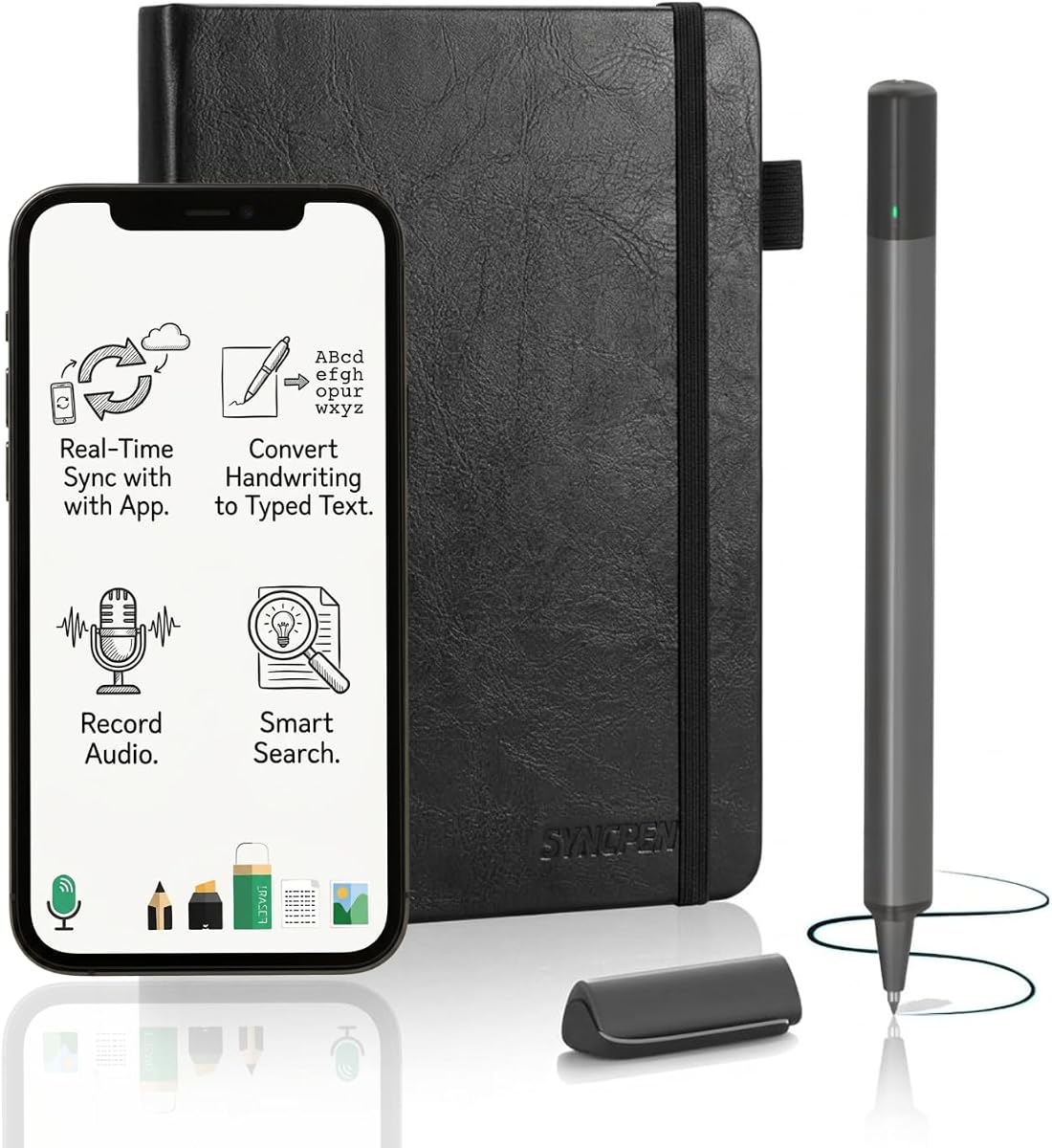
The SyncPen Digital Notebook Smart Pen Set is the most feature-dense premium-style system in this guide. It has a 3.7 rating, which is not among the highest, yet its combination of real-time stroke capture, handwriting recognition, synchronized audio, offline operation, and encrypted cloud storage gives it a distinct place in the category.
We may earn a commission when you buy through this link, at no additional cost to you.
Writing takes place in a refined A5 notebook measuring 8.5 by 6 inches and containing 128 pages. The Bluetooth pen captures each stroke and sends it to the app in real time, preserving the feel of ink on paper. Advanced AI recognition can interpret handwriting across more than 71 languages, including complex mathematical equations and music notation, and turn it into editable text. Keyword, tag, or recognized-text search makes the resulting library easier to navigate.
Audio recording is synchronized with writing, allowing a user to replay a recording that corresponds to a particular written moment. This is valuable in lectures, meetings, and brainstorming sessions because it retains context beyond the visible ink. The system also operates offline first: notes are saved locally and synchronized after reconnection, helping users continue working without a dependable internet connection.
Cloud storage is described as unlimited, protected with AES 256 encryption, and accessible without recurring subscription fees. Exports are available as PDF, DOCX, JPEG, and MP4, supporting editing, sharing, archiving, and presentation workflows. The trade-offs are the lower rating and the more complex software environment. Users seeking a simple reusable scanner notebook may prefer Rocketbook, while the SyncPen is aimed at people who value sophisticated OCR, audio context, and continuous capture. Verify compatibility and app behavior before committing to a more advanced ecosystem.
The claimed support for more than 71 languages, along with math and music notation, makes the OCR system more relevant to multilingual students and technical professionals. It is designed to transform imperfect, spontaneous handwriting into structured editable content.
The combination of unlimited cloud storage, AES 256 encryption, and no recurring subscription is a notable part of the package. It provides long-term digital storage without tying the product to a permanent paid account.
We may earn a commission when you buy through this link, at no additional cost to you.
The teal Rocketbook Core provides the same dependable reusable notebook formula as the letter-size black edition, distinguished mainly by its cover color. With a 4.5 rating, it belongs among the highest-rated options and is a good choice for anyone who prefers a large writing area without advanced smartpen hardware.
We may earn a commission when you buy through this link, at no additional cost to you.
The Core uses improved reusable paper, spiral binding, and a redesigned scratch-resistant cover. Its college-ruled pages include Smart Titles and Smart Tags, helping users identify and organize digital scans. The included Pilot Frixion pen supports the intended write-digitize-erase cycle, and a damp cloth removes completed content so the notebook can be used again.
Cloud organization is handled through the Rocketbook app. Users can scan and upload pages to Google Drive, Dropbox, OneNote, and other supported destinations, then access those records from other locations. The letter-size format is large enough for detailed notes, equations, sketches, and meeting diagrams while remaining portable in a backpack, purse, or briefcase.
This product does not offer anything materially different from the black Core beyond appearance, so the choice between them is mostly personal. It also retains the same central trade-off: digital capture requires an app-based scan rather than a pen that records strokes automatically. Buyers who want the simplest reusable cloud notebook should find that workflow approachable, while those seeking live ink capture, OCR, or audio should look toward the smartpen systems.
Letter-size pages provide enough room for detailed note-taking and visual work without requiring a separate sketchbook. The format is especially helpful for students, project teams, and professionals who want to capture more detail on one page.
The Core depends on a conventional erasable pen and smartphone or tablet camera. That simplicity can appeal to users who do not want to maintain a rechargeable digital writing instrument.
We may earn a commission when you buy through this link, at no additional cost to you.
The blue Rocketbook Core Executive is the most compact reusable notebook in the roundup, offering a 6-by-8.8-inch format that is easier to carry than letter size. Its 4.4 rating reflects a strong balance of portability, writing quality, reusable construction, and dependable cloud organization.
We may earn a commission when you buy through this link, at no additional cost to you.
The grid layout is particularly useful for diagrams, sketches, calculation, and structured notes, while the spiral binding allows the notebook to lie flat. Improved reusable paper is designed to provide a convincing pen-to-paper feel, and the scratch-resistant cover protects the notebook during travel. Users can write with the included Pilot Frixion pen, scan finished pages through the app, and erase the surface with a damp cloth.
Smart Titles and Smart Tags support a repeatable digital filing system. After scanning, pages can be stored in Google Drive, Dropbox, OneNote, and other preferred cloud destinations. This makes the notebook suitable for students carrying notes between classes, travelers maintaining a daily journal, or professionals who want a compact book for meetings and ideas.
The smaller page is an obvious limitation for users accustomed to letter-size writing, and the app-scanning workflow still requires a separate device and a few intentional steps. It also does not offer real-time smartpen capture, OCR, or audio. Even so, it is a highly approachable option for anyone who prioritizes portability and a grid-based page over advanced digitization features.
The executive size fits comfortably into smaller bags and reduces the bulk of carrying a full-size notebook. It is a practical middle ground for users who want more space than a pocket book without the footprint of letter paper.
A grid format supports charts, calculations, sketches, and neatly arranged bullet points. It can be especially useful for technical notes or personal planning where visual alignment improves clarity.
We may earn a commission when you buy through this link, at no additional cost to you.
The Moleskine Smart Writing Set pairs a notebook with a pen that uses Ncoded technology to transfer handwriting to a phone or tablet in real time. Its 3.3 rating is the lowest in this selection, so potential buyers should review recent customer feedback carefully, but the product addresses a clear need: preserving the Moleskine writing experience while adding editable and shareable digital notes.
We may earn a commission when you buy through this link, at no additional cost to you.
The smart pen captures handwriting and transfers it to the device screen as it is written. Users can then edit, search, share, and organize the resulting content. Compatibility with both Android and Apple devices broadens the potential audience, while the included USB charging cable, one ink refill, and manual cover the basic setup needs.
Its multimedia function records audio in sync with the written page. This helps retain explanations, tone, and contextual details that might otherwise disappear when a notebook page becomes a digital file. The set also supports saving work as a PDF and uploading it to Google Drive or Evernote, connecting the familiar physical notebook with established cloud organization tools.
The lower rating is the main reason this model finishes the list rather than competing more closely with the higher-rated smartpen systems. Its stated digital workflow is also narrower than products offering multiple export formats, extensive OCR, or offline-first capture. Still, buyers who prioritize the recognizable Moleskine physical design, real-time handwriting transfer, broad platform compatibility, and audio-linked notes may find the set compelling.
Ncoded technology captures the handwriting without requiring the user to photograph each page. The result fits naturally into a Moleskine notebook while making the content available for editing, searching, and sharing.
Audio recorded alongside writing can preserve the reasoning behind a page. The resulting PDF and cloud-upload workflow lets users retain both the visual note and its associated spoken explanation.
We may earn a commission when you buy through this link, at no additional cost to you.
The right smart notebook depends on whether you prefer automatic pen capture or app-based scanning, what kinds of pages you need, and how extensively you use cloud organization. These factors help narrow the list before choosing a device.
Choose automatic capture for speed and live retrieval, or scanning for control and simplicity.
Prioritize the cloud service you already use and confirm the supported export formats.
Use OCR when editable text matters, but verify recognition quality for your handwriting and language.
Favor offline saving when uninterrupted writing is a priority, and understand how delayed uploads are handled.
Match the page size and template to your subject, workspace, and portability needs.
Choose audio synchronization when spoken context matters; prioritize simpler capture when it does not.
Follow the manufacturer's cleaning method and allow smartpens to charge before important sessions.
Verify app compatibility, account terms, and core export features before purchasing the hardware.
Begin by fully charging a smartpen if the product uses one, then install the correct companion app and complete its pairing or account setup. For scanning notebooks, create a cloud destination connection before capturing important pages. Test a short page with handwriting, a diagram, and a title so you can confirm that the digital version is legible, searchable, and filed in the expected location.
Develop a consistent capture routine. Automatic pen systems work best when pages are completed or clearly separated before synchronization, while scanner-based products benefit from cleaning the page, positioning the device for an even image, and reviewing the scan before upload. Use Smart Titles, tags, or app folders consistently, and add a searchable name that describes the subject and date rather than relying on vague labels.
Care for the system according to its design. Reusable Rocketbook pages should be erased with a damp cloth or towel and water after the digital copy is safely stored. Special smartpen paper may not be erasable and should remain dry. Keep pens charged, protect notebooks from excessive moisture and heat, and back up important cloud files. Periodically check that exports, recordings, and tagged pages can still be opened and retrieved.
A smartpen notebook captures handwritten strokes automatically as the user writes, usually sending them to an app without taking photographs. A scan-based smart notebook uses a conventional erasable pen and requires the user to capture pages through a companion app. The first is faster for live note-taking, while the second is often simpler and gives the user greater control over which pages become digital files.
Not all of them do. Ophaya, SyncPen, and YUAN describe offline capture with later automatic synchronization, which allows writing to continue without connectivity. Rocketbook models use an app-based scanning process and require a device and connection to upload pages. If offline work is essential, confirm the product's local-saving and reconnection behavior before purchasing.
Yes, but the level of conversion varies among the products. Ophaya includes integrated OCR that converts handwriting to editable Word text, while SyncPen supports advanced recognition across many languages and also claims support for equations and music notation. Other products in the roundup primarily digitize and organize handwritten pages without emphasizing full text conversion.
The listed Rocketbook models support destinations such as Google Drive, Dropbox, and OneNote. The Pro model also refers to additional cloud choices, while the Core and Flex descriptions specifically name those three services. Because supported destinations and workflow details can change, buyers should verify the current app and account compatibility before organizing an extensive archive.
Reusability depends on the system. Rocketbook pages are designed to be wiped clean with water and a cloth or towel, after their content has been scanned and saved. Smartpen systems such as Noteorius, YUAN, SyncPen, and Moleskine use dedicated paper that may not be erasable, so their sustainability benefit comes from reusing the writing system rather than erasing every page.
Several products support audio recording alongside handwriting. Ophaya offers audio-linked notes that can be replayed from the associated page, SyncPen includes synchronized voice recording, and the Moleskine Smart Writing Set provides a multimedia function. This feature is especially useful when spoken context contains details that will not appear in the written notes.
Check your preferred cloud service, supported devices, and whether the essential features require a paid account. Consider the writing surface, portability, OCR quality, export options, offline behavior, and battery requirements. Recent customer feedback can also help reveal setup or app issues that are not apparent from the core feature list.
A phone or tablet is generally needed to store, organize, and access digital notes, although some smartpen systems may save locally before synchronization. Scan-based products also require a device with the companion app. Check the stated operating-system requirements and make sure the device you own can run the relevant application.
The Rocketbook Core stands out as the most approachable high-rated option, with reusable letter-size pages, smart organization, and a straightforward scanning workflow. YUAN is the strongest editorial choice for buyers who want real-time pen capture, a large A4 surface, and local-first storage, while SyncPen offers the most advanced package for multilingual OCR, synchronized audio, offline work, and encrypted cloud storage.
Your priorities should determine the remaining choice. Choose a Rocketbook model when reusability and familiar app scanning matter most, a smartpen system when automatic capture matters most, and a planner or compact model when scheduling or portability is central. Before committing, verify app compatibility, account terms, supported cloud destinations, paper requirements, and the value of the specific digital features you will genuinely use.
Product ratings, app features, and listing details can change over time, so check the current product pages and account requirements before purchasing. Comparing those details alongside your own writing habits will lead to a more durable choice than choosing solely by feature count or appearance.