
Cable Matters 8K HDMI Keystone Jack
4.5Editor score
HDMI 2.1 performance
8K at 60Hz support
Reusable snap-in design
Two inserts included
This HDMI Junction Box guide compares ten options for in-wall connections, panel mounting, 4K and 8K performance, installation needs, and modern home theater
An HDMI junction box gives a home theater, conference room, or gaming space a cleaner way to connect equipment through a wall, desk, or equipment enclosure. The best model depends on cable routing, panel size, supported resolution, environmental protection, and whether you need a simple pass-through or an integrated switching solution.
This guide compares ten HDMI-related junction and pass-through products based on their stated connectors, supported HDMI features, installation methods, and intended uses. It covers complete wall plates, keystone inserts, panel-mount bulkheads, waterproof couplers, and a pair of HDMI switchers that solve related source-routing problems.
Each review explains the product's strongest benefits, practical limitations, and ideal installation environment. The top selections reflect feature coverage, user ratings, installation convenience, and suitability for common home theater projects, while current prices and availability should be checked before purchasing.
4.5Editor score

4.3Editor score

4.4Editor score
The comparison below separates complete wall plates from modular keystone jacks, panel-mount bulkheads, and source-switching alternatives. Ratings reflect the supplied product data, while specifications identify the main installation and signal features that distinguish each option.
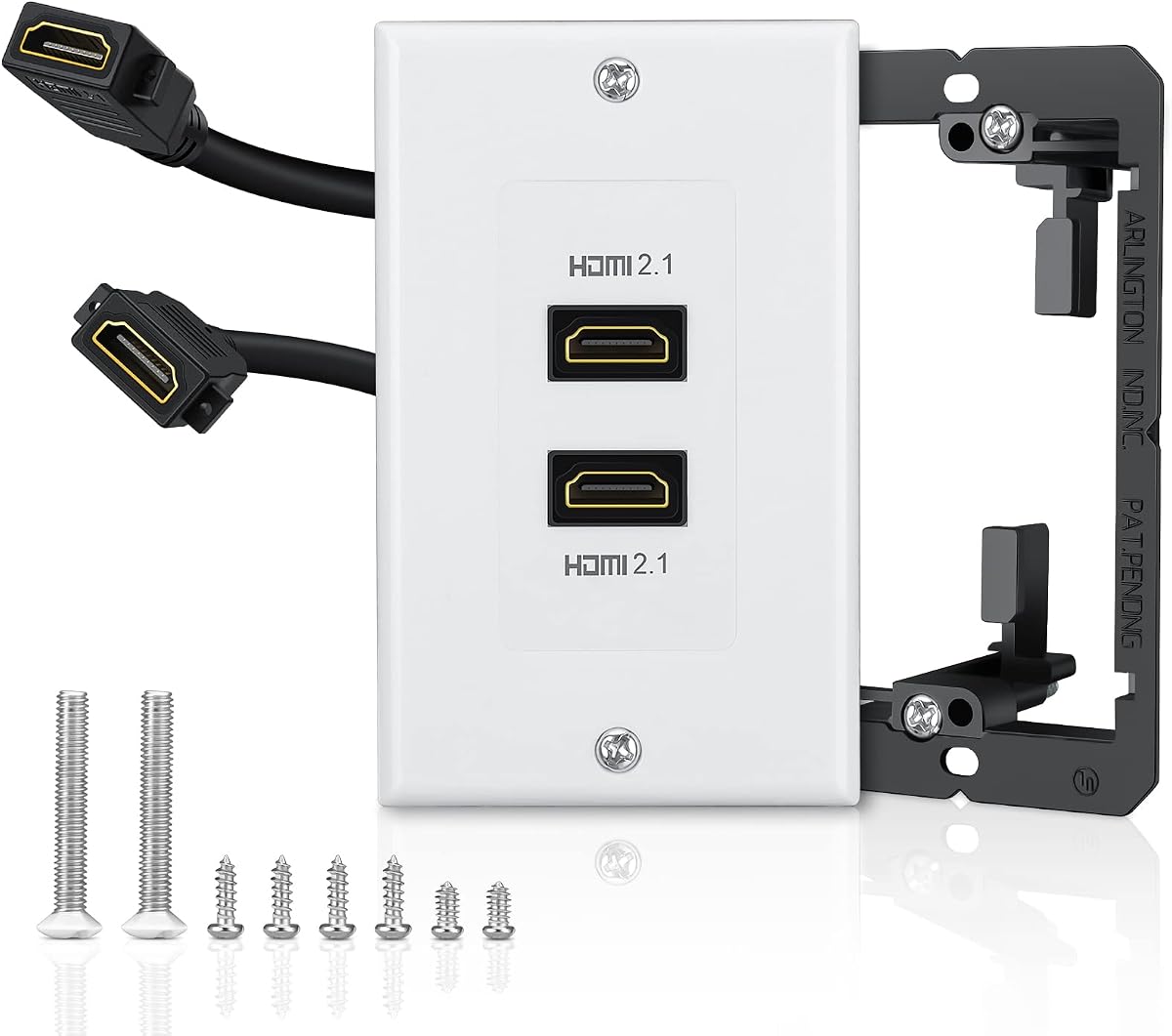



The TNP 2 Port HDMI Wall Plate is a complete-looking pass-through solution for hiding HDMI cable runs behind a wall. It has a 4.3 rating and stands out for combining a two-port white wall plate, rear pigtails, and a straightforward low-voltage installation format. Rather than acting as a source switch, it provides two female-facing pass-through connections that can link in-wall cabling to visible equipment.
We may earn a commission when you buy through this link, at no additional cost to you.
Its headline capability is support for 4K UHD video, including 3840 by 2160 and several other listed resolutions. The stated 18 Gbps bandwidth also accommodates features such as ARC or eARC, HDMI Ethernet Channel, 48-bit color, 32-channel audio, and high-resolution audio formats. The included modular insert and mounting screws are useful because the faceplate and connection module can be handled separately during installation.
The rear pigtail design is a practical strength because it reduces the amount of permanent cable routing required directly at the wall opening. The product can be mounted near an AV receiver or home theater system using a standard-size low-voltage bracket, and it requires no soldering. One caveat is that its listed performance centers on 4K rather than the 8K capabilities promoted by HDMI 2.1 alternatives.
This is a strong general recommendation for anyone building or finishing a conventional in-wall home theater connection. It is particularly useful when two HDMI paths need to terminate in one visible plate and the installer values a straightforward, no-solder process. If your equipment requires 8K at 60Hz or 4K at 120Hz, one of the HDMI 2.1 models may be a closer fit, but for common 4K theater installations this plate is versatile and approachable.
The faceplate conceals the in-wall cable path, reducing visible clutter around a television, projector, or entertainment cabinet. Its two ports make it useful for separating a display connection from an additional device or receiver path.
The stated 18 Gbps bandwidth and listed support for ARC, eARC, HEC, advanced color, and surround audio make the plate suitable for mainstream 4K home theater equipment. Cable length and source compatibility still determine the final experience.
We may earn a commission when you buy through this link, at no additional cost to you.
The ELECTOP HDMI 2.1 Wall Plate is aimed at installations where bandwidth and future-facing specifications matter. Its two-port design provides a visible wall outlet with rear pigtails, while the included low-voltage metal bracket simplifies mounting. A 3.9 rating places it behind several alternatives, but its advertised 48 Gbps capability and support for 8K at 60Hz make it one of the most technically ambitious products in this roundup.
We may earn a commission when you buy through this link, at no additional cost to you.
The feature list includes 4K at 120Hz and 144Hz, 8K at 60Hz, HDR, 3D, ALLM, VRR, eARC, HEC, 48-bit color, and 32-channel audio. Those capabilities suit a modern gaming display, high-end television, projector, or next-generation source device. Backward compatibility is also stated, allowing the plate to work with older HDMI standards when the connected equipment and cables support them.
Installation is centered on a single-gang low-voltage bracket, with a detachable short HDMI extension cable and eight screws included. The design uses a female port at the front and a pigtail at the rear, which is familiar to installers. It should still be matched to the opening and cable routing plan, and higher-resolution modes depend on the full source-to-display chain rather than the wall plate alone.
Buyers should choose this product when a 4K-oriented plate would limit an 8K-capable system. It is also relevant for gaming installations that value VRR and ALLM. The tradeoff is its less favorable user rating and the need for compatible equipment, cables, and display modes. Within those boundaries, it offers one of the strongest specifications among the complete wall plates reviewed here.
The 48 Gbps design leaves room for 8K television and high-refresh 4K applications. That is useful when a wall outlet is expected to remain in place while connected hardware evolves.
ALLM and VRR support can be beneficial for compatible consoles and PCs. The source, display, cable, and converter chain must support the same features for them to operate.
We may earn a commission when you buy through this link, at no additional cost to you.
The D-Type HDMI Panel Coupler is a compact female-to-female pass-through connector designed for standard D-type panels, walls, or junction boxes. Its 4.5 rating and 4K-at-60Hz specification make it a focused option for installers who need a neat connection point rather than a full decorative wall plate. It also fits naturally into equipment furniture, desks, and custom panels.
We may earn a commission when you buy through this link, at no additional cost to you.
The coupler uses HDMI 2.0 technology with a stated bandwidth of 18 Gbps. It supports 3D content, 60 frames per second, ARC, and HEC, covering the central features expected in a mainstream home theater or office installation. Because it accepts two HDMI cables, it can extend a cable run by linking an upstream source to the display or other destination.
One practical advantage is the reduced wear placed on a television, projector, or computer port. Instead of connecting and disconnecting a cable directly at the device, the permanent cable can terminate at the coupler while a shorter cable remains accessible. The trade-off is that the product is only a connector, not a complete faceplate or mounting-bracket system.
This is a good choice for a custom enclosure, built-in media cabinet, D-panel control desk, or junction box where a small female-to-female coupler is needed. It works best for 4K at 60Hz installations and when the installer already has a suitable cutout and faceplate. For a finished room, the larger wall-plate products provide a more decorative and self-contained appearance.
The small panel format is convenient when a full wall plate would be too large or visually inappropriate. It can create a deliberate connection point in a custom enclosure or furniture panel.
Keeping one cable permanently connected at the coupler reduces repeated insertion on the display or projector. The remaining exposed connection should still be handled carefully.
We may earn a commission when you buy through this link, at no additional cost to you.
The Cable Matters 8K HDMI Keystone Jack is a premium modular option for installers who want a professional-looking connection that can be removed or relocated. It has a 4.5 rating, includes two HDMI 2.1 inserts, and supports 8K at 60Hz and 4K at 120Hz. The vertically oriented design fits standard keystone wall plates or patch panels, although the faceplate or panel is not included.
We may earn a commission when you buy through this link, at no additional cost to you.
Its female-to-female construction provides a secure pass-through between two HDMI cables. Beyond resolution support, the stated feature set includes eARC, ALLM, VRR, 5.1 and 7.1 surround sound, and object-based audio. Those capabilities align well with a modern theater, gaming room, or professional presentation space where the wall outlet needs to disappear cleanly into the finish.
Reusability is a meaningful advantage. The inserts use a snap-in arrangement that can be disconnected without discarding the wall opening, making future upgrades or decorating changes easier. The product also supports 90-degree or 270-degree adapters for routing cables in confined spaces, although those adapters are not included in the stated package contents.
This is the strongest choice for a polished custom installation where 8K readiness, modularity, and future serviceability matter. It is less convenient for a plug-and-play project because a compatible keystone plate and suitable opening must already be available. For that reason, it best suits a careful installer or homeowner planning a deliberate wiring project rather than a temporary connection.
The vertical keystone format is designed to blend into a matching wall plate or patch panel. That creates a tidier result than a protruding coupler and allows the connection to be replaced without patching the wall.
Because the inserts can be removed and relocated, the opening can be reused when equipment changes. The included pair also makes it convenient to terminate two HDMI paths in one plate.
We may earn a commission when you buy through this link, at no additional cost to you.
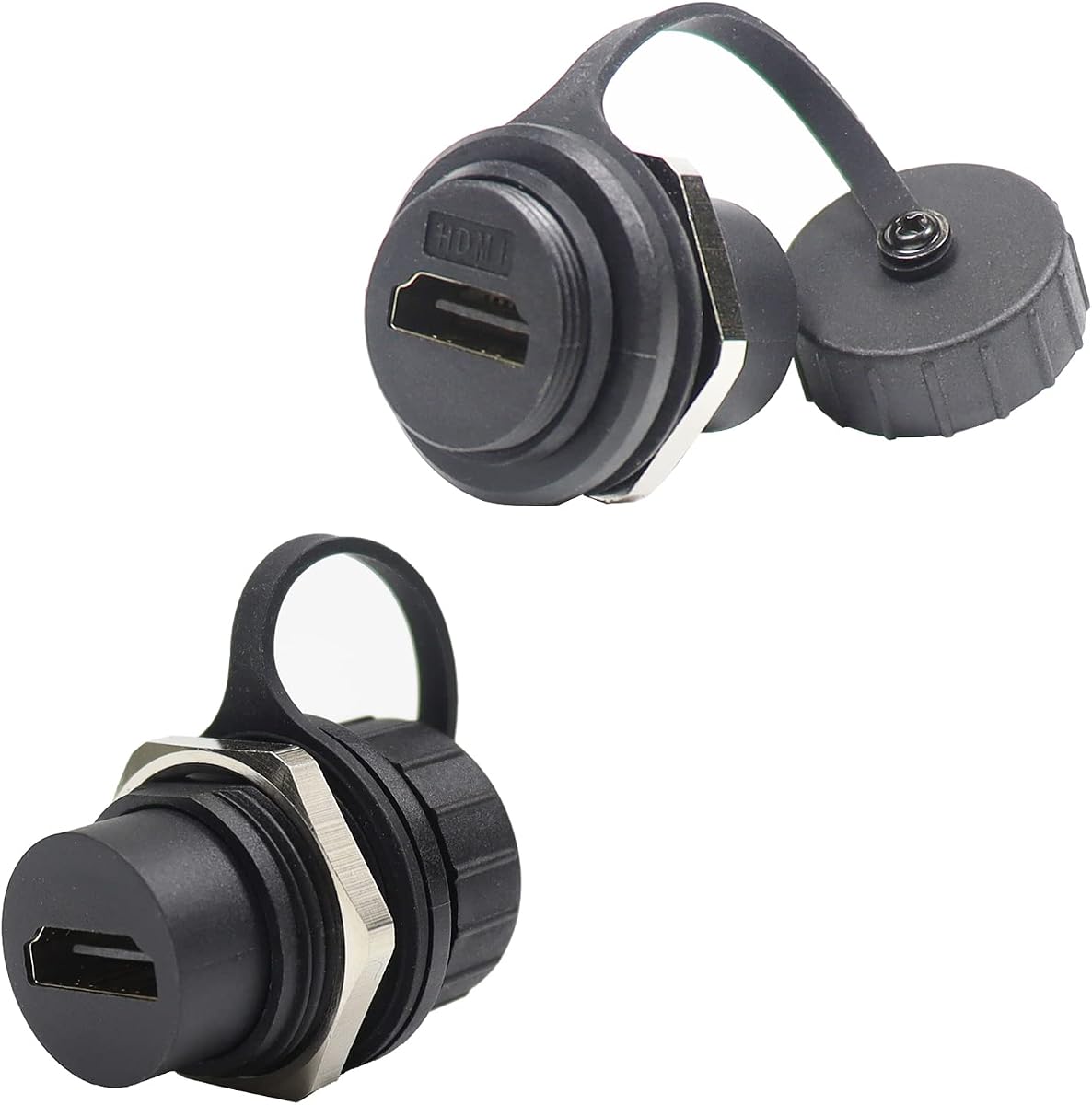
The PENGLIN Waterproof HDMI Panel Mount Coupler combines a 4.9 rating with a 4K-oriented bulkhead format. Two reinforced couplers are included, each made from PA6BG33 and designed for installation in a standard round panel-mount opening. It is a compelling choice for equipment enclosures, marine installations, workshops, or other environments where ordinary decorative keystone jacks would be vulnerable.
We may earn a commission when you buy through this link, at no additional cost to you.
The stated IP67 protection means the coupler is designed to resist water and dust when properly mounted. The connectors join two HDMI cables and support ultra HD 4K video with uncompressed stereo sound. The product is presented as plug-and-play, requiring no software or drivers, which makes it convenient to add to an existing cable route.
Its applications extend to televisions, monitors, projectors, PCs, laptops, TV boxes, game consoles, and Blu-ray players. Reinforced construction, scratch resistance, and the option to mount securely with a standard round hole distinguish it from a simple loose coupler. The main limitation is that a bulkhead connector is not intended to replace a decorative faceplate in a living room.
Choose this model when environmental protection and panel integrity are more important than cosmetic integration. It is especially appropriate for outdoor-adjacent equipment, utility rooms, custom gaming furniture, or exposed connection points. For a conventional finished wall with no moisture or dust concern, a keystone or complete wall plate will usually provide a more polished installation.
The IP67 housing is the defining feature. It is better suited to exposed or enclosed installations where dust and moisture may reach the connection than a standard decorative wall jack.
The female-to-female bulkhead links two HDMI cables and can simplify long or awkward routes. Secure panel mounting also reduces movement at the termination points.
We may earn a commission when you buy through this link, at no additional cost to you.
The Metal M25 HDMI Bulkhead is a rugged panel-mount coupler designed for equipment enclosures and field-installable projects. Its 4.4 rating, zinc die-cast housing, and included IP67 dust and water cap distinguish it from lightweight plastic adapters. The product includes two female-to-female connectors for joining HDMI cables through a D-series panel opening.
We may earn a commission when you buy through this link, at no additional cost to you.
The stated bandwidth reaches 18 Gbps, with support for 4K HDR and 1080p at 60 frames per second. Phosphor bronze contact pins receive a 7-micron gold plating for conductivity and corrosion resistance. The housing is described as flame retardant, UV resistant, and resistant to aging, making it appropriate for equipment that may be exposed to heat, sunlight, or long operating periods.
Installation is designed to be straightforward. A standard HDMI plug fits into the coupler without soldering or specialized tools, and the bulkhead mounts through the panel opening. The protective cap helps seal the unused port against water and dust. The cap must also be used correctly to maintain the intended level of protection.
This bulkhead is a good fit for outdoor entertainment areas, utility equipment, custom control cabinets, and other technically oriented installations. It is less likely to suit someone seeking a simple in-wall faceplate because it requires an appropriate panel cutout and does not include decorative trim. Its advantages are durability, compactness, and field-friendly installation rather than residential styling.
The die-cast shell and plated contacts are designed for repeated connection cycles and resistance to corrosion. These attributes suit panels that remain accessible for service rather than sealed permanently behind a finish.
A standard HDMI connector can be attached without soldering. That keeps enclosure work straightforward and allows the bulkhead to be removed or repositioned when equipment changes.
We may earn a commission when you buy through this link, at no additional cost to you.
The Cable Matters 4K HDMI Keystone Jack is a popular two-pack for custom home theater wiring, earning a 4.6 rating. It provides female-to-female HDMI pass-through inserts in a vertical keystone format designed for wall-mounted televisions, projectors, and other permanently installed displays. The separate wall plate and patch panel are not included.
We may earn a commission when you buy through this link, at no additional cost to you.
Its feature coverage includes 3D, 4K, ARC, Consumer Electronics Control, and Ethernet functions when used with compatible cables and devices. Gold-plated contacts are intended to support signal transmission and resist corrosion. The product also accepts 90-degree or 270-degree HDMI adapters, which can make it easier to route cables inside shallow walls or cabinetry.
The quick-connect, reusable design is perhaps its most attractive feature for homeowners. The insert can be removed and relocated without damaging the opening, allowing it to remain useful through decorating changes or equipment upgrades. The two-pack supports two separate HDMI terminations in compatible keystone plates.
This is a sensible choice for 4K installations that value a familiar, serviceable keystone format and do not need 8K. It performs best when paired with a matching wall plate, adequate wall depth, and cable bends that meet HDMI routing requirements. For a straightforward 4K theater project, it offers a balanced combination of installation flexibility, feature support, and strong user feedback.
Reusable snap-in construction allows the jack to be removed and reinstalled. This is useful when replacing displays, moving to a different wall, or changing room layout.
Compatibility with 90-degree and 270-degree adapters provides options for directing cables within shallow openings. The angle adapters themselves are separate accessories.
We may earn a commission when you buy through this link, at no additional cost to you.
The HDMI Wall Plate Wall Outlet Panel is a straightforward two-port solution for reducing visible cable clutter. It has a 4.4 rating and is designed for home theaters, game systems, and TV boxes. The white face and female-to-female connector arrangement make it easy to understand and useful in rooms where a simple, coordinated finish matters more than advanced modularity.
We may earn a commission when you buy through this link, at no additional cost to you.
The plate supports HDR, 4K UHD, 3D, ARC, and Ethernet features according to the supplied information. It is also described as backward compatible with HDMI 2.0, 1.4, 1.3b, and 1.3a. That broader compatibility makes it appropriate for mixed systems containing an older game console, a modern television, and a conventional streaming device.
A screw-free rear connector is intended to reduce installation concerns and lower the chance of breaking the back connection while fitting the plate. The unit has two ports, allowing two HDMI paths to emerge at the wall while their wiring disappears behind the surface. Buyers should verify whether the required low-voltage mounting box is included, as the stated information does not clearly confirm it.
This is our best budget recommendation for a practical in-wall HDMI outlet. It is ideal for a straightforward 4K theater, gaming room, or living-room cable-management project. The absence of advertised 8K support and lack of a stated mounting bracket mean it is less suitable for a future-oriented installation, but it remains a capable, uncomplicated choice for common home setups.
The two-port faceplate lets multiple cables disappear into the wall, leaving only short connections visible at the display or equipment. It can make an inexpensive project look substantially more finished.
Support for several HDMI generations and common features is useful when a room contains mixed-age devices. The actual resolution and audio options remain limited by the source, display, and cables.
We may earn a commission when you buy through this link, at no additional cost to you.
The Y.D.F 3-Way HDMI Switcher is a source-routing solution rather than a conventional wall junction box. It combines three HDMI 2.0 inputs with a two-channel RCA-to-HDMI converter in a two-in-one design. With a 4.5 rating, it is most relevant to gamers or collectors who need to connect several modern consoles and older composite-video hardware to one display.
We may earn a commission when you buy through this link, at no additional cost to you.
Modern HDMI sources can include PCs, MacBooks, Xbox consoles, PlayStation systems, Blu-ray players, Chromecast, Switch, Apple TV, Fire TV, and Roku devices. The legacy converter side supports systems and media players such as Sega, Wii, N64, GameCube, SNES, PlayStation generations, Xbox, set-top boxes, VHS, and VCR equipment. Output can go to an HD-ready or full-HD television, projector, or monitor.
One-key switching simplifies source selection, while the aluminum construction is intended for durability. The device supports 4:3 and 16:9 aspect-ratio switching for legacy content. Its 4K-at-60Hz and 18 Gbps specification is useful for modern sources, but the supplied note recommends keeping the combined input and output HDMI cable length within 10 feet to reach 4K at 60Hz.
Choose this model when the core problem is managing multiple sources rather than terminating one in-wall cable. It is particularly attractive for a game room with both current and retro consoles. It does not replace a junction box, wall plate, or keystone jack, and its input switching and converter function should be considered separately from hidden cable routing.
The combination of three HDMI inputs and RCA conversion reduces the number of separate adapters needed. It is particularly useful for game rooms that mix modern consoles with older composite-output systems.
A front-panel switching action is easier than reconnecting cables each time the source changes. The 4:3 and 16:9 controls also help legacy content display more appropriately.
We may earn a commission when you buy through this link, at no additional cost to you.
The Y.D.F 4-Way HDMI Switcher expands the switching concept by providing four HDMI 2.0 inputs and a four-channel RCA-to-HDMI converter. It has a 4.6 rating, the highest among the two switchers in this list, and is built for installations with a large collection of modern and legacy entertainment sources.
We may earn a commission when you buy through this link, at no additional cost to you.
The HDMI section supports PCs, MacBooks, Xbox and PlayStation systems, Blu-ray and DVD devices, Chromecast, Nintendo Switch, Apple TV, Fire TV, and Roku. The RCA side supports Sega, Wii, N64, GameCube, SNES, PlayStation 1 through 3, Xbox, set-top boxes, VHS, VCR, and related composite sources. HD-ready and full-HD televisions, projectors, and monitors can be used as outputs.
The switcher includes one-key operation, 4:3 and 16:9 switching, and an aluminum enclosure. It advertises HDMI 2.0, 4K at 60Hz, and 18 Gbps bandwidth. As with the smaller model, the supplied information recommends limiting the combined length of input and output HDMI cables to 10 feet for 4K at 60Hz, so this unit works best near the equipment it serves.
This is the appropriate choice for a dedicated game room, media cabinet, or retro-gaming installation with numerous sources. It should not be mistaken for an in-wall junction box, and it does not conceal cables. If the goal is to terminate hidden in-wall wiring, choose one of the wall plates, keystone jacks, or panel couplers instead; if the goal is effortless source selection, this four-way model offers greater capacity.
Four HDMI inputs and four RCA conversion channels support a room with numerous consoles and media devices. It reduces dependence on manual cable changes and separate legacy adapters.
The switcher can feed an HD-ready or full-HD television, projector, or monitor. Aspect-ratio controls help accommodate the different output characteristics of classic game and video sources.
We may earn a commission when you buy through this link, at no additional cost to you.
The right HDMI junction box depends first on where the connection must live and how it will be mounted. Resolution, cable depth, environmental exposure, and source-switching needs then determine which type offers the most useful fit.
Complete wall plates are the most self-contained option and usually include a faceplate, port insert, and sometimes a low-voltage bracket. Keystone jacks are smaller modules that require a compatible faceplate or patch panel. Panel-mount couplers fit a specific cutout in an enclosure or furniture panel, while switchers focus on selecting among sources rather than terminating a single cable path.
A junction box cannot improve the capabilities of the cables and devices connected to it. For conventional 4K use, a model advertising 4K at 60Hz and 18 Gbps may be sufficient. For 8K displays, 4K gaming above 60Hz, or future-oriented installations, look for HDMI 2.1, 48 Gbps bandwidth, eARC, VRR, and ALLM support. Every device in the chain must also support the desired mode.
Most pass-through junction boxes use female-to-female connectors, allowing an in-wall cable and a visible cable to meet at the plate. A complete wall plate may also use short rear pigtails. Panel couplers can differ in shape, so confirm that the opening matches the D-type, round, M25-style, or other mounting design before ordering.
HDMI cables need enough room to curve without creating sharp bends, particularly when a connector remains attached inside the wall. Low-voltage boxes vary in depth, and some deep keystone inserts or 90-degree adapters require additional clearance. Consider the connector depth, cable diameter, distance to the stud, and route to the equipment before selecting a plate.
A standard indoor wall plate is appropriate for dry, controlled rooms. For outdoor cabinets, workshops, utility areas, or equipment exposed to dust and moisture, choose a panel-mount product with a stated IP67 rating and suitable capped or sealed construction. Even a waterproof connector can lose that protection if it is mounted incorrectly or left with an unprotected open port.
One HDMI path is enough for a single display, but a two-port plate can provide separate terminations for a television, projector, game room, or shared distribution location. A keystone two-pack similarly provides two inserts. Switchers serve a different purpose: they let several sources feed one display. Count both modern HDMI devices and legacy RCA sources before choosing a combined switching solution.
ARC and eARC carry television audio back to a sound system, while HEC supports HDMI Ethernet Channel functionality. ALLM can automate gaming display settings, and VRR synchronizes frame presentation with a compatible display. Consumer Electronics Control can provide control over compatible devices. Check the features you actually use, because a model may support high resolution without advertising every optional HDMI function.
Reusable keystone inserts are valuable when a television, projector, or game console may be replaced. A high-bandwidth HDMI 2.1 plate offers more upgrade headroom, but it still cannot overcome incompatible source hardware or cables. Decide whether the junction box will be buried permanently behind a finished wall or remain accessible in a panel where the module can be swapped.
Confirm the mounting opening, connector orientation, and available cavity depth before cutting the wall or modifying a panel. Route the in-wall HDMI cable to the junction location without creating tight bends. If the wall plate uses a pigtail, connect the permanent cable to the rear connector and secure the module according to the included instructions.
Install the low-voltage box or panel cutout, attach the junction component, and make sure the faceplate sits flush without forcing the housing. For a keystone insert, snap it into the designated opening; for a bulkhead, tighten the mounting hardware evenly to preserve the protective seal. Connect the display or source cables only after the installation is secure.
Test the full source-to-display connection with the intended resolution, refresh rate, and audio features. If the image or sound is unstable, check connector seating, cable strain, and bends before changing settings. Keep unused waterproof ports covered, avoid repeated sideways loads on panel connectors, and periodically inspect exposed cables for damage or looseness.
An HDMI junction box provides a organized connection point for HDMI cables, particularly when the cable route passes through a wall, furniture panel, or equipment enclosure. It can conceal a long in-wall run and keep the visible connection neat. Some models provide one or more pass-through ports, while others combine pass-through connectors with source switching or legacy video conversion.
No. A junction box or pass-through coupler generally connects one source path to one destination and may provide a wall termination. An HDMI switcher lets a display receive input from several sources and uses a control to choose among them. The Y.D.F models in this guide are switchers with added RCA conversion, while the other products are primarily pass-through or connection products.
Yes, provided the wall has a suitable low-voltage electrical box and enough depth for the HDMI cables and junction module. If no box is present, the wall may need to be opened, and a new box may have to be installed by a qualified professional. Do not place a low-voltage HDMI box where it interferes with electrical wiring or structural members.
Usually, yes. Keystone jacks are designed to fit standard keystone openings in compatible wall plates or patch panels, and those faceplates are generally sold separately. Confirm the jack's orientation, shape, and opening dimensions before purchasing. A complete wall plate can be simpler when no suitable keystone faceplate is already installed.
No. The junction box must support 8K, but the source device, HDMI cables, display, and any intermediate converter must also support the same resolution and refresh rate. Supported features such as VRR, ALLM, and eARC similarly require compatible equipment on both ends of the connection.
Yes, although it may be less visually integrated than a wall plate or keystone jack. A bulkhead is particularly useful inside equipment cabinets, custom gaming desks, outdoor-rated enclosures, or any panel where rugged construction and a secure mount are more important than a decorative finish. Proper panel installation and use of the dust cap are important for environmental protection.
The difference is primarily the physical panel cutout and housing shape. A D-type panel coupler is designed to fit a standard D-series opening, while the PENGLIN product uses a round mounting hole. The correct product is determined by the available panel space and the connector's physical dimensions, not merely by the HDMI version.
Higher video modes require more reliable signal transmission, especially when video and audio pass through several cables and adapters. The supplied Y.D.F guidance recommends keeping total input and output HDMI cable length within 10 feet for 4K at 60Hz. For in-wall runs, use high-quality cables, avoid sharp bends, and minimize unnecessary adapters.
The TNP 2 Port HDMI Wall Plate is the most balanced overall recommendation because it provides a complete, two-port pass-through assembly with common 4K features and rear pigtails. The Cable Matters 8K HDMI Keystone Jack leads the premium group with modular construction and 48 Gbps capability, while the two-port HDMI Wall Plate offers a practical budget route to cleaner cable management.
Prioritize the form factor that fits the installation before comparing bandwidth. Use a complete wall plate for a standard low-voltage opening, a keystone for a custom or reusable finish, and a panel-mount bulkhead for an enclosure or exposed location. If the actual need is to choose among several consoles or legacy devices, select one of the Y.D.F switchers instead.
Finally, verify the current specifications, package contents, compatibility, and price directly on the product listing. HDMI standards, included brackets, and retailer bundles can change, so checking the latest listing helps ensure the selected junction box matches the wall, panel, cables, source equipment, and display in the completed installation.