
ESR Ultra-Light Keyboard Case
4.4Editor score
Detachable magnetic keyboard
Large multi-touch trackpad
Slim six-point-nine-mm design
Compare the best iPad Air folio case with keyboard options, comparing compatibility, typing, trackpads, stands, protection, and portability for iPad users.
An iPad Air folio case with keyboard can transform a tablet into a compact workstation while still protecting the device during travel. The best models combine a comfortable typing experience, responsive navigation, useful viewing angles, reliable connectivity, and enough shell protection for daily use.
This guide compares ten keyboard folio cases for current and recent iPad Air models. We considered stated compatibility, keyboard layout, trackpad support, backlighting, magnetic or detachable designs, viewing positions, charging options, stylus storage, protection, and overall portability.
Each pick reveals what type of buyer it is best suited for, from buyers seeking a trackpad and floating design to those prioritizing value, illumination, or broad model compatibility. Product listings and prices can change, so confirm the exact iPad model number before purchasing.
4.4Editor score

4.5Editor score

4.5Editor score
The table below provides a direct comparison of compatibility, connectivity, viewing options, and standout features across all ten keyboard folio cases considered for iPad Air users.
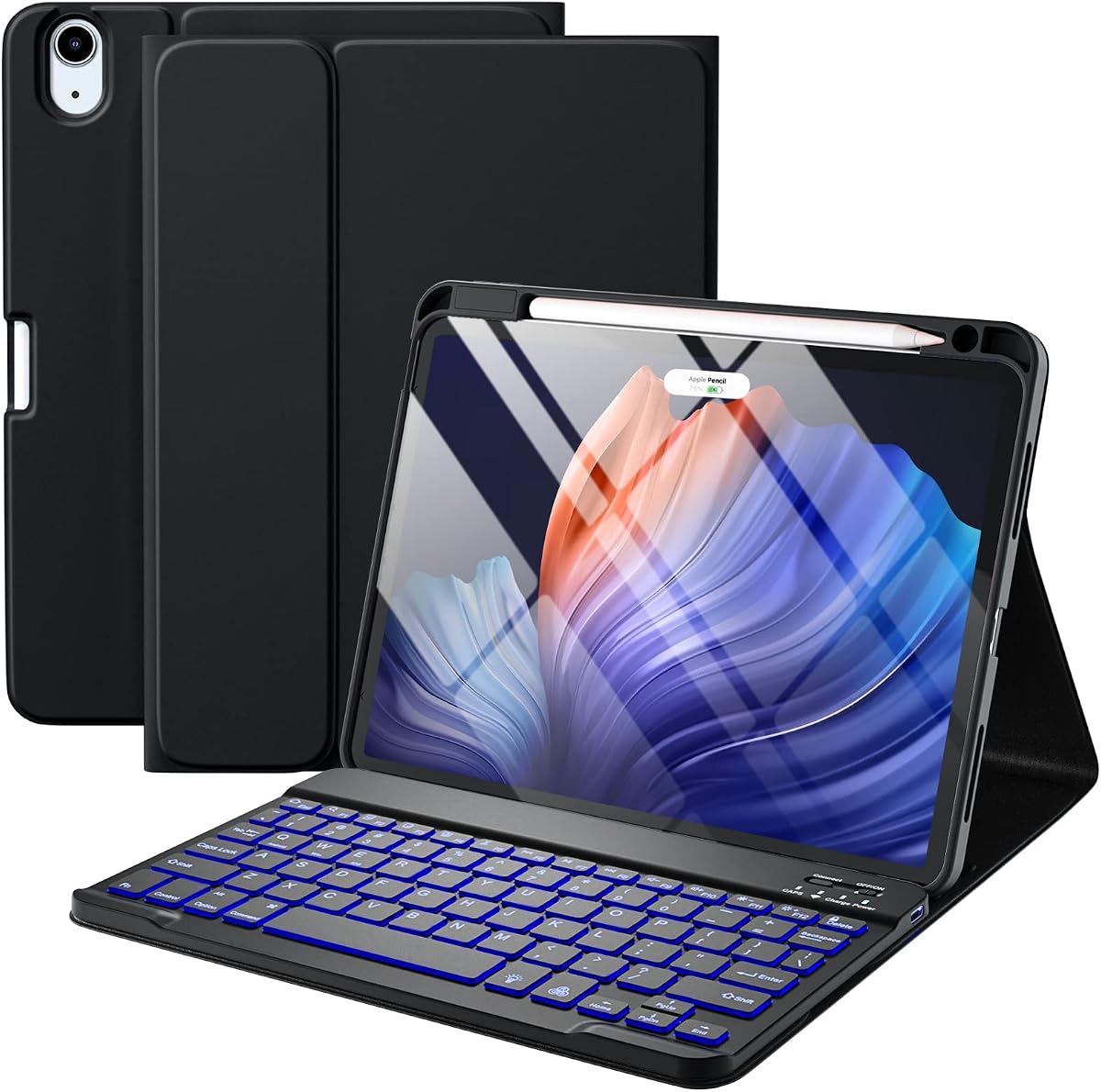



The Logitech Flip Folio Keyboard Case 11-inch iPad Air, Graphite combines a protective cover, physical keyboard, precision trackpad, and adjustable viewing system in one polished folio. Its 4.5 rating reflects a strong balance of productivity features, convenient connectivity, portability, and device protection.
We may earn a commission when you buy through this link, at no additional cost to you.
One of its most useful advantages is the high-precision trackpad, which supports familiar multi-touch gestures such as swiping, pinching, and scrolling. The keyboard includes large, well-spaced keys, a complete row of iPadOS shortcut keys, and backlighting that automatically adjusts to ambient light while also offering manual brightness control.
The Folio supports type, sketch, view, and read modes. Its kickstand offers a 40-degree range, allowing the tablet to be used at an upright workstation angle or folded into a more natural sketching and viewing position. The keyboard folds away so the display can be used without an obstruction when precision input matters.
Connectivity is also streamlined. Rather than requiring Bluetooth pairing or a separate keyboard charge, the Smart Connector pairs the Folio and draws power directly from the iPad Air. The stated MIL-STD-810G protection and magnetic closure add everyday resilience, while storage for Logitech Crayon or magnetic Apple Pencil attachment keeps a stylus accessible. This is the most complete recommendation for a buyer who values mature trackpad performance, flexible viewing modes, and minimal charging hassles.
The large multi-touch trackpad makes cursor control more natural than repeatedly reaching for the screen. Together with a full shortcut row and well-spaced keys, it creates a convincing small-laptop experience for email, documents, browsing, and light creative work.
Smart Connector power means the keyboard does not need its own charging routine. That removes one common source of travel friction, particularly when the case is used for meetings, flights, or extended mobile work.
We may earn a commission when you buy through this link, at no additional cost to you.
The Harvopu for iPad Air 11 Inch & Air 5th 4th Generation Case with keyboard delivers one of the broadest stated compatibility ranges in this guide. Its 4.3 rating reflects a versatile package that supports several iPad Air generations through both a detachable, illuminated keyboard and a protective tablet shell.
We may earn a commission when you buy through this link, at no additional cost to you.
The keyboard attaches magnetically but can also be removed completely, allowing the owner to switch between laptop-style typing and unrestricted tablet use. It reconnects through Bluetooth and offers selectable illumination, including a single-color mode and a seven-color breathing effect. A built-in 400mAh rechargeable battery and Type-C charging port support mobile work, while an energy-saving mode is designed to extend standby time.
The case itself is more than a keyboard holder. Three anti-slip grooves create multiple tablet positions for typing, browsing, watching video, or writing. A dedicated holder supports an Apple Pencil and is described as charging compatible second-generation and newer Apple Pencil models directly in the case. The upper cover is PU leather, while the back uses a soft TPU material with a honeycomb structure intended to aid heat dissipation.
The principal trade-off is that the supplied feature description does not identify a trackpad, making this more suitable for buyers who prefer physical keys over pointer navigation. It also requires separate Bluetooth pairing and keyboard charging. Even so, the case stands out for its illuminated detachable design, wide model support, stylus charging function, and generous accessory package. It is a practical choice for students and commuters who value adjustable lighting and tablet flexibility.
The keyboard supports multiple illumination choices and a 400mAh rechargeable battery. This is useful for evening study or travel, although buyers should expect to manage the keyboard's own charging cycle independently from the iPad.
The integrated pencil holder can charge compatible Apple Pencil models while the tablet remains inside the case. Combined with three viewing grooves, it creates a more flexible setup for handwritten notes and sketching.
We may earn a commission when you buy through this link, at no additional cost to you.
The Apple Magic Keyboard for iPad Air delivers a particularly streamlined laptop-style experience, pairing an exceptionally thin keyboard with a floating cantilever case, integrated trackpad, and magnetic attachment. Its 4.5 rating indicates a refined combination of typing comfort, simple setup, adjustable viewing, and protective coverage.
We may earn a commission when you buy through this link, at no additional cost to you.
The keyboard uses physical scissor-mechanism keycaps and includes a full 14-key function row. Its built-in trackpad supports familiar cursor movement and gestures, while the two-cantilever hinge allows the tablet to float at an adjustable angle. Because the accessory attaches magnetically, setup is quick and the transition between tablet and keyboard modes feels deliberate rather than improvised.
Another major convenience is the absence of a separate pairing or charging process. The supplied information states that no pairing or keyboard charging is required. A USB-C connector provides pass-through charging, letting the iPad receive power while the keyboard remains connected, which is especially useful during longer work sessions.
When folded, the keyboard provides front and back protection, but its slim profile does not provide the roomy structure of a full-size protective folio. It is also specifically listed in US English, so buyers requiring another keyboard layout should verify availability. Even with those considerations, the Magic Keyboard is the premium choice for owners who value Apple's integrated design, a polished trackpad, stable floating support, and effortless connection.
The cantilever structure raises the display above the keyboard while allowing the viewing angle to move smoothly. This gives the iPad a familiar laptop silhouette without adding a heavy hinge assembly beneath the screen.
The built-in multi-touch trackpad reduces the need to touch the display during desktop-style navigation. USB-C pass-through charging adds another layer of convenience by preserving power access while the keyboard is attached.
We may earn a commission when you buy through this link, at no additional cost to you.
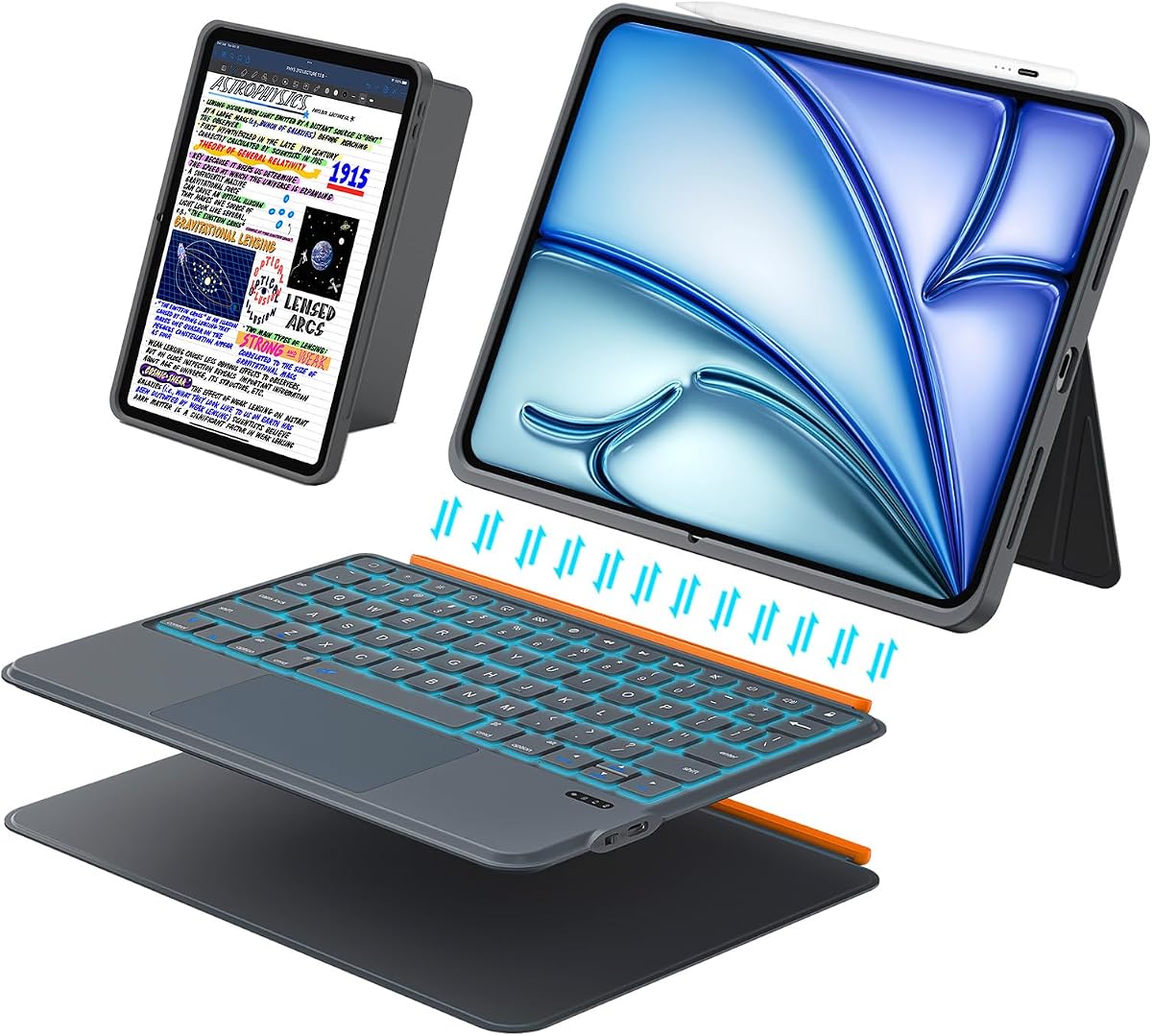
The ESR for iPad Air 11 Inch Case with Keyboard M4/M3/M2, Ultra-Light stands out for portability. Rated 4.4, it combines a detachable magnetic keyboard, a generously sized multi-touch trackpad, two stable viewing positions, and a protective form-fit shell in a design stated to be only 6.9 millimeters thick.
We may earn a commission when you buy through this link, at no additional cost to you.
The magnetic construction makes mode switching straightforward. The keyboard can remain attached for typing or be removed for reading, video, and sketching without removing the tablet from its protective cover. Its trackpad is described as 65 percent larger than those on regular keyboard cases and supports one-finger dragging, three-finger scrolling, and other intuitive gestures.
The triangular support provides a 65-degree working and viewing angle along with a 20-degree angle intended for writing or sketching. The case itself uses a durable form-fit cover with reinforced Air Guard corners, magnetic strips, and precise cutouts for buttons, ports, and speakers. These details make it a practical companion for travel and daily carry.
The key limitation is that the keyboard has no backlight, which may matter during nighttime travel or low-light work. The two fixed angles are also less versatile than products with continuously adjustable stands. Even so, the slim profile, detachable layout, large trackpad, and strong compatibility make this the best lightweight and value-oriented recommendation in the guide.
At a stated thickness of 6.9 millimeters, the case is designed to preserve the Air's slim character. Its detachable keyboard avoids forcing users to carry a permanently bulky laptop-style assembly.
The extended touch surface supports multi-touch navigation and comfortably handles document editing, browsing, and app switching. It is one of the most useful features for owners who want desktop-style pointer control.
We may earn a commission when you buy through this link, at no additional cost to you.
The Magnetic-Style Multi-Touch Case is an adaptable keyboard folio designed for multiple 11-inch iPad families. Its 4.3 rating reflects a capable blend of floating stand mechanics, multi-touch navigation, keyboard illumination, shortcut controls, and broad stated compatibility across iPad Air and iPad Pro generations.
We may earn a commission when you buy through this link, at no additional cost to you.
The iPad attaches magnetically to the rear cover, allowing the floating cantilever stand to open with one smooth motion. This creates a stable laptop-like position for travel, business, and school. A built-in precision trackpad supports multi-touch gestures, while a row of iPadOS shortcut keys gives direct access to common functions such as brightness, volume, and media controls.
The backlit keyboard offers three brightness levels and uses a 750mAh battery with an efficiency-focused design. Its stated battery endurance is approximately three months of daily use or two weeks of nightly use on a single charge, with convenient USB-C recharging. The synthetic vegan leather cover is intended to provide structural protection against knocks and falls while maintaining a relatively slim profile.
Its broad Air and Pro compatibility is useful for buyers who may move between supported devices, but it also makes model verification more important. The keyboard also maintains a separate charging cycle rather than drawing directly from the tablet. For anyone seeking a floating layout with both a trackpad and illumination, it provides a strong and adaptable feature set.
The magnetic cantilever design offers a polished laptop-like appearance while freeing the screen from an obstructing support panel. The multi-touch trackpad then supports smoother editing, browsing, and presentation work.
Three backlight levels and a stated 750mAh battery target regular work and study sessions. USB-C charging makes recharging straightforward when the keyboard is used independently of the iPad.
We may earn a commission when you buy through this link, at no additional cost to you.
The Detachable Backlit Gray Case combines a magnetic keyboard, multi-touch trackpad, adjustable stand, and full-edge protective shell in one unusually flexible design. Its 4.5 rating supports its appeal to buyers who want broad compatibility across recent iPad Air, iPad Pro, and specified 11-inch iPad models.
We may earn a commission when you buy through this link, at no additional cost to you.
The modular layout lets the keyboard be attached for productive sessions or removed for reading, video, drawing, and other touch-first activities. Bluetooth 5.3 provides the stated connection method, while the 78-key scissor layout offers one millimeter of key travel and dedicated iPadOS shortcuts. The keyboard is also backlit for low-light use.
A particularly useful feature is the rear stand, which supports adjustment up to 160 degrees in landscape mode. The case can also hold the tablet in portrait or landscape orientation. The larger precision trackpad supports tap, swipe, scroll, and app switching, with smart palm rejection intended to reduce accidental input while typing.
Its compatibility is extensive but includes a long collection of model numbers, making careful checking essential. It also requires separate Bluetooth pairing rather than using a Smart Connector arrangement. Regardless, the wide stand range, full shortcut-equipped keyboard, illuminated keys, and detachable construction make it a strong choice for users who alternate among several supported tablet models.
The rear stand offers a much wider range than basic folio hinges, reaching 160 degrees in landscape use. This makes the case adaptable to typing, viewing, and touch-oriented tasks without repositioning the tablet itself.
Detachable construction and Bluetooth pairing allow one keyboard to be used across the compatible models listed by the manufacturer. Buyers should still confirm the exact A-number before ordering to avoid fit or control issues.
We may earn a commission when you buy through this link, at no additional cost to you.
The renewed Apple Smart Keyboard Folio is a straightforward keyboard-cover option for owners of the fifth-generation iPad Air. Its 4.6 rating is the highest among the products listed, and the case focuses on the core Apple experience: a full-size keyboard, protective cover, folding stand, and automatic connection.
We may earn a commission when you buy through this link, at no additional cost to you.
The defining convenience is that the folio requires no charging or pairing procedure. Once attached, the keyboard can be used like a compact physical keyboard for notes and travel work. It also folds into a stand, allowing the display to remain upright while the keyboard lies flat in front of it.
Apple's design keeps the folio visually uncluttered and easy to carry. It is particularly relevant for users who still favor the fifth-generation iPad Air or the supported iPad Pro model and prefer a direct Apple accessory rather than a third-party keyboard with separate charging controls.
The most important limitation is generation age. It does not offer the same explicit compatibility coverage for current M2, M3, and M4 iPad Air models, so it should not be selected for a newer device without careful verification. Its renewed status also means buyers may encounter cosmetic wear. Despite that, it is a refined option for a compatible fifth-generation iPad Air owner seeking the core Apple folio experience.
The Smart Connector arrangement eliminates the need for a separate Bluetooth pairing routine. This makes the folio approachable for users who want their keyboard and case to work together immediately.
The folio folds into a stand while protecting the display when closed. Its simplicity makes it effective for travel, presentations, and quick writing sessions.
We may earn a commission when you buy through this link, at no additional cost to you.
The renewed Logitech Folio Touch iPad Keyboard Case with Trackpad is built around four iPad Air generations: fourth- and fifth-generation models. Its 4.1 rating makes it a viable productivity-focused choice for owners of those supported devices, particularly those who place trackpad functionality above newer-model compatibility.
We may earn a commission when you buy through this link, at no additional cost to you.
Its high-precision trackpad supports multi-touch gestures such as swipe, pinch, and scroll. The physical keyboard has well-spaced keys, a full row of iPadOS shortcuts, and backlighting that automatically adjusts to the environment while permitting manual brightness changes. Type, sketch, view, and read modes cover a broad range of working styles.
A 40-degree kickstand range works together with the foldable keyboard, creating a clear screen-forward position for viewing or sketching. Smart Connector technology handles pairing and power, so the keyboard does not need separate charging. The folio also provides storage for a Logitech Crayon or a charging location for a second-generation Apple Pencil while the case remains attached.
The stated protection level exceeds MIL-STD-810G, and a magnetic latch keeps the cover closed during transport. However, the case is limited to older fourth- and fifth-generation iPad Air models, and its renewed condition introduces uncertainty about exterior wear. It remains a sensible fit for a compatible older iPad Air that prioritizes a large trackpad and refined Logitech input accessories.
The sizable multi-touch surface is the Folio Touch's defining advantage. It supports intuitive navigation for documents, browsing, and app management while preserving the option to use the display directly.
The distinction among type, sketch, view, and read modes is more useful than it may initially appear. Each configuration changes the relationship between keyboard, kickstand, and screen for the task at hand.
We may earn a commission when you buy through this link, at no additional cost to you.
The Harvopu Multi-Touch Case combines several features that are not always found together in one keyboard folio: a detachable magnetic keyboard, a built-in multi-touch trackpad, colorful backlighting, and broad compatibility across several iPad Air generations. Its 4.3 rating reflects a flexible package for current and recent Air owners.
We may earn a commission when you buy through this link, at no additional cost to you.
The high-sensitivity touchpad supports smoother document editing, browsing, and application management without constant screen contact. A strong magnetic connection keeps the keyboard stable while typing, while the detachable design allows it to be removed for reading, media, and sketching. The shell provides precise cutouts for buttons, ports, and cameras.
The keyboard pairs through Bluetooth using the stated Fn+C shortcut. Its seven-color illumination and three brightness levels make it especially suitable for dim environments and buyers who enjoy a more personalized keyboard appearance. Multiple viewing positions allow the display angle to be changed according to whether the owner is typing, watching video, or drawing.
Unlike Smart Connector designs, this keyboard must be paired and charged separately. It is also important to note that the product's stated model compatibility includes both the current M2, M3, and M4 iPad Air families and the fourth- and fifth-generation models, so buyers should verify the exact model number in Settings before ordering. For a colorful, versatile, trackpad-equipped alternative, it offers an appealing mix of features.
Seven selectable colors and three brightness levels distinguish this model from standard illuminated keyboards. The controls make it easier to adapt the keyboard to different ambient lighting conditions.
The magnetic keyboard can be removed without taking the iPad out of its protective shell. That makes it easy to alternate between productive typing sessions and lighter touch-based activities.
We may earn a commission when you buy through this link, at no additional cost to you.
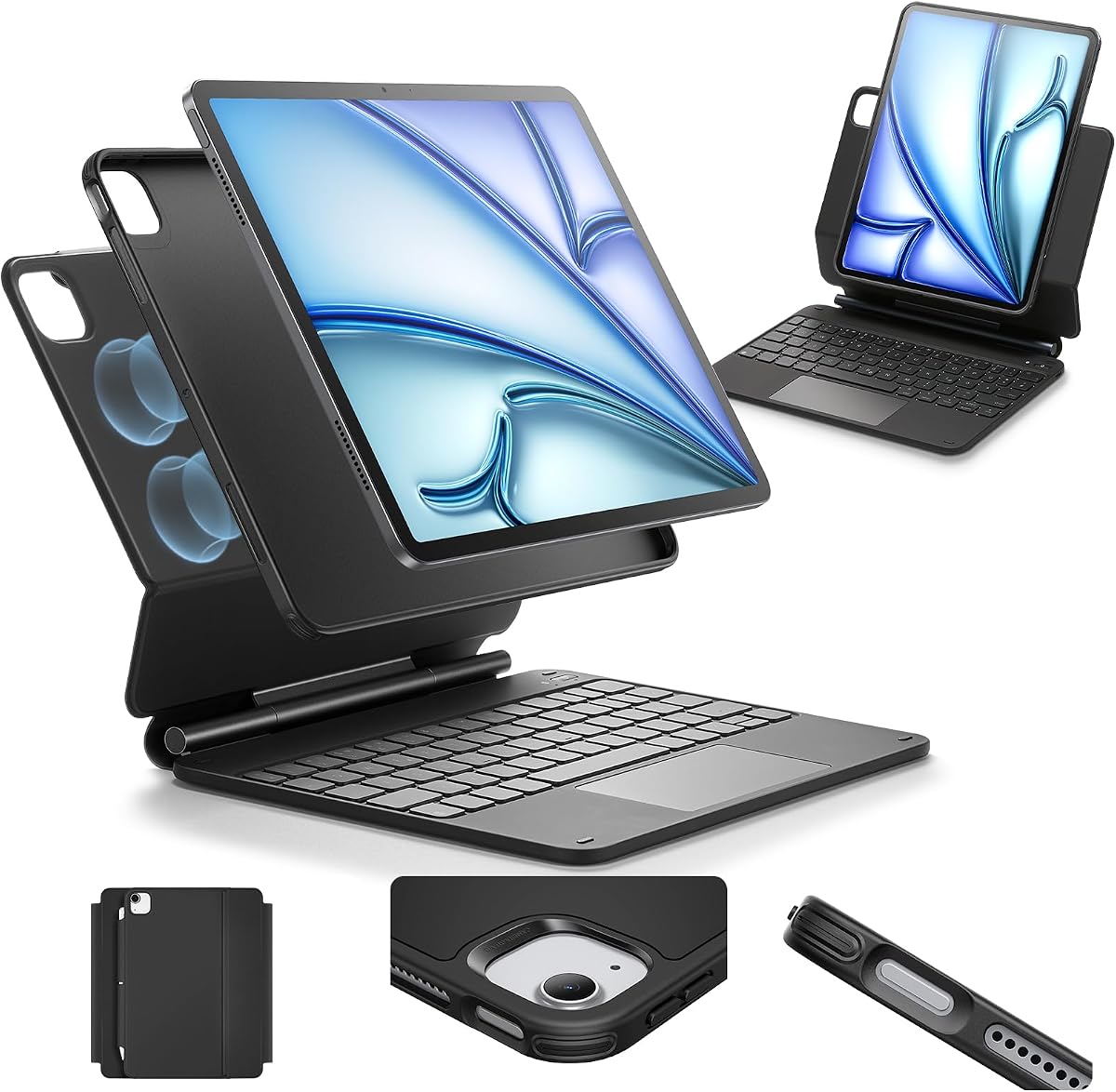
The ESR Multi-Mode Stand distinguishes itself through a detachable back case that can create a raised screen view, a portrait setup, or a floating cantilever position for typing and browsing. Its 4.2 rating reflects a flexible approach to positioning that extends beyond the basic fixed-angle folio design.
We may earn a commission when you buy through this link, at no additional cost to you.
Strong magnets connect the tablet and case, allowing the floating stand to be opened smoothly at the desired viewing angle. The rear case can then detach for hands-on use while retaining full-body protection. Portrait mode is particularly relevant for video calls, while the raised configuration can help place the display at a more comfortable height during desk work.
Navigation is handled by an extended, highly sensitive multi-touch trackpad capable of tapping, pinching, and swiping. This allows owners to navigate the iPad in a desktop-like manner without adding a separate pointing device. The broad compatibility list spans current iPad Air M2, M3, and M4 models, fourth- and fifth-generation iPad Air, and several iPad Pro 11-inch generations.
As with any folio that covers multiple product families, confirming the exact model number is essential. The stated viewing options are also less expansive than the 160-degree range offered by some competing adjustable stands. Still, the combination of portrait mode, raised viewing, floating support, detachable protection, and a multi-touch trackpad makes this a versatile productivity accessory.
Portrait mode supports calls and vertical content, while the raised screen view changes the relationship between the display and desk. The cantilever position provides a familiar laptop-like angle for typing.
The back cover can be separated when hands-on access is needed. This preserves a protective shell around the iPad while allowing the keyboard and stand to be used only when needed.
We may earn a commission when you buy through this link, at no additional cost to you.
Choosing the right iPad Air folio case with keyboard requires balancing device fit, input quality, connectivity, viewing flexibility, protection, and the way you travel and work. The following factors help narrow the field before purchase.
An iPad Air case that appears physically similar may still use different cutouts, magnetic positions, or connector locations across generations. Check the model number on the back of the tablet or open Settings, tap General, select About, and tap the Model line to reveal the A-number. Compare that identifier with the seller's supported list rather than relying only on the words iPad Air or 11-inch.
In short, verify the exact iPad model before ordering to prevent fit, charging, or pairing problems.
Decide whether you need a permanently attached laptop-style keyboard, a detachable magnetic module, or a folio that folds into a stand. Attached designs provide a cohesive workstation and may include stronger screen support, while detachable models make it easier to hold the tablet comfortably for reading, drawing, or watching video. A keyboard layout with dedicated iPadOS shortcut keys can reduce the need to hunt through menus.
Choose an attached or detachable layout according to how frequently you switch between typing and touch use rather than selecting on appearance alone.
A multi-touch trackpad can make an iPad feel much more like a laptop, especially for document editing, browsing, and application switching. Look for support for natural gestures such as tapping, scrolling, swiping, and pinching. A larger touch surface can reduce the precision required to move the cursor, but overall responsiveness and palm rejection during typing are equally important to consider.
Prioritize a responsive multi-touch trackpad with gesture support if your work involves frequent cursor navigation rather than only quick text entry.
Some folios use a Smart Connector that attaches directly to the iPad, supplies power to the keyboard, and eliminates separate pairing and charging. Bluetooth designs are more portable and can sometimes move between devices, but they require pairing and have a battery that must be recharged independently. If your priority is the fewest setup steps, a connector-based system is usually preferable; if flexibility matters more, Bluetooth may be worth the extra routine.
Choose Smart Connector for minimal maintenance or Bluetooth for flexible detachable use, based on which inconvenience matters less to you.
A fixed 65-degree work position may suit desk use but can be less comfortable for drawing or viewing. Lower angles are often better for stylus work, while wider adjustments help with reclined reading, travel, and portrait calls. Also consider whether the tablet can remain attached while the keyboard folds away, because that arrangement provides more screen access for sketching and reading than a conventional laptop hinge.
Match the available angles to your tasks, especially if handwriting, drawing, video calls, or reclined use is part of your routine.
Backlit keys improve visibility at night or during travel, and adjustable brightness helps avoid unnecessary glare. Some models offer a single white backlight, while others provide multiple colors or lighting effects. Battery capacity and charging method also matter: a larger-capacity keyboard may last longer between charges, but USB-C charging is convenient for owners who already carry a compatible cable.
Choose adjustable backlighting for frequent low-light use and verify the charging method and stated battery life before relying on the keyboard away from a desk.
A full wraparound shell can protect the front and back of the iPad, while reinforced corners help absorb impacts around vulnerable edges. Port access, speaker cutouts, button alignment, and magnetic closure strength are just as important as the raw protection claim. Very thin designs are convenient to carry, but they may offer less cushioning than a deeper case with a substantial keyboard base.
Look for complete edge coverage, accurate cutouts, and secure closures without adding more thickness than your normal carrying setup can accommodate.
A keyboard folio can be more useful if it stores or charges a compatible stylus. Apple Pencil charging generally depends on both the pencil generation and the case's electronics, so confirm compatibility rather than assuming every magnetic holder provides power. Storage without charging may still be worthwhile because it reduces the chance of leaving the stylus behind.
Confirm the exact stylus model and whether the holder stores or charges it before treating this feature as a deciding requirement.
Begin by confirming that the case fits the exact iPad model, attaching the tablet to the keyboard base, and securing the magnetic or folding closure. Connector-based keyboards should attach directly, while Bluetooth models need to be powered on and paired using the manufacturer's stated shortcut or control procedure.
For comfortable use, place the iPad at the angle suited to the task and avoid forcing the hinge beyond its intended range. Use a supported protective cover when typing, keep the keyboard surface free of liquids and grit, and attach a compatible stylus only where the case is designed to hold it.
Remove the iPad before cleaning the case with a soft, lightly dampened cloth. Avoid soaking the keyboard, exposing electronics to excessive heat, and using abrasive cleaners. Recharge Bluetooth keyboards before long trips, inspect magnetic contacts periodically, and keep the tablet's ports clear of debris.
Open Settings and tap General, then About. Tap the Model line to reveal the A-number, which is the identifier most useful for confirming case compatibility. Compare it with the manufacturer's supported model list rather than relying only on the generation name. This step is especially important when a listing covers several iPad Air and iPad Pro families.
No. A case designed for the fourth- or fifth-generation iPad Air may not fit the M2, M3, or M4 versions correctly. Connector placement, dimensions, cutouts, and magnetic alignment can differ even when screen sizes appear similar. Always check the exact A-number before ordering.
A detachable keyboard can be removed while the tablet stays inside its protective shell, making reading and sketching more comfortable. An attached keyboard creates a more unified laptop-style setup and may offer stronger screen positioning. The best choice depends on how often you alternate between typing and direct touch use.
That depends on the connection system. Smart Connector designs generally draw power from the iPad and do not require separate keyboard charging. Bluetooth keyboards use their own rechargeable battery and need periodic charging, although some also permit wired use while their battery is depleted.
It depends on the buyer. A trackpad is especially valuable for document editing, spreadsheets, browsing, and any task involving extensive cursor movement. For shorter writing sessions or users who prefer touching the screen, a well-spaced keyboard and comfortable viewing angle may matter more.
Many cases include a holder designed for Apple Pencil, but charging support varies by model. Apple Pencil charging requires compatible case electronics and a compatible pencil generation. Verify both requirements before purchasing, and note that a storage holder is still useful even when it does not provide power.
A renewed case can provide the same functional design at a different market level, but buyers should review the condition description and any available warranty information. Inspect for visible scratches, discoloration, hinge wear, or damaged corners once received. The product should still provide accurate cutouts and reliable keyboard or connector performance.
Remove the iPad first, then wipe the case and keyboard with a soft, lightly dampened microfiber cloth. Keep liquid away from openings and controls, and do not use abrasive cleaners or saturate the material. For stubborn marks, check the manufacturer's care instructions because leather and synthetic finishes may require different treatments.
The Logitech Flip Folio is the strongest all-around recommendation because it combines a precise multi-touch trackpad, backlit keyboard, adjustable kickstand, four use modes, direct iPad power, and solid stated protection. It is particularly well suited to buyers who want a mature laptop-style experience without managing a separate keyboard battery.
Buyers prioritizing portability should consider the ultra-light ESR option with its detachable magnetic keyboard and large trackpad, while those wanting the cleanest premium integration may favor the Apple Magic Keyboard. A trackpad with illumination or a wider range of stand angles can also be valuable, depending on whether creative work, travel, or extended typing is more common.
Before purchasing, verify the exact iPad Air A-number, decide whether you value a trackpad and backlight, and choose a connection method that matches your tolerance for pairing and charging. Product availability, condition details, and prices can change, so check the current listing carefully before placing an order.