
TP-Link Deco X55 Pro AX3000
4.4Editor score
Two 2.5G ports per unit
Up to 6,500 square feet
Supports over 150 devices
Mesh WiFi for Thick Walls systems compared for coverage, speed, backhaul, ports, roaming, and the best options for demanding homes.
Thick walls can make ordinary routers feel inadequate, especially in older homes, renovated buildings, brick houses, and properties with masonry between floors. A capable mesh system spreads several access points throughout the space, reducing dead zones and helping devices maintain a useful connection as they move from room to room.
The systems in this guide were compared using the supplied specifications, emphasizing radio bands, stated coverage, backhaul options, Ethernet ports, device capacity, roaming features, and management tools. The list includes WiFi 6, WiFi 6E, and WiFi 7 systems for homes of different sizes and budgets.
Each review explains where a system is best suited and where its specifications may not solve every coverage challenge. The top picks highlight a balanced WiFi 6E option, a value-oriented dual-band system, and a premium mesh platform with 2.5G ports. Current prices and availability can change.
4.4Editor score

4.4Editor score
4.4Editor score
This side-by-side comparison highlights the radio design, stated coverage, backhaul flexibility, and wired connectivity that matter most when walls interrupt a home network.


The Deco 7 BE5000 is a dual-band WiFi 7 mesh system designed to deliver modern wireless performance across up to 6,600 square feet and more than 150 devices. Its 4.3 rating reflects a capable platform, while the combination of WiFi 7, 2.5G Ethernet, and expandable Deco compatibility makes it a strong candidate for homes where newer client devices are important.
We may earn a commission when you buy through this link, at no additional cost to you.
Its standout feature is the combination of a 5 GHz radio rated for up to 4,324 Mbps and a 2.4 GHz radio rated for up to 688 Mbps. Although both bands also handle client traffic, a 2.5G wired connection can be used to strengthen the link between Deco units. The system also offers AI-driven roaming, a unified network name, app-based management, and support for remote VPN servers.
The main limitation is that it is a dual-band design. In a difficult environment with several thick walls, wireless backhaul must share spectrum with client traffic. A wired backhaul arrangement is more dependable when a home has Ethernet cable or a suitable way to add it. It also does not include a modem, and its stated coverage and device limits remain dependent on the property, client capabilities, and interference.
This is a sensible pick for a homeowner who wants WiFi 7 without moving to a tri-band system. It works particularly well when units can be connected with 2.5G Ethernet or when coverage requirements are moderate rather than extreme. For older client devices, the system remains backward compatible, making it a practical foundation for a mixed-generation home network.
WiFi 7 improves efficiency and provides headroom for compatible phones, computers, televisions, and other devices. That headroom is useful in a crowded home where several high-bandwidth clients may be active at once.
Connecting compatible Deco units through 2.5G Ethernet can preserve wireless capacity for clients. This is especially helpful when structural walls make a purely wireless connection between nodes difficult.
We may earn a commission when you buy through this link, at no additional cost to you.
The Deco 7 Pro BE10000 is a tri-band WiFi 7 mesh system with a 6 GHz radio, broad whole-home capacity, and a 10G WAN/LAN connection. Its 4.2 rating does not obscure the fact that this is a technically advanced package aimed at large homes, newer devices, and users who want dedicated backhaul without relying on a dual-band arrangement.
We may earn a commission when you buy through this link, at no additional cost to you.
The 3-pack is stated to cover up to 7,600 square feet and support more than 200 devices. Aggregate band speeds reach up to 5,188 Mbps on 6 GHz, 4,324 Mbps on 5 GHz, and 574 Mbps on 2.4 GHz. Four 2.5G ports on each unit, a 10G port, and a USB 3.0 connection make it suitable for high-speed fiber, local storage, and wired home-office equipment.
Its disadvantage is that the specification level is unnecessary for some homes. The 6 GHz band also requires compatible clients, and real performance through masonry will depend on unit placement and construction. The product does not include a modem. Buyers who only need basic internet access in a small apartment may find less demanding dual-band systems more appropriate.
The system is best for a large, device-heavy residence with newer WiFi 7 clients and an internet plan that can use multi-gig speeds. It is also compelling for owners planning a wired network because the port selection gives room for a NAS, media server, or switches. For demanding layouts, using Ethernet backhaul can further improve resilience through thick walls.
A separate 6 GHz radio can carry backhaul traffic without competing directly with the more widely used 5 GHz and 2.4 GHz client bands. This is a major architectural advantage in crowded, multi-level homes.
The combination of 2.5G and 10G ports supports advanced internet plans and high-speed local connections. It also gives installers more options when connecting access points through the home.
We may earn a commission when you buy through this link, at no additional cost to you.
The Deco XE75 is the strongest all-around recommendation in this guide for a home struggling to cover rooms separated by thick walls. It is a tri-band WiFi 6E system with a 4.4 rating, stated coverage of up to 7,200 square feet, and support for as many as 200 devices. Its dedicated 6 GHz backhaul gives it a meaningful advantage over dual-band alternatives.
We may earn a commission when you buy through this link, at no additional cost to you.
Each band is rated at up to 2,402 Mbps on 6 GHz, 2,402 Mbps on 5 GHz, and 574 Mbps on 2.4 GHz. The 6 GHz band can serve as the default backhaul link between nodes, leaving the remaining bands available for client traffic. The system also uses AI-driven mesh roaming, supports app-based management, and provides familiar TP-Link HomeShield features including security scans, IoT identification, parental controls, and quality-of-service tools.
No mesh product can guarantee that every wall will disappear as a source of attenuation. The XE75 still benefits from thoughtful placement, with nodes positioned on different floors or in rooms that actually need coverage. Its 6 GHz reach may be shorter than lower-band frequencies, and only WiFi 6E-compatible clients can use that band. These limitations do not outweigh its dedicated-backhaul design for many modern homes.
Choose the XE75 when you need a large, device-capable system with a dedicated wireless backhaul and do not require the newest WiFi 7 standard or multi-gig ports. It is particularly suitable for new construction, renovated homes, and medium-to-large properties where three nodes can be distributed evenly.
Using 6 GHz for the link between nodes can reduce the conflict that occurs when the same radio carries client data and backhaul traffic. That is valuable in a home with thick barriers and many connected devices.
The stated 7,200-square-foot reach and 200-device capacity make the XE75 a practical option for busy homes. Actual performance still depends on placement, walls, client standards, and internet service.
We may earn a commission when you buy through this link, at no additional cost to you.
The Deco S4 AC1900 is a mature dual-band WiFi 5 system with a 4.5 rating and a clear emphasis on uncomplicated whole-home coverage. Three units are stated to cover up to 5,500 square feet and support up to 100 devices, making it a practical choice for homes with moderate bandwidth needs and multiple obstructive walls.
We may earn a commission when you buy through this link, at no additional cost to you.
The principal advantage is the number of nodes in the package. Instead of relying on one powerful router, the S4 distributes access points across the property and presents a single network name and password. Each unit has two Gigabit Ethernet ports, allowing a three-pack to provide six wired ports in total. It also supports Ethernet backhaul, which can be the most dependable way to link nodes when walls make wireless links weak.
The limitation is the WiFi 5 platform. It lacks the newer 6 GHz band, multi-link operation, and the potential capacity improvements associated with WiFi 6 and WiFi 7. The 2.4 GHz component also has limited reach and speed compared with newer systems. Houses with very demanding devices, high-resolution streaming, or multi-gig service may eventually need a more advanced platform.
The S4 suits buyers who want reliable mesh roaming, a three-node package, and wired options without paying for a WiFi 7 or 6E system. It can be especially useful in a two- or three-story home where each floor needs its own node. Users should prioritize wired backhaul if their objective is getting the most dependable service through masonry.
Each S4 unit includes two Gigabit Ethernet ports, providing enough flexibility for a wired desktop, network switch, or access-point link. The ports are modest by current standards but remain practical for many homes.
A single network name and password remove the need to manually switch between a router and range extender. Devices can move between nearby nodes as the mesh selects the most appropriate path.
We may earn a commission when you buy through this link, at no additional cost to you.
The Deco X55 AX3000 is a dual-band WiFi 6 system designed for smaller homes and simpler layouts. It carries a 4.3 rating, offers stated coverage of up to 4,500 square feet, and is rated for as many as 150 connected devices. The two-pack makes it a practical option when a single router is insufficient but three access points would be excessive.
We may earn a commission when you buy through this link, at no additional cost to you.
The radio specification combines up to 2,402 Mbps on 5 GHz with 574 Mbps on 2.4 GHz. It does not have a separate 6 GHz backhaul band, so wireless mesh traffic shares the available dual-band spectrum. However, each unit has three Gigabit Ethernet ports, making wired backhaul easy when the home has cable or when a short network connection can be installed.
Its main weakness is the shared-spectrum design in a difficult building. A thick wall can reduce the usable wireless link between nodes, and the two included units may need careful placement. Users seeking multi-gig wired connections or a dedicated backhaul band will find better fits elsewhere in this list. The product also requires a separate modem for most providers.
The X55 is best for apartments, smaller houses, and medium homes with manageable client traffic. Its combination of WiFi 6, AI-driven mesh behavior, three Ethernet ports per unit, and straightforward app management makes it a sensible, moderately equipped option. For a large home with severe wall attenuation, compare it with a tri-band system or plan on Ethernet backhaul.
Three Gigabit Ethernet ports on every node provide useful connection options for a small home office, entertainment system, or wired backhaul. A switch can also expand the number of connected devices.
WiFi 6 improves network efficiency and capacity compared with older standards. It is a sensible generation for a compact home where the latest client features are not essential.
We may earn a commission when you buy through this link, at no additional cost to you.
The Deco X15 AX1500 offers a practical way to add multiple access points without moving to a tri-band system. It has a 4.4 rating, WiFi 6 support, and a three-pack stated to cover up to 5,600 square feet and 120 devices. For a budget-conscious household dealing with dead zones, that combination of node count and modern networking is especially attractive.
We may earn a commission when you buy through this link, at no additional cost to you.
The system provides up to 1,201 Mbps on 5 GHz and 300 Mbps on 2.4 GHz. Its dynamic backhaul chooses a route between Deco units based on network conditions, while wired Ethernet backhaul can provide a more stable alternative. Two Gigabit Ethernet ports on each unit give the three-pack six ports total, and every unit can serve as the router.
The trade-off is aggregate speed. AX1500 is well suited to browsing, video calls, standard streaming, and many connected devices, but it may not satisfy households seeking multi-gig performance, extensive local file transfers, or the latest WiFi 7 functions. In a building with particularly dense walls, dynamic backhaul still cannot eliminate attenuation between nodes.
The X15 is recommended for buyers who prioritize coverage and node count over maximum speed. It is a good match for medium homes, rental properties, and growing smart-home setups. Its app-based setup, HomeShield features, and support for Alexa and Google Assistant make ongoing management approachable.
Dynamic backhaul helps the mesh select a better route between nodes as conditions change. It cannot defeat walls, but it can improve the reliability of a distributed network compared with a rigid approach.
Three included units provide more placement flexibility than a two-node system. That flexibility is often more valuable in thick-walled homes than adding a modest increase in radio speed.
We may earn a commission when you buy through this link, at no additional cost to you.
The Deco M5 AC1200 has the highest customer rating in this selection at 4.6, a notable result for an established mesh platform. Its three-pack is stated to cover up to 5,500 square feet and provide a single, seamless network throughout the home. That makes it relevant to buyers who care more about dependable coverage than the newest wireless generation.
We may earn a commission when you buy through this link, at no additional cost to you.
Adaptive Routing helps the system select an effective path for each connected device, while seamless roaming removes the separate network names associated with many range extenders. Every M5 node includes two Gigabit Ethernet ports, and the package supplies six in total. Wired Ethernet backhaul can be used to improve stability between nodes, particularly where masonry makes wireless links difficult.
Its limitations are technical rather than practical. WiFi 5 does not offer the 6 GHz band, the efficiency improvements of WiFi 6, or the features associated with WiFi 7. Older electronics and busy homes may see reduced headroom, and the system's 2.4 GHz component carries much of the longer-distance coverage. It also does not include a modem.
Choose the M5 when basic internet performance, roaming, and simple management are the priorities. It is a credible solution for a family home that struggles with a single-router dead zone but does not need modern high-end throughput. Three nodes and adaptive routing provide a sound foundation, while wired backhaul can close the most difficult gaps.
The system continually considers the best route for connected traffic. This helps maintain stability when clients move between areas served by different nodes.
The M5 focuses on familiar mesh behavior rather than headline wireless speeds. Its app-based setup, security tools, and wired options remain useful for a straightforward home network.
We may earn a commission when you buy through this link, at no additional cost to you.
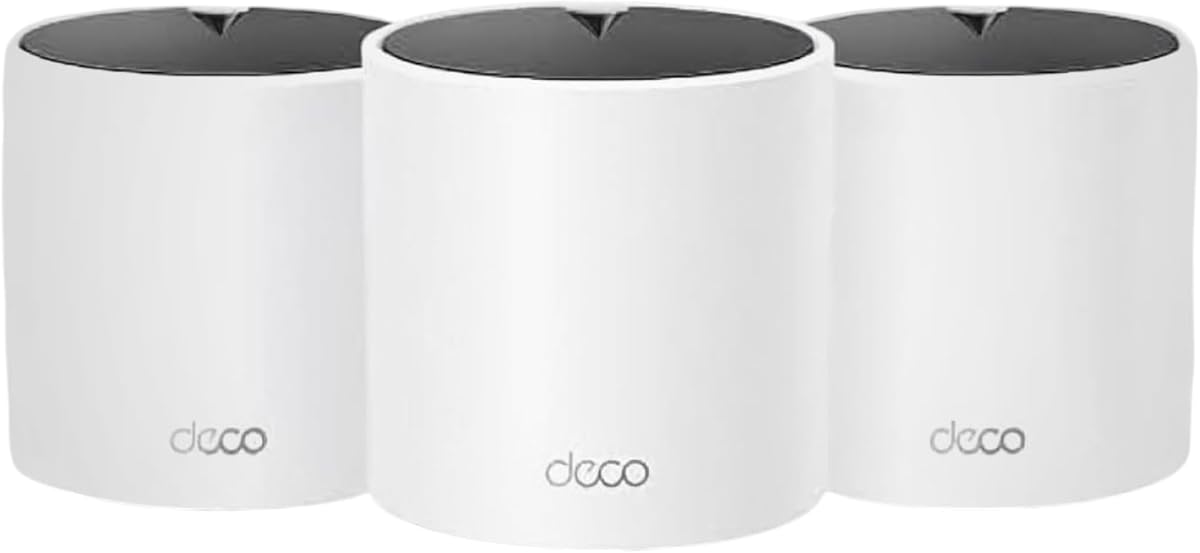
The Deco X55 Pro AX3000 combines WiFi 6 mesh performance with the wired connectivity normally associated with higher-end systems. It has a 4.4 rating, three included units, stated coverage of up to 6,500 square feet, and support for more than 150 devices. The defining feature is its pair of 2.5G ports on every unit.
We may earn a commission when you buy through this link, at no additional cost to you.
The dual-band radio specification reaches up to 2,402 Mbps on 5 GHz and 574 Mbps on 2.4 GHz. Its 2.5G Ethernet ports can support internet service above 1 Gigabit, a NAS, and high-speed wired backhaul. The latter is especially relevant in thick-walled homes because a wired node link avoids losing wireless capacity to the backhaul path.
The trade-off is that there is no separate 6 GHz band. If Ethernet cannot be installed, the nodes must share the dual-band radios for wireless backhaul and client traffic. The stated square-footage figure is also not a guarantee of performance in every floor plan. Heavy construction, dense furniture, and poorly placed nodes can still create weak areas.
The X55 Pro is best for owners with multi-gig service, local high-speed storage, or a need for premium wired connectivity without moving to WiFi 7. Its three nodes and 2.5G ports make it particularly adaptable. It is a sensible premium choice for a wired smart home, modern office, or demanding connected household.
Two 2.5G ports per unit allow high-speed internet and local devices to benefit from faster Ethernet connections. The option also supports stronger wired backhaul between nodes.
The X55 Pro emphasizes practical throughput and port flexibility rather than the newest radio generation. It remains well suited to high-speed service and modern local networking.
We may earn a commission when you buy through this link, at no additional cost to you.
The Deco 7 Pro BE14000 is the most advanced specification in this guide, with WiFi 7, tri-band operation, multi-gig ports, and stated coverage of up to 8,100 square feet. It is designed for large homes with more than 200 devices, newer WiFi 7 clients, and owners who want room for 10 Gbps internet service.
We may earn a commission when you buy through this link, at no additional cost to you.
The 6 GHz band is rated at up to 8,647 Mbps, the 5 GHz band at 4,324 Mbps, and the 2.4 GHz band at 688 Mbps. Each unit includes 10 Gbps, 2.5 Gbps, and 1 Gbps WAN/LAN ports, plus USB 3.0. Tri-band wireless and 10G wired backhaul provide two strong ways to preserve performance between nodes, while Multi-Link Operation is designed to improve resilience for compatible devices.
The rating of 4.0 is the lowest in this collection, and the most advanced specifications do not guarantee a better experience for every household. WiFi 7 features require compatible clients, 10G service or local networking adds complexity, and 6 GHz range can be shorter. A separate modem is also required. Most importantly, thick walls still attenuate signals regardless of headline speed.
This system is for ambitious, future-oriented homes rather than basic coverage. It is especially appropriate where the internet plan, switch, NAS, and endpoint devices can use multi-gig connections. Buyers with a large floor plan should distribute all three units carefully, and those unable to benefit from the extra radio capacity should consider the less advanced BE10000 or XE75.
The 10G port supports advanced service plans and high-speed local links. It can also create a robust wired backhaul path for homes that are equipped for structured networking.
Compatible devices can use multiple links to improve continuity. The feature is most valuable for newer equipment and demanding applications rather than legacy clients.
We may earn a commission when you buy through this link, at no additional cost to you.
The NETGEAR Orbi RBW30 is a wall-plug satellite designed specifically to extend an existing Orbi whole-home mesh network. With a 4.4 rating, it adds a stated 1,500 square feet of coverage and is particularly useful when one troublesome room or section of a home remains outside the main system’s reach.
We may earn a commission when you buy through this link, at no additional cost to you.
Its slim design plugs directly into a standard outlet, avoiding the need for a tabletop unit or additional power cable. Tri-band technology helps preserve speed as more clients connect, while a single WiFi network name lets users move around without manually selecting different access points. The product is positioned to deliver speeds up to 2.2 Gbps when paired with an appropriate Orbi router.
Its defining limitation is compatibility. The RBW30 is an extender for an Orbi router and is not a complete standalone mesh system. It also uses WiFi 5, and its stated coverage increment is smaller than the broad area offered by a complete three-node modern mesh package. Owners starting from scratch would be better served with a full mesh system.
Choose the RBW30 if you already own a compatible Orbi router and want to fill one stubborn dead zone without replacing the network. It is especially convenient in a bedroom, home office, or lower level where a wall outlet is available. Its purpose is targeted extension, not a full-network upgrade.
The wall-plug form makes it easy to add coverage in a location where a shelf is inconvenient. A standard electrical outlet provides both power and a convenient installation point.
This satellite is intended to work with an existing Orbi router. Confirm compatibility before purchasing because it is not interchangeable with unrelated mesh brands or standalone Deco systems.
We may earn a commission when you buy through this link, at no additional cost to you.
The right system depends on the building, node placement, internet speed, client devices, and whether you can add Ethernet. These factors matter more than headline speed alone when walls create difficult radio conditions.
Brick, concrete, stone, foil-backed insulation, metal, and dense plaster can absorb or reflect radio energy. A higher advertised speed does not guarantee that a signal will pass through these materials. Look for a multi-node system, place access points on different floors or sides of obstructions, and treat the stated square-footage figure as a planning estimate rather than a promise.
Choose more nodes in difficult buildings, but place them where clients actually need service. A node in an unused hallway cannot compensate for missing coverage in a bedroom or basement.
Backhaul is the connection between mesh nodes. It determines how much wireless capacity remains for phones, computers, televisions, and smart-home devices. A tri-band system with a 6 GHz backhaul radio is generally better suited to demanding layouts than a dual-band system sharing both radios between clients and node links.
Wired Ethernet backhaul is the most dependable option when available. If wiring is not practical, favor a tri-band design and place nodes with a clear line of communication between them.
WiFi 6 systems improve efficiency and capacity, WiFi 6E adds the 6 GHz band, and WiFi 7 brings further wireless capabilities. Newer standards can help crowded networks, but clients must support the relevant features to benefit. An older WiFi 5 or WiFi 6 mesh may still provide the strongest practical result if it is affordable, reliably placed, and supported by the equipment in the home.
Choose a newer standard for frequent upgrades, high-end devices, and demanding local traffic. Choose an established dual-band system for basic browsing, standard streaming, and smaller homes.
A single-floor apartment may be adequately served by a two-node package, while a multi-level house often benefits from three units. Basements, attics, detached offices, and long corridors create different demands. Include rooms with poor reception in the plan and avoid placing every node in a central location if heavy walls separate the usable spaces.
Compare stated coverage, but prioritize placement flexibility. A smaller system positioned well can outperform a larger package with poor node locations.
Gigabit ports are sufficient for most internet connections and common wired devices. 2.5G ports add value for high-speed fiber, NAS equipment, modern laptops, and faster local transfers. A 10G port may be useful for advanced networks, but only if the modem, switch, storage, and endpoint devices support matching speeds.
Count the ports on each node and consider backhaul needs. A premium port is most valuable when it is used to connect nodes through cable or link a high-speed local device.
The number of supported devices is an estimate based on the manufacturer’s testing and network conditions. Phones, televisions, cameras, appliances, work laptops, and IoT products all place different demands on the airtime. A larger stated capacity is useful in busy homes, but radio efficiency, client standards, and internet throughput still determine the experience.
Allow some headroom above the number of devices you currently own. This helps when family members add new products or several devices stream and game at once.
A mesh system should present one network name and allow clients to move between nodes without manual switching. AI-driven roaming and adaptive routing can make that movement smoother. The companion app should also make setup, firmware updates, parental controls, guest access, and basic network management understandable for nontechnical users.
Check whether advanced security features are included or available through a subscription. Security scanning, IoT identification, parental controls, and quality-of-service tools can all be useful, but basic setup should not require expert knowledge.
The best mesh platform is one you can expand without replacing earlier units. Check whether additional nodes from the same family can join the network, whether nodes from different models in the same ecosystem are compatible, and whether the app supports the features you need. Expansion can be more effective than upgrading every device at once.
Plan for expansion around likely needs, such as a basement, office, or garden building. Make sure the additional node supports the same wired options and backhaul approach as the original system.
Begin by mapping where reliable WiFi is needed, especially bedrooms, work areas, entertainment spaces, and upper or lower floors. Place the primary router near the incoming internet connection, then position additional nodes in open areas rather than directly behind large furniture or appliances. Overlapping coverage helps devices transition between nodes, but excessively close placement can create unnecessary interference.
Configure the system through the manufacturer's app, update the firmware, set a strong administrator password, and create a secure wireless password. Enable guest access, parental controls, and network security tools that match your household needs. If Ethernet is available, connect the nodes with the appropriate cables and select wired backhaul so the radios are reserved for client traffic.
Treat the mesh as a system that needs periodic attention. Review connected devices, remove access for equipment you no longer use, check for firmware updates, and reposition a node if coverage remains weak. Avoid placing units beside microwaves, cordless-phone bases, metal cabinets, or large mirrors, and keep firmware current to benefit from security and stability improvements.
Mesh WiFi can improve coverage around thick walls, but it cannot make the walls disappear. The system works by placing several access points throughout the property, so clients connect to a nearby node instead of relying on one distant router. Masonry and metal can still weaken signals, making careful placement or Ethernet backhaul important.
A tri-band system often offers an advantage because one radio can be dedicated to backhaul between nodes. That leaves more spectrum for client devices than a dual-band system sharing two radios. The benefit is smaller in small homes or when nodes have an excellent clear path, and it is greatest in large homes with heavy traffic.
Most apartments and smaller homes can start with two nodes, while large or multi-level homes often benefit from three. The right number depends on the floor plan, building materials, and where devices are used. More nodes are not automatically better if they are placed too close together or all in the same central area.
Wired backhaul is generally the most reliable option because it removes the wall-attenuated wireless link between mesh nodes. Wireless backhaul is much easier to deploy and dedicated 6 GHz designs can perform well. If the home has Ethernet, connecting the nodes with cable is often worth the added installation effort.
Most mesh routers require a separate modem or gateway to establish the internet connection. Some providers offer a combined modem-router unit, while others require you to connect the mesh system to a compatible modem. Check the existing provider equipment before ordering to confirm compatibility.
A modern mesh router can generally connect to older WiFi devices, but those clients will use their own supported standard and will not gain WiFi 6E or WiFi 7 features. Backward compatibility makes it possible to upgrade a network gradually without replacing every connected device at once.
Place the main router near the modem or provider gateway, ideally in an open and central location for the relevant area. Additional nodes should be distributed toward rooms with weak service and positioned where they can communicate with other nodes. Avoid enclosing units in cabinets or placing them beside large metal objects.
The supplied product information states that TP-Link Deco products can work together to form a mesh WiFi network and are backward compatible with all WiFi generations. Configuration and feature availability can vary by model, so the Deco app and current manufacturer guidance should be checked before adding mixed units.
The TP-Link Deco XE75 AXE5400 is the strongest overall choice because its tri-band design, dedicated 6 GHz backhaul, broad stated coverage, and three-node package address many of the common challenges in large homes. The Deco X55 Pro AX3000 stands out for its 2.5G ports, while the Deco X15 AX1500 offers a practical budget-oriented path to better whole-home coverage.
Prioritize node placement, usable backhaul, and a design matched to the building before focusing on the highest headline speed. A tri-band system with a dedicated 6 GHz radio is attractive for demanding homes, while Ethernet backhaul can make even a dual-band system more reliable. Match the number of nodes to the floor plan and ensure ports align with the internet service and local devices.
Before purchasing, confirm the current product details, package size, provider compatibility, and available offers. Prices and promotions change frequently, so compare the complete system rather than judging only by a temporary discount. A properly selected and thoughtfully positioned mesh system is the most practical way to expand usable coverage through thick walls.